Hello,
I wanted to make a selector where I can select YTD, QTD or MTD.
I followed some articles and posts on this forum and this is what I eventually came up with:
I made a new table called "SelectMeasure" that looks as followed:
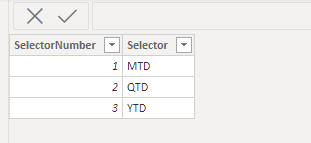
I made a measure within that table called "SelectorNum" which does the following:
SelectorNum = MIN(SelectMeasure[SelectorNumber])
I then made my MTD, QTD and YTD measures:
SALESMTD = TOTALMTD(SUM('Credit Memo + Invoice'[Amount]),'Calendar'[Date])
SALESQTD = TOTALQTD(SUM('Credit Memo + Invoice'[Amount]),'Calendar'[Date])
SALESYTD = TOTALYTD(SUM('Credit Memo + Invoice'[Amount]),'Calendar'[Date])
After that I made a Selector measure within my sales table:
Selector = SWITCH([SelectorNum]
, 1, [SALESMTD]
, 2, [SALESQTD]
, 3, [SALESYTD]
)
I then use the "SelectorMeasure" for my graphs and the "Selector" for slicers.
Now the problem that I have is that when I select YTD, it seems to work but whenever I select QTD or MTD it just doesn't display anything.


