cancel
Showing results for 
Search instead for 
Did you mean: 

The Power BI Data Visualization World Championships is back! Get ahead of the game and start preparing now! Learn more

Reply
espinozan
Helper I
Helper I

YTD Revenue Calculation

Hi everyone,


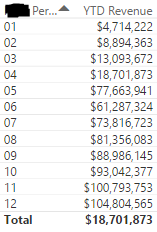
I'm trying to create a measure in my report that calculates YTD Revenue but somehow I can't get it to do what I'm looking for. I have data ranging from Jan 2016 to Apr 2017. My measure is not giving me the correct numbers. 

YTD Revenue = TOTALYTD([Total Sales],'Calendar'[Date])YTD Rev.PNG
1 ACCEPTED SOLUTION
v-jiascu-msft
Microsoft Employee
Microsoft Employee

Hi @espinozan,


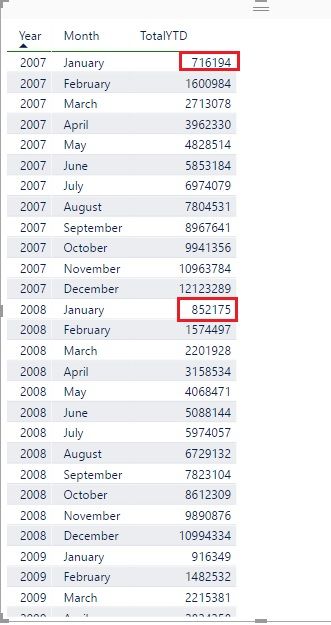
It seems that it's something wrong with the report. The "year" context should always be there with function "TOTALYTD". Have a look at the example in the picture. The "TotalYTD" will accumulate in one year (2007). And it will start from 0 in the next year.


You have data of two years. So the result will be wrong if there is only a month context. Please try to create a report as the picture showed. 


YTD Revenue Calculation .jpg


Best Regards!

Dale

Community Support Team _ Dale
If this post helps, then please consider Accept it as the solution to help the other members find it more quickly.

View solution in original post

4 REPLIES 4
v-jiascu-msft
Microsoft Employee
Microsoft Employee

Hi @espinozan,


It seems that it's something wrong with the report. The "year" context should always be there with function "TOTALYTD". Have a look at the example in the picture. The "TotalYTD" will accumulate in one year (2007). And it will start from 0 in the next year.


You have data of two years. So the result will be wrong if there is only a month context. Please try to create a report as the picture showed. 


YTD Revenue Calculation .jpg


Best Regards!

Dale

Community Support Team _ Dale
If this post helps, then please consider Accept it as the solution to help the other members find it more quickly.

Thanks @v-jiascu-msft,


This helps alot, thank you. But is there to do a continuing YTD? Meaning it gives me a running sum for 12 months prior to today's date.


Hi @espinozan,


Could you please tell me if your problem was resolved? Could you please share the answer or mark the proper answer as solution if it's convenient for you? That will be a help to the others.

Best Regards!
Dale

Community Support Team _ Dale
If this post helps, then please consider Accept it as the solution to help the other members find it more quickly.

Hi @espinozan,


Yes, YTD is continuing for 12 months. The third parameter decides the end of the 12 months. Have a look at this formula. It starts from "07-25" to "07-24" of the next year. (but we can't use today())

TotalYTD =
TOTALYTD (
    SUMX ( Sales, Sales[Quantity] * Sales[Unit Price] ),
    'Date'[Date],
    "07-24"
)

Best Regards!

Dale

Community Support Team _ Dale
If this post helps, then please consider Accept it as the solution to help the other members find it more quickly.

Helpful resources

Announcements
Power BI DataViz World Championships

Power BI Dataviz World Championships

The Power BI Data Visualization World Championships is back! Get ahead of the game and start preparing now!

December 2025 Power BI Update Carousel

Power BI Monthly Update - December 2025

Check out the December 2025 Power BI Holiday Recap!

FabCon Atlanta 2026 carousel

FabCon Atlanta 2026

Join us at FabCon Atlanta, March 16-20, for the ultimate Fabric, Power BI, AI and SQL community-led event. Save $200 with code FABCOMM.