
We've captured the moments from FabCon & SQLCon that everyone is talking about, and we are bringing them to the community, live and on-demand. Starts on April 14th. Register now
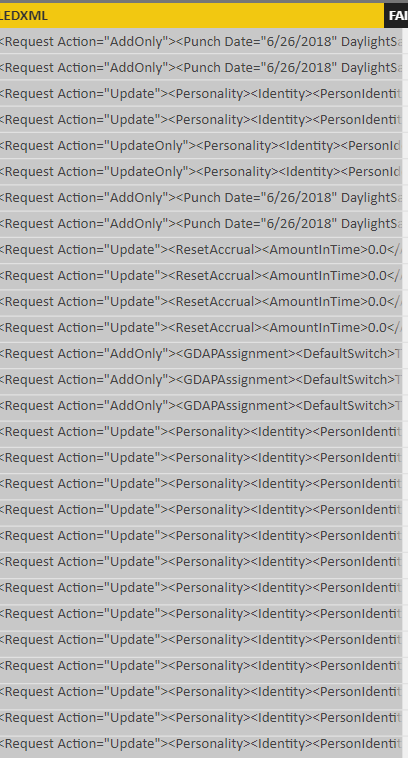
I'm working with a transaction log on PBI that only shows the failures, and one column, "FAILEDXML" shows the details of each fail in an XML document format (see below). My goal is to take this data and convert it to a better/neater presentation on Power BI. Is this possible and how would I go about it?
Thank you very much!
Solved! Go to Solution.
Hi @hokiefan1113,
You could click the icon highlight in red and expand the table.
Best Regards,
Cherry
Hi @v-piga-msft thanks for your response. I parsed the data and now it looks like this. Any idea of how to extract the data in the "table" link?
Please use below M Code. This has worked for me. Just change the path and rest it will handle;
let
Path = "C:\test\Outstanding Report BI\AutoRefresh\Current\",
Source = Folder.Files(Path),
XMLImport= Xml.Tables(Source{[#"Folder Path"= Path,Name="TALLY.xml"]}[Content],null,1252),
#"Added Custom" = Table.AddColumn(XMLImport, "Custom", each Table.ToList([Table])),
Transform = #table(#"Added Custom"[Name],List.Zip(#"Added Custom"[Custom]))
in
Transform
Hi @hokiefan1113,
You could click the icon highlight in red and expand the table.
Best Regards,
Cherry
Hi @hokiefan1113,
You could have a try with clicking Parse to xml.
If you still need help, could you share a dummy pbix file which can reproduce the scenario, so that we can help further investigate on it? You can upload it to OneDrive or Dropbox and post the link here. Do mask sensitive data before uploading.)
Best Regards,
Cherry
If you have recently started exploring Fabric, we'd love to hear how it's going. Your feedback can help with product improvements.
A new Power BI DataViz World Championship is coming this June! Don't miss out on submitting your entry.
Share feedback directly with Fabric product managers, participate in targeted research studies and influence the Fabric roadmap.
| User | Count |
|---|---|
| 57 | |
| 38 | |
| 33 | |
| 19 | |
| 16 |
| User | Count |
|---|---|
| 68 | |
| 66 | |
| 41 | |
| 34 | |
| 25 |