Get certified for free when you join Fabric Data Days 2026 and dive into Fabric, Power BI, SQL, AI, and other essential data skills.
Join nowData Days is here! Join us now for 60+ days of learning, challenges, and connection. Learn more
Hi there,
I am pretty new to power bi but fully enjoying it, I have a question regards to x-axis labels. Now I have been doing some research and implementing some of the ideas that I got off the net but they still don't solve my issue.
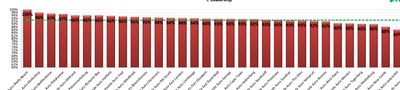
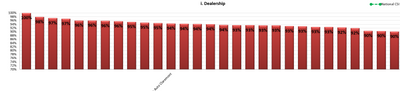
What I want to achieve is below, so when an 'adminstrator' logs in they see the full dataset with all the labels on the x-axis, But if someone with a limited access logs in they should still be able to see the full dataset however when it comes to the x-axis labels they should only see the data label of the region their in. The reason for this to show their position in regards to every other region but not know which regions are those(names of regions). The pictures below should further explain this if I am being cryptic. RLS is what I thought would work but the problem with it is that it excludes all the other data (Pic 1-Full access; Pic 2 -Limited access based on region)
.
Please let me know of your thoughts, thanks.
KR
T
Solved! Go to Solution.
I don't think there is a way to do this within the same report. However, you can implement a cross-filter drillthrough to another report that the two user types could have access to. So clicking on one visual on your main report could bring the two different user groups to another page with the different views you are trying to accomplish.
Proud to be a Super User!
I don't think there is a way to do this within the same report. However, you can implement a cross-filter drillthrough to another report that the two user types could have access to. So clicking on one visual on your main report could bring the two different user groups to another page with the different views you are trying to accomplish.
Proud to be a Super User!
Don't miss out on Data Days, June 15 through August 7. Learn Fabric, Power BI, SQL, AI and more.
Check out the May 2026 Power BI update to learn about new features.
| User | Count |
|---|---|
| 23 | |
| 23 | |
| 21 | |
| 20 | |
| 15 |
| User | Count |
|---|---|
| 58 | |
| 55 | |
| 43 | |
| 30 | |
| 24 |