Join us at FabCon Atlanta from March 16 - 20, 2026, for the ultimate Fabric, Power BI, AI and SQL community-led event. Save $200 with code FABCOMM.
Register now!The Power BI Data Visualization World Championships is back! Get ahead of the game and start preparing now! Learn more
Hi Community!
I have a table of data similar to the below:
Name Speed Agility Purpose
John 4 3 2
John's Manager 3 2 3
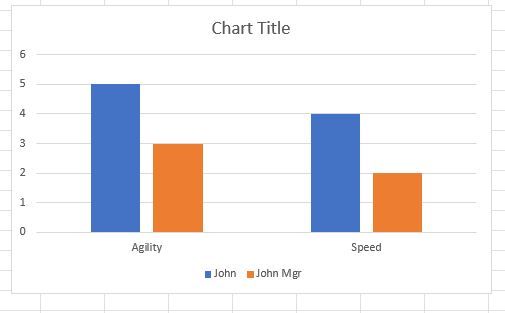
In excel, the layout of this data would allow for a simple barchart where the X-axis is Speed, Agility, Purpose... and the bars for Speed, for example, would be side-by-side for easy visual comparison of differences in scores - even if the names were the fields and the scores, the rows. Excel does the below with either layout.
For the life of me, I cannot figure how to do this in PBI.... Do I need to pivot my data in PQ in some way to achieve this?
I just want to see John's self rating for Speed next to his manager's rating, then John's rating for Agilty next to his manager's rating for Agility and so on... Is this possible with my data layout as it is in my table?
Thank you!
Solved! Go to Solution.
Hi, @samdep
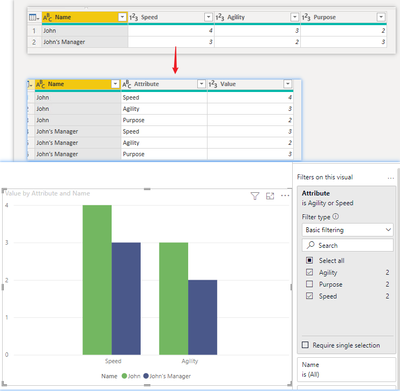
Yes, you need to unpivot the columns. But for what you mentioned above, I would recommend to unpivot all three fields( Speed,Agility,Purpose), and then filter the fields you want to compare.
Result:
Best Regards,
Community Support Team _ Zeon Zheng
If this post helps, then please consider Accept it as the solution to help the other members find it more quickly.
Hi, @samdep
Yes, you need to unpivot the columns. But for what you mentioned above, I would recommend to unpivot all three fields( Speed,Agility,Purpose), and then filter the fields you want to compare.
Result:
Best Regards,
Community Support Team _ Zeon Zheng
If this post helps, then please consider Accept it as the solution to help the other members find it more quickly.
This is very helpful, thank you!
Figured it out. If anyone stumbles on this and is looking for an answer, I unpivoted my data in PQ and the field (Agility, Speed) became rows and from there, I was able to group by row and compare the same data point for two users side-by-side.
The Power BI Data Visualization World Championships is back! Get ahead of the game and start preparing now!
| User | Count |
|---|---|
| 41 | |
| 38 | |
| 36 | |
| 31 | |
| 28 |
| User | Count |
|---|---|
| 129 | |
| 88 | |
| 79 | |
| 68 | |
| 63 |