cancel
Showing results for 
Search instead for 
Did you mean: 

The Power BI Data Visualization World Championships is back! Get ahead of the game and start preparing now! Learn more

Reply
Anonymous
Not applicable

Wrong selectedvalue calculation

Hi!


I have a report with a slicer by Code, when I select any of this code I need to see the summarize of this material with this code and the material with code ¨-¨.

I'm trying to use SELECTEDVALUE but it only shows me the total of "-" for all materials.

I don´t know what I am missing.. 


Total = SUMX(FILTER(ALL(Sheet),Sheet[Code]=SELECTEDVALUE(Sheet[Code],Sheet[Code]="-")),Sheet[amount1])


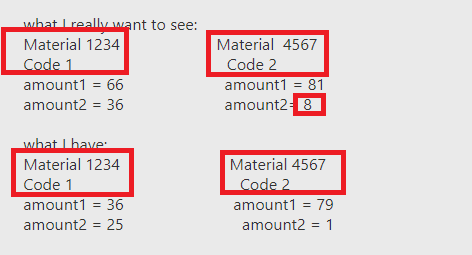
what I really want to see:

Material 1234                      Material  4567

Code 1                                   Code 2

amount1 = 66                       amount1 = 81

amount2 = 36                       amount2= 8


what I have:        

Material 1234                         Material 4567

Code 1                                      Code 2

amount1 = 36                         amount1 = 79

amount2 = 25                           amount2 = 1


Thank you!


Sheet

materialcodeamount1amount2
12341235
1234176
123423432
1234-01
1234-321
1234-423
1234-00
4567228
45671450
4567-781
4567-10
4567-00
8973-09
89731329
8973-59
8973245
8973102
8973-11
8973-13
1 ACCEPTED SOLUTION
Anonymous
Not applicable

@Anonymous,

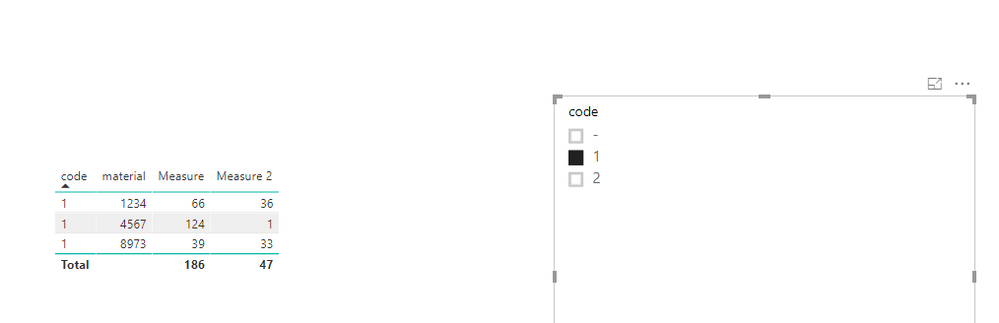
It seems that your expected result is not correct based on the requirement "when I select any of this code I need to see the summarize of this material with this code and the material with code ¨-¨". I create the following columns firstly.
1.PNG

specificcodeforamount1 = CALCULATE(SUM(Table1[amount1]),FILTER(Table1,Table1[material]=EARLIER(Table1[material])&&Table1[code]="-"))
specificcodeforamount2 = CALCULATE(SUM(Table1[amount2]),FILTER(Table1,Table1[material]=EARLIER(Table1[material])&&Table1[code]="-"))


And then create the measures below. For more details, please review attached PBIX file.

Measure = SUM(Table1[amount1])+MAX(Table1[specificcodeforamount1])
Measure 2 = SUM(Table1[amount2])+MAX(Table1[specificcodeforamount2])

1.PNG2.PNG

Regards,
Lydia

View solution in original post

1 REPLY 1
Anonymous
Not applicable

@Anonymous,

It seems that your expected result is not correct based on the requirement "when I select any of this code I need to see the summarize of this material with this code and the material with code ¨-¨". I create the following columns firstly.
1.PNG

specificcodeforamount1 = CALCULATE(SUM(Table1[amount1]),FILTER(Table1,Table1[material]=EARLIER(Table1[material])&&Table1[code]="-"))
specificcodeforamount2 = CALCULATE(SUM(Table1[amount2]),FILTER(Table1,Table1[material]=EARLIER(Table1[material])&&Table1[code]="-"))


And then create the measures below. For more details, please review attached PBIX file.

Measure = SUM(Table1[amount1])+MAX(Table1[specificcodeforamount1])
Measure 2 = SUM(Table1[amount2])+MAX(Table1[specificcodeforamount2])

1.PNG2.PNG

Regards,
Lydia

Helpful resources

Announcements
Power BI DataViz World Championships

Power BI Dataviz World Championships

The Power BI Data Visualization World Championships is back! Get ahead of the game and start preparing now!

December 2025 Power BI Update Carousel

Power BI Monthly Update - December 2025

Check out the December 2025 Power BI Holiday Recap!

FabCon Atlanta 2026 carousel

FabCon Atlanta 2026

Join us at FabCon Atlanta, March 16-20, for the ultimate Fabric, Power BI, AI and SQL community-led event. Save $200 with code FABCOMM.