cancel
Showing results for 
Search instead for 
Did you mean: 

The Power BI Data Visualization World Championships is back! Get ahead of the game and start preparing now! Learn more

Reply
Anonymous
Not applicable

Wrong calculation in DAX Measure for Unichair

Dear all,


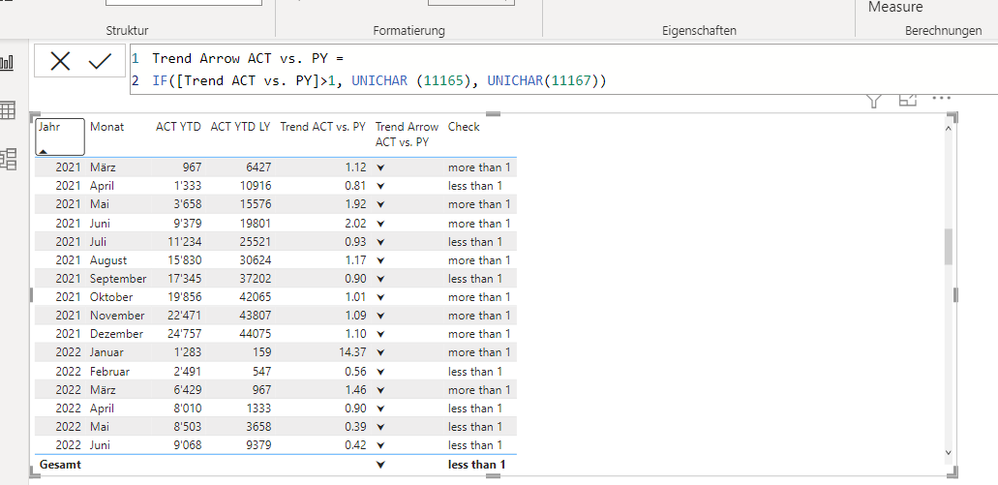
I try to create arrows based on a trend line, if trend is higher than 1, arrow should go up, otherwise down and I am working with Unichair to achieve this.

Measure:

Trend Arrow ACT vs. PY =
IF([Trend ACT vs. PY]>1, UNICHAR (11165), UNICHAR(11167))
 
however for some reason, all the arrows are facing down as seen in the picture. If I test with another formula with text, it works perfectly 
Measure: Check = IF([Trend ACT vs. PY]>1, "more than 1", "less than 1") -> see screenshot below
 
Strange enough, if I use different Unichar it works as well, just with the arrows it doesn't work (it works if I use one arrow and one something else, but as soon as I want both, it doesnt).
 
Anyone any idea what I do wrong? Or alternative arrows which I could use, which allow conditional formatting, which I need to be consistent in my dashboard?
Thanks in advance helping me out here, after spending one evening finding a solution...
Nualos
Test Table for Arrows with supporting columns.png


2 REPLIES 2
vicky_
Super User
Super User

Could you try use the Icons instead of Unichars? If you go to Format Visuals > Cell Elements > Icons, you could get a very similar result for trend arrows (just replace the sum of Qty with your measure).

vicky__1-1670277809834.png


Anonymous
Not applicable

Der Vicky, thanks for your fast replay. Yes, this would work in the table, however I use this measures later in the visual "cards". Here it doesn't work anymore, I can only do conditional formatting on the color, but not add icons. But for the table this looks very nice (and correct :)) indeed.

Thank you.

Helpful resources

Announcements
Power BI DataViz World Championships

Power BI Dataviz World Championships

The Power BI Data Visualization World Championships is back! Get ahead of the game and start preparing now!

December 2025 Power BI Update Carousel

Power BI Monthly Update - December 2025

Check out the December 2025 Power BI Holiday Recap!

FabCon Atlanta 2026 carousel

FabCon Atlanta 2026

Join us at FabCon Atlanta, March 16-20, for the ultimate Fabric, Power BI, AI and SQL community-led event. Save $200 with code FABCOMM.