Join us at FabCon Atlanta from March 16 - 20, 2026, for the ultimate Fabric, Power BI, AI and SQL community-led event. Save $200 with code FABCOMM.
Register now!Get Fabric Certified for FREE during Fabric Data Days. Don't miss your chance! Request now
Hi All,
I am trying to do a dashboard in Power BI with Google Analytics but User and Conversions metric are wrong. I made a table with Users, date, sessions, etc...., But users in the card visualization is wrong, same for conversions.
Any idea of how to solve it??
I am pulling the data thourgh the connector of powwr BI: get data>>> google analytics>>> connection and thena choose the metrics and dimensions.
Thanks.
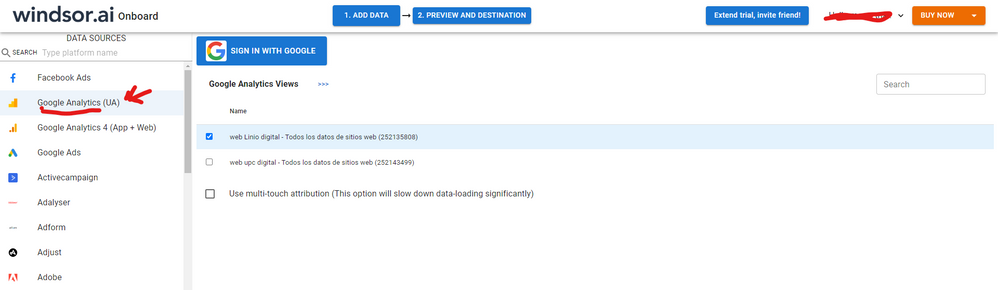
Hi, were you able to find a solution? As a workaround, maybe you can try to test your connection with a 3rd party connector, it may be a data mismatch. I currently use windsor.ai 's GA connector and I haven't had any issue with data quality and accuracy so far. In case you wonder, to make the connection first search for the GA connector in the data sources list:
After that, just grant access to your GA account using your credentials, then on preview and destination page you will see a preview of your GA fields:
There just select the fields you need. Finally, just select PBI as your data destination and finally just copy and paste the url on PBI --> Get Data --> Web --> Paste the url.
Hi @Anonymous ,
Please kindly refer to
Visualize and Explore your Google Analytics data with Power BI
Power BI with Google analytics Source | Power BI Tutorials
Best Regards,
Stephen Tao
If this post helps, then please consider Accept it as the solution to help the other members find it more quickly.
Check out the November 2025 Power BI update to learn about new features.
Advance your Data & AI career with 50 days of live learning, contests, hands-on challenges, study groups & certifications and more!