Join us in Barcelona for FabCon and SQLCon, September 28 - October 1, 2026.
This is best Fabric, Power BI, SQL and AI community event. How do we know? The last event sold out! Save €200 with code FABCMTY200.
Register now- Power BI forums
- Get Help with Power BI
- Desktop
- Service
- Report Server
- Power Query
- Mobile Apps
- Developer
- DAX Commands and Tips
- Custom Visuals Development Discussion
- Health and Life Sciences
- Power BI Spanish forums
- Translated Spanish Desktop
- Training and Consulting
- Instructor Led Training
- Dashboard in a Day for Women, by Women
- Galleries
- Data Stories Gallery
- Themes Gallery
- Contests Gallery
- QuickViz Gallery
- Quick Measures Gallery
- Visual Calculations Gallery
- Notebook Gallery
- Translytical Task Flow Gallery
- TMDL Gallery
- R Script Showcase
- Webinars and Video Gallery
- Ideas
- Custom Visuals Ideas (read-only)
- Issues
- Issues
- Events
- Upcoming Events
A new Data Days event is coming soon! This time we’re going bigger than ever. Fabric, Power BI, SQL, AI and more. Don't miss out.
- Power BI forums
- Forums
- Get Help with Power BI
- Desktop
- Re: Wrong Total
- Subscribe to RSS Feed
- Mark Topic as New
- Mark Topic as Read
- Float this Topic for Current User
- Bookmark
- Subscribe
- Printer Friendly Page

- Mark as New
- Bookmark
- Subscribe
- Mute
- Subscribe to RSS Feed
- Permalink
- Report Inappropriate Content
Wrong Total
How can i fix my total in a matrix.
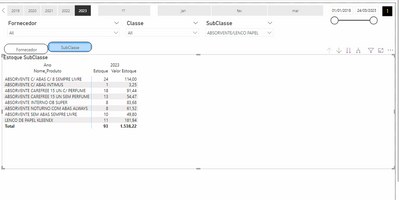
The expresions are:
Saldos:= CALCULATE(SUM(Saldos[Entrada])-SUM(Saldos[Saida]))
Estoque:=
VAR DATAINI=FIRSTDATE(ALL('Calendar'[Data]))
VAR DATAFIM=LASTDATE('Calendar'[Data])
VAR Estoque = CALCULATE(_Medidas[Saldos],
ALL(Saldos[Tipo]),
DATESBETWEEN('Calendar'[Data],DATAINI,DATAFIM))
RETURN
Estoque


- Mark as New
- Bookmark
- Subscribe
- Mute
- Subscribe to RSS Feed
- Permalink
- Report Inappropriate Content
Hi,
Please describe the question, share data in a format that can be pasted in an MS Excel file and show the expected result. If possible, could you share the column names in English language?
Regards,
Ashish Mathur
http://www.ashishmathur.com
https://www.linkedin.com/in/excelenthusiasts/
- Mark as New
- Bookmark
- Subscribe
- Mute
- Subscribe to RSS Feed
- Permalink
- Report Inappropriate Content
I changed the column and measurement names to English.
- Mark as New
- Bookmark
- Subscribe
- Mute
- Subscribe to RSS Feed
- Permalink
- Report Inappropriate Content
https://drive.google.com/file/d/1wdZ1YnBT2BqekXoaPc3yZhkpth_X5i83/view?usp=share_link
I need to calculate the inventory on the selected date. Physical inventory and inventory value.
I can calculate the measurements, but the totals are not adding up
Thanks,
- Mark as New
- Bookmark
- Subscribe
- Mute
- Subscribe to RSS Feed
- Permalink
- Report Inappropriate Content
Hi,
You may downlaod my PBI file from here. I have also simplified your measures
Hope this helps.
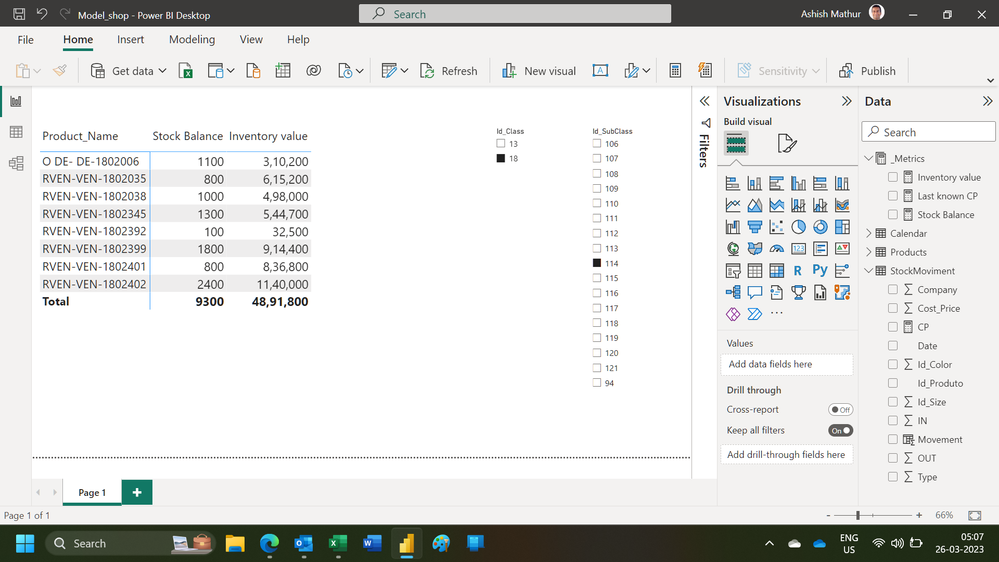
Regards,
Ashish Mathur
http://www.ashishmathur.com
https://www.linkedin.com/in/excelenthusiasts/
- Mark as New
- Bookmark
- Subscribe
- Mute
- Subscribe to RSS Feed
- Permalink
- Report Inappropriate Content
"Good job, But I need to check the balances from previous periods as well. For example: Click on the year 2022, month of August, and be able to see the physical and financial retroactive balance.
However, with these measures, when I filter a year and month, the data only calculates the information for the selected period."
- Mark as New
- Bookmark
- Subscribe
- Mute
- Subscribe to RSS Feed
- Permalink
- Report Inappropriate Content
Thank you. That is a new requirement. Not in any previous post have you mentioend that. Explain your new requirement very clearly. Show the expected result.
Regards,
Ashish Mathur
http://www.ashishmathur.com
https://www.linkedin.com/in/excelenthusiasts/
- Mark as New
- Bookmark
- Subscribe
- Mute
- Subscribe to RSS Feed
- Permalink
- Report Inappropriate Content
Yes, man! You are correct.
I really appreciate your help.
But my real intention is to get the stock balance from a previous date as well. For example, if the user selects March 2022, they should be able to see the exact stock balance from March 2022 of the previous year.
You get it ?
Here is the link to my model again. I have added some slicers for the year and month.
Thanks for your time.
- Mark as New
- Bookmark
- Subscribe
- Mute
- Subscribe to RSS Feed
- Permalink
- Report Inappropriate Content
Here is the link to my model again. I have added some slicers for the year and month.
Thanks for your time.
https://drive.google.com/file/d/1SRLaszxsVbKNi70vtu7A9QqzRsVd9tr4/view?usp=share_link
- Mark as New
- Bookmark
- Subscribe
- Mute
- Subscribe to RSS Feed
- Permalink
- Report Inappropriate Content
Hi,
Use this measure to get the stock value in the same month last year
Inventory value in SPLY = CALCULATE([Inventory value],SAMEPERIODLASTYEAR('Calendar'[Data]))Hope this helps.
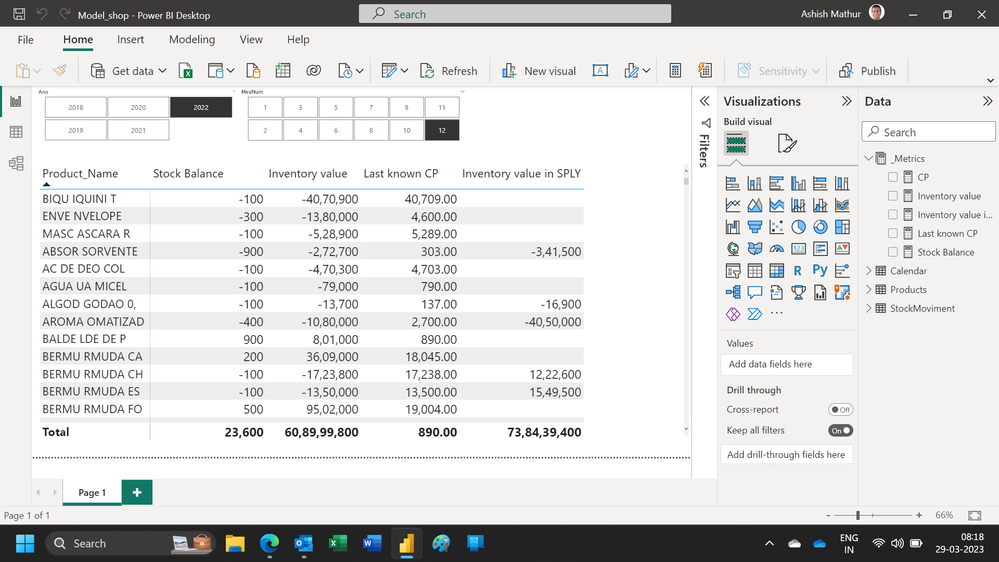
Regards,
Ashish Mathur
http://www.ashishmathur.com
https://www.linkedin.com/in/excelenthusiasts/


- Mark as New
- Bookmark
- Subscribe
- Mute
- Subscribe to RSS Feed
- Permalink
- Report Inappropriate Content
@IsmaelConsult First, please vote for this idea: https://ideas.powerbi.com/ideas/idea/?ideaid=082203f1-594f-4ba7-ac87-bb91096c742e
This looks like a measure totals problem. Very common. See my post about it here: https://community.powerbi.com/t5/DAX-Commands-and-Tips/Dealing-with-Measure-Totals/td-p/63376
Also, this Quick Measure, Measure Totals, The Final Word should get you what you need:
https://community.powerbi.com/t5/Quick-Measures-Gallery/Measure-Totals-The-Final-Word/m-p/547907
Also: https://youtu.be/uXRriTN0cfY
And: https://youtu.be/n4TYhF2ARe8
Follow on LinkedIn
@ me in replies or I'll lose your thread!!!
Instead of a Kudo, please vote for this idea
Become an expert!: Enterprise DNA
External Tools: MSHGQM
YouTube Channel!: Microsoft Hates Greg
Latest book!: DAX For Humans
DAX is easy, CALCULATE makes DAX hard...
- Mark as New
- Bookmark
- Subscribe
- Mute
- Subscribe to RSS Feed
- Permalink
- Report Inappropriate Content
I separated the measurements but it didn't work, here's the link to the file so you can analyze it better. I also changed the column and measurement names to English.
https://drive.google.com/file/d/1wdZ1YnBT2BqekXoaPc3yZhkpth_X5i83/view?usp=share_link
I need to calculate the inventory on the selected date. Physical inventory and inventory value.
I can calculate the measurements, but the totals are not adding up
Thanks,
- Mark as New
- Bookmark
- Subscribe
- Mute
- Subscribe to RSS Feed
- Permalink
- Report Inappropriate Content
@Greg_Deckler
I try with this metric:
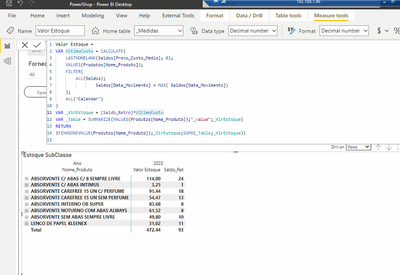
But not works.
- Mark as New
- Bookmark
- Subscribe
- Mute
- Subscribe to RSS Feed
- Permalink
- Report Inappropriate Content
@IsmaelConsult Can't do it like that, that's not how VAR's work. Use 2 separate measures like in the example.
Follow on LinkedIn
@ me in replies or I'll lose your thread!!!
Instead of a Kudo, please vote for this idea
Become an expert!: Enterprise DNA
External Tools: MSHGQM
YouTube Channel!: Microsoft Hates Greg
Latest book!: DAX For Humans
DAX is easy, CALCULATE makes DAX hard...

Helpful resources

Power BI Monthly Update - May 2026
Check out the May 2026 Power BI update to learn about new features.

Data Days 2026 coming soon!
Sign up to receive a private message when registration opens and key events begin.

New to Fabric Survey
If you have recently started exploring Fabric, we'd love to hear how it's going. Your feedback can help with product improvements.

Power BI DataViz World Championships - June 2026
A new Power BI DataViz World Championship is coming this June! Don't miss out on submitting your entry.

| User | Count |
|---|---|
| 28 | |
| 25 | |
| 25 | |
| 20 | |
| 14 |


| User | Count |
|---|---|
| 53 | |
| 45 | |
| 20 | |
| 19 | |
| 18 |


