Join us at FabCon Atlanta from March 16 - 20, 2026, for the ultimate Fabric, Power BI, AI and SQL community-led event. Save $200 with code FABCOMM.
Register now!The Power BI Data Visualization World Championships is back! Get ahead of the game and start preparing now! Learn more
Hi @Pikachu-Power ,
Not very clear what you mean, you mean the filter inside it calcuated.
It can not only restrict two conditions, but can have many restrictions. Use && as an intermediate connecting character, for example:
Measure =
CALCULATE(SUM('Table'[amount]),FILTER(ALL('Table'),'Table'[flag]="PositionName1"&&'Table'[ID]>=1&&'Table'[ID]<=10))
If you mean the switch inside the condition, whether written or write directly measure the original formula is feasible
When a certain condition is met, the corresponding result will be obtained, if the condition is not met, the final result will be directly obtained.
Measure_switch =
SWITCH(
TRUE(),
SELECTEDVALUE('Table'[flag])="PositionName1",CALCULATE(SUM('Table'[amount]),FILTER(ALL('Table'),'Table'[flag]="PositionName1"&&'Table'[ID]>=1&&'Table'[ID]<=10)), SELECTEDVALUE('Table'[flag])="PositionName2",CALCULATE(SUM('Table'[amount]),FILTER(ALL('Table'),'Table'[flag]="PositionName1"&&'Table'[ID]>=1&&'Table'[ID]<=10)),
SELECTEDVALUE('Table'[flag])="PositionName3",CALCULATE(SUM('Table'[amount]),FILTER(ALL('Table'),'Table'[flag]="PositionName3"&&'Table'[ID]>=5&&'Table'[ID]<=11)),
'Table'[Measure 1]+'Table'[Measure 2]+'Table'[Measure 3])
If it does not meet your expected results, can you share sample data and sample output in table format? Or a sample pbix after removing sensitive data
Best Regards,
Liu Yang
If this post helps, then please consider Accept it as the solution to help the other members find it more quickly.
Hi @Pikachu-Power ,
Switch can use the Else condition at the end. When the above conditions are not met, the result will be obtained directly.
I created some data:
1. Create meausre.
Measure1 = CALCULATE(SUM('Table'[amount]),FILTER(ALL('Table'),'Table'[ID]<=3))Measure 2 = CALCULATE(SUM('Table'[amount]),FILTER(ALL('Table'),'Table'[ID]<=4))Measure 3 = CALCULATE(SUM('Table'[amount]),FILTER(ALL('Table'),'Table'[ID]<=5))Measure 4 = CALCULATE(SUM('Table'[amount]),FILTER(ALL('Table'),'Table'[ID]<=6))Measure 5 = CALCULATE(SUM('Table'[amount]),FILTER(ALL('Table'),'Table'[ID]<=7))Measure_switch =
SWITCH(
TRUE(),
SELECTEDVALUE('Table'[flag])="PositionName1",'Table'[Measure 1],
SELECTEDVALUE('Table'[flag])="PositionName2",'Table'[Measure 2],
SELECTEDVALUE('Table'[flag])="PositionName3",'Table'[Measure 3],
SELECTEDVALUE('Table'[flag])="PositionName4",'Table'[Measure 4],
SELECTEDVALUE('Table'[flag])="PositionName5",'Table'[Measure 5],
'Table'[Measure 1]+'Table'[Measure 2]+'Table'[Measure 3]+'Table'[Measure 4]+'Table'[Measure 5])
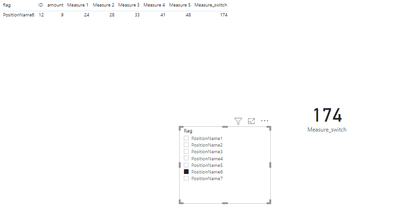
2. Result:
When you select PositionName6 that does not meet any of the above conditions, all of its additions are displayed
Best Regards,
Liu Yang
If this post helps, then please consider Accept it as the solution to help the other members find it more quickly.
Thanks but looks complicated for my case 🙂 My measures have three or more restrictions and FILTER accept only two.
And what if
SWITCH(
TRUE(),
SELECTEDVALUE('Table'[flag])="PositionName1",'Table'[Measure 1],
SELECTEDVALUE('Table'[flag])="PositionName2",'Table'[Measure 1],
SELECTEDVALUE('Table'[flag])="PositionName3",'Table'[Measure 3],
...
@Pikachu-Power , Try like
Measure_Column =
sumx(values(Table[Position]), SWITCH(TRUE(),
SELECTEDVALUE(Table[Position]) = "PositionName1", [Measure1],
SELECTEDVALUE(Table[Position]) = "PositionName2", [Measure1],
SELECTEDVALUE(Table[Position]) = "PositionName3", [Mesaure2],
SELECTEDVALUE(Table[Position]) = "PositionName4", [Mesaure2],
SELECTEDVALUE(Table[Position]) = "PositionName5", [Mesaure2],
blank()
))
Hello, seems not to work yet... I get BLANK for the Total.
The Power BI Data Visualization World Championships is back! Get ahead of the game and start preparing now!
| User | Count |
|---|---|
| 41 | |
| 38 | |
| 36 | |
| 30 | |
| 28 |
| User | Count |
|---|---|
| 128 | |
| 88 | |
| 79 | |
| 67 | |
| 62 |