cancel
Showing results for 
Search instead for 
Did you mean: 

The Power BI Data Visualization World Championships is back! Get ahead of the game and start preparing now! Learn more

Reply
Anonymous
Not applicable

Worklog - Total is Wrong

Hi, 

I am working on the Team Worklog and for some reason the Capacity total is coming wrong.


It's a simple worklog. The total for Capacity should be '469' but it's showing '784'.
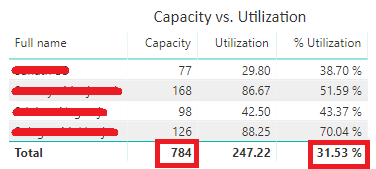


capacity.png

The Measure I am using to calculate Capacity is


Capacity = DISTINCTCOUNT(Worklogs[Full name]) * DISTINCTCOUNT(Worklogs[Work date]) * 7


Utilization = SUM(Worklogs[Hours])


% Utilization = Worklogs[Utilization] / Worklogs[Capacity]


I guess is there is a better way to calculate the Capacity team.


My log looks something like this.


Full nameWork dateHours
Member 12018-2-5 00:002
Member 22018-2-5 00:002
Member 32018-3-14 00:001
Member 22018-3-14 00:002
Member 32018-2-8 00:003
Member 22018-2-5 00:000.25
Member 22018-2-7 00:000.5
Member 32018-2-9 00:000.25
Member 32018-2-13 00:000.25
Member 32018-2-14 00:000.25
Member 32018-3-6 00:002
Member 22018-3-1 00:001
Member 32018-2-19 00:002
Member 12018-2-20 00:003
Member 12018-2-21 00:000.5


Thanks,

Joydeep

1 ACCEPTED SOLUTION
Anonymous
Not applicable

Hi @joydeep7,


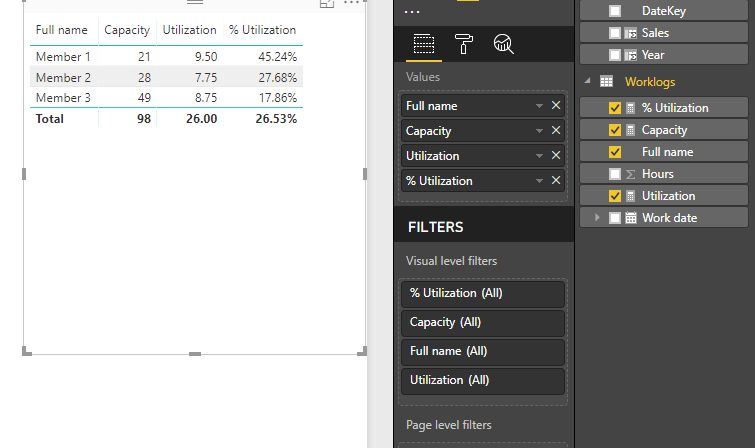
AFAIK, measure formulas has different calculation logic on total level. You need to add some conditions and specific formula to handling total level calculation.


Sample formula:

Capacity =
IF (
    ISFILTERED ( Worklogs[Full name] ),
    DISTINCTCOUNT ( Worklogs[Full name] ) * DISTINCTCOUNT ( Worklogs[Work date] )
        * 7,
    SUMX (
        SUMMARIZE (
            Worklogs,
            [Full name],
            [Work date],
            "Capa", DISTINCTCOUNT ( Worklogs[Full name] ) * DISTINCTCOUNT ( Worklogs[Work date] )
                * 7
        ),
        [Capa]
    )
)


 12.PNG


Reference link:
Clever Hierarchy Handling in DAX


Regards,

Xiaoxin Sheng

View solution in original post

2 REPLIES 2
Anonymous
Not applicable

Hi @joydeep7,


AFAIK, measure formulas has different calculation logic on total level. You need to add some conditions and specific formula to handling total level calculation.


Sample formula:

Capacity =
IF (
    ISFILTERED ( Worklogs[Full name] ),
    DISTINCTCOUNT ( Worklogs[Full name] ) * DISTINCTCOUNT ( Worklogs[Work date] )
        * 7,
    SUMX (
        SUMMARIZE (
            Worklogs,
            [Full name],
            [Work date],
            "Capa", DISTINCTCOUNT ( Worklogs[Full name] ) * DISTINCTCOUNT ( Worklogs[Work date] )
                * 7
        ),
        [Capa]
    )
)


 12.PNG


Reference link:
Clever Hierarchy Handling in DAX


Regards,

Xiaoxin Sheng

Anonymous
Not applicable

Thank you Xiaoxin, this is really helpful. 

Helpful resources

Announcements
Power BI DataViz World Championships

Power BI Dataviz World Championships

The Power BI Data Visualization World Championships is back! Get ahead of the game and start preparing now!

December 2025 Power BI Update Carousel

Power BI Monthly Update - December 2025

Check out the December 2025 Power BI Holiday Recap!

FabCon Atlanta 2026 carousel

FabCon Atlanta 2026

Join us at FabCon Atlanta, March 16-20, for the ultimate Fabric, Power BI, AI and SQL community-led event. Save $200 with code FABCOMM.