Join us at FabCon Atlanta from March 16 - 20, 2026, for the ultimate Fabric, Power BI, AI and SQL community-led event. Save $200 with code FABCOMM.
Register now!The Power BI Data Visualization World Championships is back! Get ahead of the game and start preparing now! Learn more
Hi,
1. I am trying to prepare a bug metrics to check the %age of bug has been fixed till now:
%age of Bug fixed is = Total no of Bugs in Closed State/ (Total bugs in Closed State+Total bugs in New State + Total bugs in Active State) * 100.
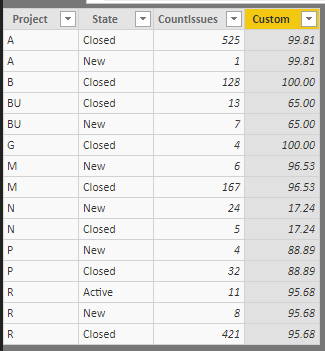
Below is the table which represents the data. I want to poulate the Custom column with the values using the above formula. How can I do this?
| Project | State | CountIssues | Custom |
| A | Closed | 525 | 525/526 |
| A | New | 1 | 525/526 |
| B | Closed | 128 | 0 |
| BU | Closed | 13 | 13/20 |
| BU | New | 7 | 13/20 |
| G | Closed | 4 | 0 |
| M | New | 6 | 167/173 |
| M | Closed | 167 | 0 |
| N | New | 24 | 5/(29) |
| N | Closed | 5 | 5/(29) |
| P | New | 4 | 36/36 |
| P | Closed | 32 | 36/36 |
| R | Active | 11 | 421/440 |
| R | New | 8 | 421/440 |
| R | Closed | 421 | 421/440 |
How can Iuse the filter on State column in Custom column dialog so that I can filter the records based on State[new]+State[Active] etc?
TIA
Solved! Go to Solution.
@sprasad After performing the steps posted above, then create a new table as below
Test187Final = SUMMARIZE(Test187,Test187[Project],"Custom",MAX(Test187[Custom]))
Proud to be a PBI Community Champion
@sprasad Please try this as a new column in Modeling tab (DAX) instead of Power Query Editor.
Custom = VAR _ClosedProjectSum = CALCULATE(SUM(Test187[CountIssues]),FILTER(ALL(Test187),Test187[State]="Closed" && Test187[Project] = EARLIER(Test187[Project]))) VAR _AllProjectSum = CALCULATE(SUM(Test187[CountIssues]),FILTER(ALL(Test187),Test187[Project] = EARLIER(Test187[Project]))) RETURN (_ClosedProjectSum/_AllProjectSum ) * 100
Proud to be a PBI Community Champion
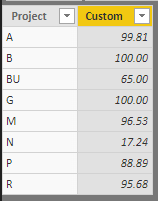
Thanks Manohar, It is working correctly. Can we display the %age calculated in Custom column in a single row for each project?
@sprasad After performing the steps posted above, then create a new table as below
Test187Final = SUMMARIZE(Test187,Test187[Project],"Custom",MAX(Test187[Custom]))
Proud to be a PBI Community Champion
As a custom Column, you can use this
Please see attached file's query editor
ChangedType is the name of previous step
=let myproject=[Project]
in
let
mystates=Table.SelectRows(ChangedType, each [Project]=myproject)[State],
numerator=Table.SelectRows(ChangedType, each [Project]=myproject and [State]="Closed")[CountIssues],
denominator=Table.SelectRows(ChangedType, each [Project]=myproject)[CountIssues]
in
if List.Contains(mystates,"New") then List.Sum(numerator)/List.Sum(denominator) else 0
Hi Zubair,
Thanks for your help, Actually i couln't work through your code. where can i get the references or help of the code you worte?
Thanks
Sudhir
The Power BI Data Visualization World Championships is back! Get ahead of the game and start preparing now!
| User | Count |
|---|---|
| 41 | |
| 37 | |
| 35 | |
| 34 | |
| 28 |
| User | Count |
|---|---|
| 134 | |
| 101 | |
| 71 | |
| 67 | |
| 65 |