Join us at FabCon Atlanta from March 16 - 20, 2026, for the ultimate Fabric, Power BI, AI and SQL community-led event. Save $200 with code FABCOMM.
Register now!The Power BI Data Visualization World Championships is back! Get ahead of the game and start preparing now! Learn more
Dear Community,
Please help to figure out what is wrong with formula I have
| LINK_Date | WeekDayName | WorkingDayCount |
| 1-May-19 | Wednesday | |
| 2-May-19 | Thursday | 1 |
| 3-May-19 | Friday | |
| 4-May-19 | Saturday | |
| 5-May-19 | Sunday | |
| 6-May-19 | Monday | 2 |
| 7-May-19 | Tuesday | 3 |
| 8-May-19 | Wednesday | 4 |
| 9-May-19 | Thursday | 5 |
| 10-May-19 | Friday | 6 |
| 11-May-19 | Saturday | |
| 12-May-19 | Sunday | |
| 13-May-19 | Monday | 7 |
| 14-May-19 | Tuesday | 8 |
| 15-May-19 | Wednesday | 9 |
| 16-May-19 | Thursday | 10 |
| 17-May-19 | Friday | 11 |
| 18-May-19 | Saturday | |
| 19-May-19 | Sunday | |
| 20-May-19 | Monday | 12 |
| 21-May-19 | Tuesday | 13 |
| 22-May-19 | Wednesday | 14 |
| 23-May-19 | Thursday | 15 |
| 24-May-19 | Friday | 16 |
| 25-May-19 | Saturday | |
| 26-May-19 | Sunday | |
| 27-May-19 | Monday | 17 |
| 28-May-19 | Tuesday | 18 |
| 29-May-19 | Wednesday | 19 |
| 30-May-19 | Thursday | 20 |
| 31-May-19 | Friday | 21 |
Solved! Go to Solution.
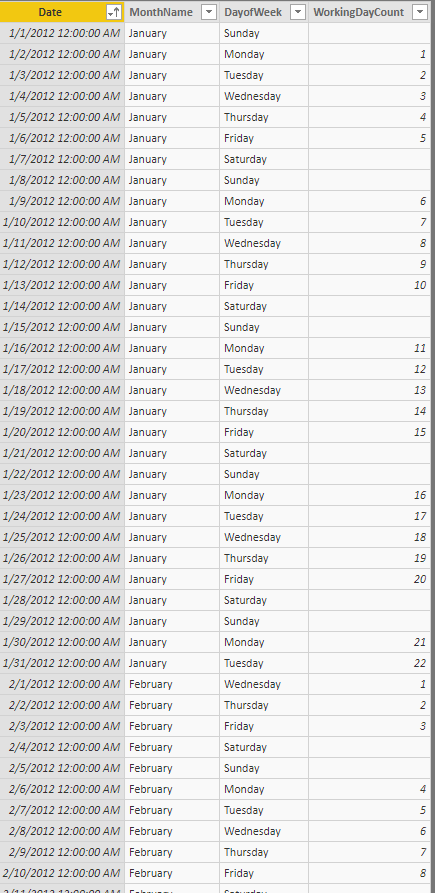
You can use this Calculated Column:
WorkingDayCount =
Var __CurrentDate = 'Table'[Date]
Var __CurrentMonth = 'Table'[MonthName]
Var __CurrentYear = YEAR( 'Table'[Date] )
Var __CurrentDay = 'Table'[DayofWeek]
Var __List= {"Saturday" , "Sunday" }
RETURN
CALCULATE(
COUNTROWS( 'Table' ),
Filter(
ALL( 'Table'),
__CurrentDate >= 'Table'[Date]
&& NOT 'Table'[DayofWeek] IN __List
&& NOT __CurrentDay IN __List
&& __CurrentMonth = 'Table'[MonthName]
&& __CurrentYear = Year( 'Table'[Date])
)
)
This will tell you the weekday count (M-F), but you'd need a separate table to link to this one to explicitly call out holidays and exclude this from the data as well.
WorkingDays =
CALCULATE(COUNTROWS(D_Date),
FILTER(
ALL(D_Date[LINK_Date]),
DAY(D_Date[LINK_Date])<=D_Date[DATE_DayNumberInMonth]
&& YEAR(D_Date[LINK_Date])=D_Date[DATE_YearNumber]
&& MONTH(D_Date[LINK_Date])=D_Date[DATE_MonthNumber]
&& WEEKDAY(D_Date[LINK_Date],2) <> 6
&& WEEKDAY(D_Date[LINK_Date],2) <> 7
)
)I'd also be inclined to do this in Power Query - at least using that to define what is and isn't a workday returning a 1/0 or True/False.
See this post here and the related PBIX file as it is very similar to what you are describing. It has the holiday table in it.
DAX is for Analysis. Power Query is for Data Modeling
Proud to be a Super User!
MCSA: BI ReportingYou can use this Calculated Column:
WorkingDayCount =
Var __CurrentDate = 'Table'[Date]
Var __CurrentMonth = 'Table'[MonthName]
Var __CurrentYear = YEAR( 'Table'[Date] )
Var __CurrentDay = 'Table'[DayofWeek]
Var __List= {"Saturday" , "Sunday" }
RETURN
CALCULATE(
COUNTROWS( 'Table' ),
Filter(
ALL( 'Table'),
__CurrentDate >= 'Table'[Date]
&& NOT 'Table'[DayofWeek] IN __List
&& NOT __CurrentDay IN __List
&& __CurrentMonth = 'Table'[MonthName]
&& __CurrentYear = Year( 'Table'[Date])
)
)
The Power BI Data Visualization World Championships is back! Get ahead of the game and start preparing now!
| User | Count |
|---|---|
| 41 | |
| 38 | |
| 36 | |
| 30 | |
| 28 |
| User | Count |
|---|---|
| 129 | |
| 88 | |
| 79 | |
| 68 | |
| 63 |