Get certified for free when you join Fabric Data Days 2026 and dive into Fabric, Power BI, SQL, AI, and other essential data skills.
Join nowJuly 7 - July 17 | Round 2 of the Power BI Dataviz World Championships. Don't miss your chance! Learn more
Hi,
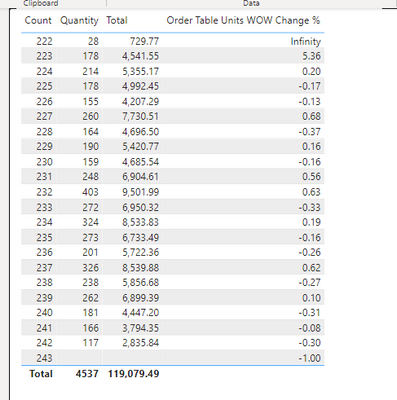
I have calcuated a WoW calculation for this matrix. The WoW calculation is based on the count column. Whenever i switch it to a different weekly column, the WoW calculation goes dead. Is that because there is text in it if i wanted to switch Count to Code?? My calculations are below. Now where it says Count, I have also switched it to Code and it still comes back with the results from the bottom screenshot.
Thanks!
Solved! Go to Solution.
Hi @Jpahl2033 ,
Please add ALL ( 'mec_business_me_retail_week_daily'[Code] ) to the formula for the [Order Units Last Week] measure.
Order Units Last Week =
VAR _current_week =
MAX ( 'mec_business_me_retail_week_daily'[Count] )
RETURN
CALCULATE (
SUM ( 'mec_business_me_retail_week_daily'[Quantity] ),
ALL ( 'mec_business_me_retail_week_daily'[Code] ),
FILTER (
ALL ( 'mec_business_me_retail_week_daily'[Count] ),
'mec_business_me_retail_week_daily'[Count] = _current_week - 1
)
)
If the problem is still not resolved, please provide detailed error information or the expected result you expect. Let me know immediately, looking forward to your reply.
Best Regards,
Winniz
If this post helps, then please consider Accept it as the solution to help the other members find it more quickly.
Hi @Jpahl2033 ,
Please add ALL ( 'mec_business_me_retail_week_daily'[Code] ) to the formula for the [Order Units Last Week] measure.
Order Units Last Week =
VAR _current_week =
MAX ( 'mec_business_me_retail_week_daily'[Count] )
RETURN
CALCULATE (
SUM ( 'mec_business_me_retail_week_daily'[Quantity] ),
ALL ( 'mec_business_me_retail_week_daily'[Code] ),
FILTER (
ALL ( 'mec_business_me_retail_week_daily'[Count] ),
'mec_business_me_retail_week_daily'[Count] = _current_week - 1
)
)
If the problem is still not resolved, please provide detailed error information or the expected result you expect. Let me know immediately, looking forward to your reply.
Best Regards,
Winniz
If this post helps, then please consider Accept it as the solution to help the other members find it more quickly.
@Jpahl2033 Sorry, having trouble following, can you post sample data as text and expected output?
Not really enough information to go on, please first check if your issue is a common issue listed here: https://community.powerbi.com/t5/Community-Blog/Before-You-Post-Read-This/ba-p/1116882
Also, please see this post regarding How to Get Your Question Answered Quickly: https://community.powerbi.com/t5/Community-Blog/How-to-Get-Your-Question-Answered-Quickly/ba-p/38490
The most important parts are:
1. Sample data as text, use the table tool in the editing bar
2. Expected output from sample data
3. Explanation in words of how to get from 1. to 2.
Join us in Barcelona for FabCon and SQLCon, the Fabric, Power BI, SQL, and AI community event. Save €200 with code FABCMTY200.
Join Fabric Data Days 2026: 60 days of free live/on-demand sessions, challenges, study groups, and certification opportunities.
| User | Count |
|---|---|
| 22 | |
| 22 | |
| 18 | |
| 16 | |
| 13 |
| User | Count |
|---|---|
| 63 | |
| 42 | |
| 40 | |
| 40 | |
| 40 |