This is best Fabric, Power BI, SQL and AI community event. How do we know? The last event sold out! Save €200 with code FABCMTY200.
Register nowA new Data Days event is coming soon! This time we’re going bigger than ever. Fabric, Power BI, SQL, AI and more. Don't miss out.
I am trying to calculate a win rate. I have two Columns (1) OldValue and (2) is Opportunity.IsWon.
The OldValue column contains Stages (i.e. stage 1, stage 2, stage 3). The Opportunity.IsWin column contains either True or False.
I want to be able to calculate the Grand Total of Opps where the old value is Stage1. Let's say, for example, that it comes out to 100 total opps.
I then need to calculate how many of those opps had an Opportunity.IsWon as True. And finally with that I want to calculate the % of wins based on how many opps were true / the total opps.
Thank you for your help!
Solved! Go to Solution.
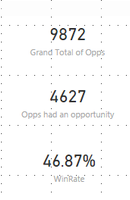
I'll do this with 3 measures.
Grand Total of Opps = CALCULATE(
COUNTROWS('YourTable'),
LEFT('YourTable'[OldValue], 7) = "Stage 1"
) Opps had an Opportunity = CALCULATE(
COUNTROWS('YourTable'),
LEFT('YourTable'[OldValue], 7) = "Stage 1",
'YourTable'[Opportunity.IsWon]
)WinRate = DIVIDE( [Opps had an Opportunity], [Grand Total of Opps] )
Assumptions:
- Your field Opportunity.IsWin is of type boolean, rather than text
- You wanted to hardcode "Stage 1" into your measure.
I'll do this with 3 measures.
Grand Total of Opps = CALCULATE(
COUNTROWS('YourTable'),
LEFT('YourTable'[OldValue], 7) = "Stage 1"
) Opps had an Opportunity = CALCULATE(
COUNTROWS('YourTable'),
LEFT('YourTable'[OldValue], 7) = "Stage 1",
'YourTable'[Opportunity.IsWon]
)WinRate = DIVIDE( [Opps had an Opportunity], [Grand Total of Opps] )
Assumptions:
- Your field Opportunity.IsWin is of type boolean, rather than text
- You wanted to hardcode "Stage 1" into your measure.
@Anonymous Thank you so much for the quick response and providing the breakdown. This worked.
Check out the May 2026 Power BI update to learn about new features.
Sign up to receive a private message when registration opens and key events begin.
If you have recently started exploring Fabric, we'd love to hear how it's going. Your feedback can help with product improvements.
| User | Count |
|---|---|
| 29 | |
| 28 | |
| 25 | |
| 20 | |
| 14 |
| User | Count |
|---|---|
| 53 | |
| 47 | |
| 27 | |
| 20 | |
| 19 |