cancel
Showing results for 
Search instead for 
Did you mean: 

Data Days is here! Join us now for 60+ days of learning, challenges, and connection. Learn more

Reply
TCarrasquillo
Helper II
Helper II

Wierd Visual Bug? Text boxes "ghosting" on to other report pages.

Hi Everyone,


I'm hoping someone else has at least seen this happen or I might drive my self crazy. I have several pages on a report 2 pages with very similar layouts (one Executive view, one Area Manager view)
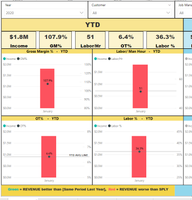
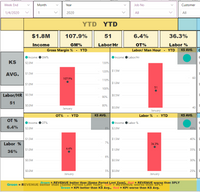
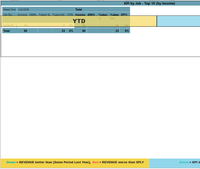
Page 1Page 1   Page 2Page 2   Page 3Page 3

I've noticed this a few times before but normally I would just close the report and open it back up and it would be fine, but today I had been working for a while refining all the visuals for the new year and didn't want to lose the progress I'd made. I saved thinking this was just visual and probably only my computer. I then went and had a collegue open the report on his system and it was saved just like this (pics above) all pages have the same text boxes and I can't remove them.


Any help would be much appreciated. 🙂

1 ACCEPTED SOLUTION
v-alq-msft
Community Support
Community Support

Hi, @TCarrasquillo 


Based on your description, you may try to click 'View' ribbon and make 'Selection Pane' selected to check whether the auto-duplicating text boxes appear in the 'Selection Pane'.

d1.png

d2.png


I have tried serval times and fail to reproduce the error. There is a similar case. You may refer to the following link.

https://community.powerbi.com/t5/Desktop/Text-box-headers-auto-duplicating-on-other-pages/m-p/821239


Best Regards

Allan


If this post helps, then please consider Accept it as the solution to help the other members find it more quickly.

View solution in original post

2 REPLIES 2
v-alq-msft
Community Support
Community Support

Hi, @TCarrasquillo 


Based on your description, you may try to click 'View' ribbon and make 'Selection Pane' selected to check whether the auto-duplicating text boxes appear in the 'Selection Pane'.

d1.png

d2.png


I have tried serval times and fail to reproduce the error. There is a similar case. You may refer to the following link.

https://community.powerbi.com/t5/Desktop/Text-box-headers-auto-duplicating-on-other-pages/m-p/821239


Best Regards

Allan


If this post helps, then please consider Accept it as the solution to help the other members find it more quickly.

Hey @v-alq-msft ,


Thanks for trying to help, your advice actually pointed me in the right direction, at least in my case. I seem to have fixed the issue.


For anyone else that might run into this issue, what happened was I duplicated the entire page, so all the visuals were the same but later on I resized and added to the "copy" for a different view. Then I grouped the visuals to make rearranging the page easier if I came up with furture edits.


I'm pretty sure my issue was the "original"/first page, did not have the visuals grouped. So when I navigated from the first page to the copy, it was still trying to duplicate the page. I still think it is some kind of "Bug", but at least for now grouping the visuals seems to have worked.

Helpful resources

Announcements
Fabric Data Days is here Carousel

Fabric Data Days 2026

Don't miss out on Data Days, June 15 through August 7. Learn Fabric, Power BI, SQL, AI and more.

May Power BI Update Carousel

Power BI Monthly Update - May 2026

Check out the May 2026 Power BI update to learn about new features.

Power BI DataViz World Championships carousel

Power BI DataViz World Championships - June 2026

A new Power BI DataViz World Championship is coming this June! Don't miss out on submitting your entry.