FabCon is coming to Atlanta
Join us at FabCon Atlanta from March 16 - 20, 2026, for the ultimate Fabric, Power BI, AI and SQL community-led event. Save $200 with code FABCOMM.
Register now!- Power BI forums
- Get Help with Power BI
- Desktop
- Service
- Report Server
- Power Query
- Mobile Apps
- Developer
- DAX Commands and Tips
- Custom Visuals Development Discussion
- Health and Life Sciences
- Power BI Spanish forums
- Translated Spanish Desktop
- Training and Consulting
- Instructor Led Training
- Dashboard in a Day for Women, by Women
- Galleries
- Data Stories Gallery
- Themes Gallery
- Contests Gallery
- QuickViz Gallery
- Quick Measures Gallery
- Visual Calculations Gallery
- Notebook Gallery
- Translytical Task Flow Gallery
- TMDL Gallery
- R Script Showcase
- Webinars and Video Gallery
- Ideas
- Custom Visuals Ideas (read-only)
- Issues
- Issues
- Events
- Upcoming Events
The Power BI Data Visualization World Championships is back! Get ahead of the game and start preparing now! Learn more
- Power BI forums
- Forums
- Get Help with Power BI
- Desktop
- Re: Why wont the same formula work?
- Subscribe to RSS Feed
- Mark Topic as New
- Mark Topic as Read
- Float this Topic for Current User
- Bookmark
- Subscribe
- Printer Friendly Page


- Mark as New
- Bookmark
- Subscribe
- Mute
- Subscribe to RSS Feed
- Permalink
- Report Inappropriate Content
Why wont the same formula work?
Hello,
I have a table I created called countries, it is a simple formula.
Countries = Distinct('Transactions'[COUNTRY])
This works perfect--No issues and yes there are multiple AND duplicate country values.
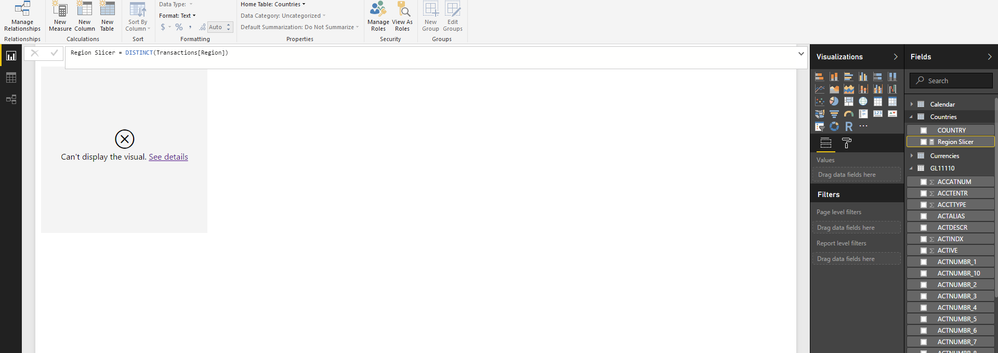
Region Slicer = DISTINCT(Transactions[Region]) Does Not work In the SAME table. Why do two same exact formulas have different results?
I do not want to creat yet a whole other table called Regions. Shouldnt I simply be able to add regions to the Country Table?
Solved! Go to Solution.
- Mark as New
- Bookmark
- Subscribe
- Mute
- Subscribe to RSS Feed
- Permalink
- Report Inappropriate Content
You could do it in Power Query with something like this:
let
    Source = Transactions,
    KeptOnlyCountryAndRegion = Table.SelectColumns(Source,{"Country", "Region"}),
    RemovedBlankCountries = Table.SelectRows(KeptOnlyCountryAndRegion, each [Country] <> ""),
    RemovedDuplicateCountryandRegions = Table.Distinct(RemovedBlankCountries)
in
    RemovedDuplicateCountryandRegions

- Mark as New
- Bookmark
- Subscribe
- Mute
- Subscribe to RSS Feed
- Permalink
- Report Inappropriate Content
- Mark as New
- Bookmark
- Subscribe
- Mute
- Subscribe to RSS Feed
- Permalink
- Report Inappropriate Content
Your "Country Formula" is a Table, and the "Region Formula" is a measure.
Try change your "Distinct Countries Table Formula" to this:
Countries = Distinct( SELECTCOLUMNS(Transactions;"Country Slicer";[Country];"Region Slicer";[Region]) )
- Mark as New
- Bookmark
- Subscribe
- Mute
- Subscribe to RSS Feed
- Permalink
- Report Inappropriate Content
Hello,
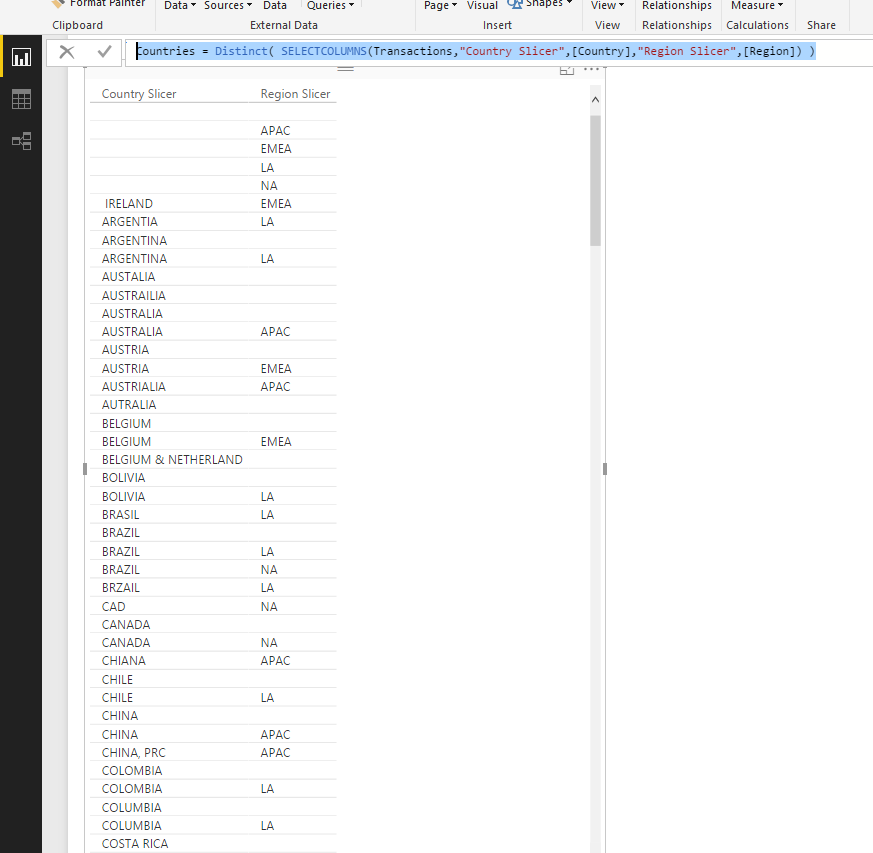
This worked as expected, But I am still getting a relation error due to there being Blanks in the data, Unfortunatly, I cant change the dataset and the dataset contains years of previous mispellings etc. The Current Data though is always correctly entered.
Is there a way to filter out Blank Countries as I need to relate tables based on countries? I am trying to Avoid creating a manual table that needs to be updated.
Countries = Distinct( SELECTCOLUMNS(Transactions,"Country Slicer",[Country],"Region Slicer",[Region]) )


- Mark as New
- Bookmark
- Subscribe
- Mute
- Subscribe to RSS Feed
- Permalink
- Report Inappropriate Content
Oops, yeah that's a measure not a column. I mixed up the icons in my head. Still, either way it's not a table.
Did I answer your question? Mark my post as a solution!
Proud to be a Super User!
- Mark as New
- Bookmark
- Subscribe
- Mute
- Subscribe to RSS Feed
- Permalink
- Report Inappropriate Content
It's because you're not creating a new table there. According to your screenshot, you're creating a new column in an existing table (Countries). That's a table formula, not a column formula.
Did I answer your question? Mark my post as a solution!
Proud to be a Super User!
- Mark as New
- Bookmark
- Subscribe
- Mute
- Subscribe to RSS Feed
- Permalink
- Report Inappropriate Content
Thanks, That does make sense now, I need to enter a Single formula to get Countries and Regions.
- Mark as New
- Bookmark
- Subscribe
- Mute
- Subscribe to RSS Feed
- Permalink
- Report Inappropriate Content
You could do it in Power Query with something like this:
let
    Source = Transactions,
    KeptOnlyCountryAndRegion = Table.SelectColumns(Source,{"Country", "Region"}),
    RemovedBlankCountries = Table.SelectRows(KeptOnlyCountryAndRegion, each [Country] <> ""),
    RemovedDuplicateCountryandRegions = Table.Distinct(RemovedBlankCountries)
in
    RemovedDuplicateCountryandRegions
Helpful resources

Power BI Dataviz World Championships
The Power BI Data Visualization World Championships is back! Get ahead of the game and start preparing now!

Power BI Monthly Update - December 2025
Check out the December 2025 Power BI Holiday Recap!

FabCon Atlanta 2026
Join us at FabCon Atlanta, March 16-20, for the ultimate Fabric, Power BI, AI and SQL community-led event. Save $200 with code FABCOMM.

| User | Count |
|---|---|
| 38 | |
| 38 | |
| 37 | |
| 28 | |
| 27 |


| User | Count |
|---|---|
| 124 | |
| 89 | |
| 73 | |
| 66 | |
| 65 |


