Join us at FabCon Atlanta from March 16 - 20, 2026, for the ultimate Fabric, Power BI, AI and SQL community-led event. Save $200 with code FABCOMM.
Register now!The Power BI Data Visualization World Championships is back! Get ahead of the game and start preparing now! Learn more
Hi to everyone,
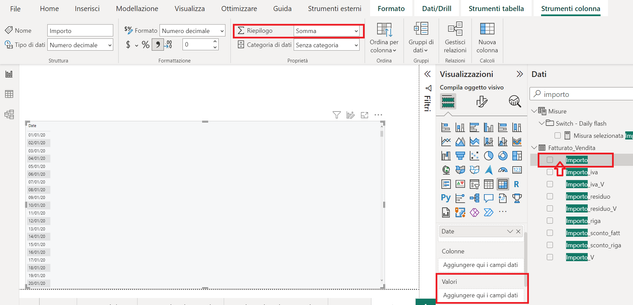
I've setting the column "Importo" as a decimal number and the default summarization as "Sum", but I can't put this column into the matrix's value section (it is valid only for the column and row section) and the sum symbol doesn't appeare at the sidebar
This appen with all columns of this data set.
Someone can help me to solved this problem?
Thanks a lot,
ER
I seem to have the same problem as you and @gvlado .
I have some of these columns in a linechart I created in the past. When I remove them, I'm unable to add them back. If i drag and drop them in the Y-axis box, they just won't stick.
However, if I create a measure =sum(Table[Column]), I can add it no problem.
Have the same poroblem ,and can't apply Quick measure ( Running total)
Manualy making measure (Runing total) is 0K
Interesting is that I see sum simbol in Model view but not in Report view side bar
Is it bug or I am doing something wrong - it makes me crazy!!!
Hard to tell without seeing an example of your data - possible that some of the data is in 'string' type and not a number type?
Not likely as the column data type is specifically "Decimal number". It's weird.
The Power BI Data Visualization World Championships is back! Get ahead of the game and start preparing now!
Check out the November 2025 Power BI update to learn about new features.
| User | Count |
|---|---|
| 59 | |
| 46 | |
| 42 | |
| 23 | |
| 17 |
| User | Count |
|---|---|
| 190 | |
| 122 | |
| 96 | |
| 66 | |
| 47 |