Join us at FabCon Vienna from September 15-18, 2025
The ultimate Fabric, Power BI, SQL, and AI community-led learning event. Save €200 with code FABCOMM.
Get registered- Power BI forums
- Get Help with Power BI
- Desktop
- Service
- Report Server
- Power Query
- Mobile Apps
- Developer
- DAX Commands and Tips
- Custom Visuals Development Discussion
- Health and Life Sciences
- Power BI Spanish forums
- Translated Spanish Desktop
- Training and Consulting
- Instructor Led Training
- Dashboard in a Day for Women, by Women
- Galleries
- Data Stories Gallery
- Themes Gallery
- Contests Gallery
- Quick Measures Gallery
- Notebook Gallery
- Translytical Task Flow Gallery
- TMDL Gallery
- R Script Showcase
- Webinars and Video Gallery
- Ideas
- Custom Visuals Ideas (read-only)
- Issues
- Issues
- Events
- Upcoming Events
Compete to become Power BI Data Viz World Champion! First round ends August 18th. Get started.
- Power BI forums
- Forums
- Get Help with Power BI
- Desktop
- Re: Why is column not summing in a table?
- Subscribe to RSS Feed
- Mark Topic as New
- Mark Topic as Read
- Float this Topic for Current User
- Bookmark
- Subscribe
- Printer Friendly Page


- Mark as New
- Bookmark
- Subscribe
- Mute
- Subscribe to RSS Feed
- Permalink
- Report Inappropriate Content
Why is column not summing in a table?


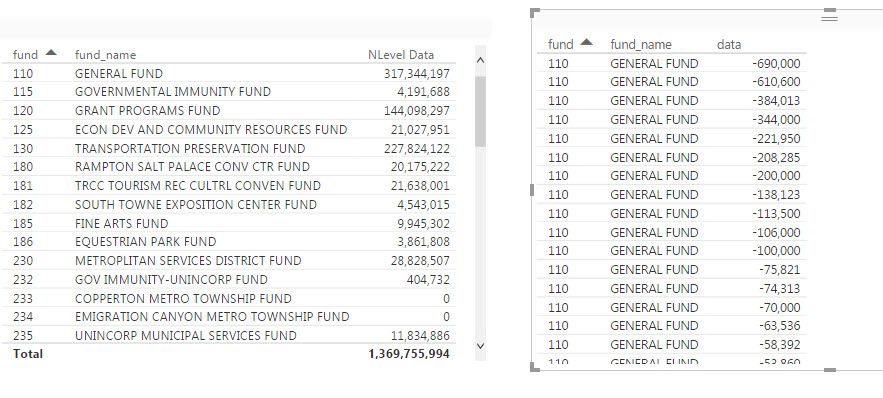
I have a column that is setup like in the image that is not summing. When I use it in a table it does not summarize by fund, and the table does not provide a total. The column seems properly set up to sum but Power BI appears to see it differently.
Below is side-by-side a table that is summing and totaling (on a different column) and one that is not. Yes I have checked that the column on the left has the same settings on the ribbon as the column on the right.

Solved! Go to Solution.


- Mark as New
- Bookmark
- Subscribe
- Mute
- Subscribe to RSS Feed
- Permalink
- Report Inappropriate Content
Check formats, If it is number stored as Text then it wont offer to Sum as Adding Text is unpossible. Make sure it is a number format.
The other thing I check first is to select the table and visualizations section make sure the values are not set to do not summarize when you click the down arrow beside them.
- Mark as New
- Bookmark
- Subscribe
- Mute
- Subscribe to RSS Feed
- Permalink
- Report Inappropriate Content
Thanks for the tip on uploading images. Here they are (the drag and drop was not working yesterday).
This is the column set up on the modeling ribbon. Below that are two tables that should be giving the same summarized result. The one on the left uses a column that is derived from the column on the right. I ought to be able to have the column on the right summarize like the column on the left.

- Mark as New
- Bookmark
- Subscribe
- Mute
- Subscribe to RSS Feed
- Permalink
- Report Inappropriate Content
Check formats, If it is number stored as Text then it wont offer to Sum as Adding Text is unpossible. Make sure it is a number format.
The other thing I check first is to select the table and visualizations section make sure the values are not set to do not summarize when you click the down arrow beside them.
- Mark as New
- Bookmark
- Subscribe
- Mute
- Subscribe to RSS Feed
- Permalink
- Report Inappropriate Content
Thanks DSimma. It was the table visualization choosing a different summarization than is the default on the column.
Before I mark that as the solution, does anyone have an explanation why two columns that appear to have exactly the same properties on the Modeling ribbon pick up a different default when used in a table?
- Mark as New
- Bookmark
- Subscribe
- Mute
- Subscribe to RSS Feed
- Permalink
- Report Inappropriate Content
My screen shots do not appear to be showing. Maybe someone can share the magic trick for making those work as well.


- Mark as New
- Bookmark
- Subscribe
- Mute
- Subscribe to RSS Feed
- Permalink
- Report Inappropriate Content
@uBoatCaptain Make sure that when you click the "Photos" button ( I assume you are grabbing a snippet of the table or something that creates an image), select the image, and wait until the image loads in the preview pane... kinda weird upper right corner. THEN, click ok, if you do it prematurely the image won't load.
As to the sum.. without the image it's hard to tell, but is the data type correct on the column?
Looking for more Power BI tips, tricks & tools? Check out PowerBI.tips the site I co-own with Mike Carlo. Also, if you are near SE WI? Join our PUG Milwaukee Brew City PUG
- Mark as New
- Bookmark
- Subscribe
- Mute
- Subscribe to RSS Feed
- Permalink
- Report Inappropriate Content
My screenshots do not appear to be showing. Maybe someone can share the magic trick for making those work as well.

Helpful resources

Power BI Monthly Update - August 2025
Check out the August 2025 Power BI update to learn about new features.

Fabric Community Update - August 2025
Find out what's new and trending in the Fabric community.


| User | Count |
|---|---|
| 83 | |
| 70 | |
| 66 | |
| 64 | |
| 43 |


