Don't miss your chance to take exam DP-600 or DP-700 on us!
Request nowLearn from the best! Meet the four finalists headed to the FINALS of the Power BI Dataviz World Championships! Register now
HI All
One week ago I post a question related matrix table return wrong GP%. See below post.
Remark :-
I have provide sample PBI file
2. I also have share my expected result using excel table.
hope some one can advise me
Paul
Hi @admin11 ,
I think you can try to get correct subtotal by SUMX() based on [_YTD_GPM] measure.
Measure 7 = SUMX(VALUES('DATE'[YrMth Sort]),[_YTD_GPM])PnL CY = SWITCH(SELECTEDVALUE('_PnL_Var'[PnL_Var]),
"1_REV", [_YTD_REV_N],
"2_COGS",[_YTD_COGS1],
"3_OTH", [_YTD_OTH_IN],
"4_EXP", [_YTD_EXP2],
"5_NET_P",[_YTD_NP_],
"6_GPM",[Measure 7],
"7_NPM",[_YTD_NPM]
)
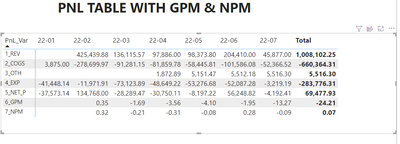
Result is as below.
Best Regards,
Rico Zhou
If this post helps, then please consider Accept it as the solution to help the other members find it more quickly.
@Anonymous
Thank you very much for your response.
i Have found out the issue :-
Share feedback directly with Fabric product managers, participate in targeted research studies and influence the Fabric roadmap.
Check out the February 2026 Power BI update to learn about new features.
| User | Count |
|---|---|
| 50 | |
| 40 | |
| 37 | |
| 14 | |
| 14 |
| User | Count |
|---|---|
| 85 | |
| 69 | |
| 38 | |
| 29 | |
| 27 |