cancel
Showing results for 
Search instead for 
Did you mean: 

Get Fabric Certified for FREE during Fabric Data Days. Don't miss your chance! Request now

Reply
wpf_
Post Prodigy
Post Prodigy

Why If, else statemet is showing both results?

I have a table of employees requests to take off.  And for the formula below it should filter by John Smith.  


wpf__0-1625758872284.png


Assuming the calculation is for 8/4/2021.  So for 8/4/2021, If John Smith has a blank() enddate, then just return the row that contains the blank enddate, else return the rows that has startdate that is less then or equal to 8/4/2021, and an enddate that is greater then or equal to 8/4/2021.  Here is the formula:


EVALUATE

FILTER(
    SUMMARIZE(
        Table1,
        Table1[RequestNum],
        Table1[StartDate],
        Table1[EndDate],
        Table1[Employee],      
    ),
    Table1[Employee] = "John Smith"  &&
    IF (
            BLANK ()
                IN CALCULATETABLE (   
            
                    DISTINCT (Table1[EndDate]),          
                    ALLEXCEPT (Table1[Employee]),
                    Table1[EndDate] = BLANK()
                ),
            IF(
                AND (
                DATEVALUE(Table1[StartDate]) <= DATEVALUE("8/4/2021")
                DATEVALUE(Table1[EndDate]) = BLANK()
                 ),
                
                DATEVALUE(Table1[EndDate]) = BLANK()     //Execute if True
                ,
                AND (                                                             //Execute if False
                DATEVALUE(Table1[StartDate]) <= DATEVALUE("8/4/2021")
                DATEVALUE(Table1[EndDate]) >= DATEVALUE("8/4/2021")
                )
            ),
  
            AND (
            DATEVALUE(Table1[StartDate]) <= DATEVALUE("8/4/2021")
            DATEVALUE(Table1[EndDate]) >= DATEVALUE("8/4/2021")
            )
        )
)


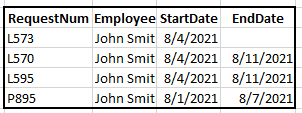
However, it returns L573 which is what should have been the only row to return, but it also returns L570, L1595 and P895.

If I take out the Execute if False part of the statement, it returns L573.  And if I take out the Execute if True part of the statement and leaving just the False part, it returns blank.  So I am not sure why when i leave everything as it is, it returns multiple rows as if it executes the true and false values. 


returned rows:
wpf__1-1625759802610.png


1 ACCEPTED SOLUTION
Anonymous
Not applicable

Hi @wpf_ ,


Please modify the formula as below.

Table 2 =
FILTER (
    SUMMARIZE (
        Table1,
        Table1[RequestNum],
        Table1[StartDate],
        Table1[EndDate],
        Table1[Employee]
    ),
    Table1[Employee] = "John Smith"
        && IF (
            BLANK ()
                IN CALCULATETABLE (
                    DISTINCT ( Table1[EndDate] ),
                    ALLEXCEPT ( Table1, Table1[employee] )
                ),
            Table1[EndDate] = BLANK (),
            Table1[startdate] <= DATEVALUE ( "8/4/2021" )
                && Table1[enddate] >= DATEVALUE ( "8/4/2021" )
        )
)


Best Regards,

Jay

View solution in original post

3 REPLIES 3
Anonymous
Not applicable

Hi @wpf_ ,


Please modify the formula as below.

Table 2 =
FILTER (
    SUMMARIZE (
        Table1,
        Table1[RequestNum],
        Table1[StartDate],
        Table1[EndDate],
        Table1[Employee]
    ),
    Table1[Employee] = "John Smith"
        && IF (
            BLANK ()
                IN CALCULATETABLE (
                    DISTINCT ( Table1[EndDate] ),
                    ALLEXCEPT ( Table1, Table1[employee] )
                ),
            Table1[EndDate] = BLANK (),
            Table1[startdate] <= DATEVALUE ( "8/4/2021" )
                && Table1[enddate] >= DATEVALUE ( "8/4/2021" )
        )
)


Best Regards,

Jay

amitchandak
Super User
Super User

@wpf_ , I think a measure like this should help with columns


New meausre =
var _min = DATEVALUE("8/4/2021")
return
calculate( count(Table1[Employee]), filter(Table1, Table1[StartDate] <= _min && (Table1[Enddate] >=Min || isblank(Table1[EndDate]))))

Share with Power BI Enthusiasts: Full Power BI Video (20 Hours) YouTube
Microsoft Fabric Series 60+ Videos YouTube
Microsoft Fabric Hindi End to End YouTube

@amitchandak Why would the count help me in this situation?

Helpful resources

Announcements
November Power BI Update Carousel

Power BI Monthly Update - November 2025

Check out the November 2025 Power BI update to learn about new features.

Fabric Data Days Carousel

Fabric Data Days

Advance your Data & AI career with 50 days of live learning, contests, hands-on challenges, study groups & certifications and more!

FabCon Atlanta 2026 carousel

FabCon Atlanta 2026

Join us at FabCon Atlanta, March 16-20, for the ultimate Fabric, Power BI, AI and SQL community-led event. Save $200 with code FABCOMM.

Top Solution Authors
Top Kudoed Authors