Join us at FabCon Atlanta from March 16 - 20, 2026, for the ultimate Fabric, Power BI, AI and SQL community-led event. Save $200 with code FABCOMM.
Register now!The Power BI Data Visualization World Championships is back! It's time to submit your entry. Live now!
Hi ,
I need help regarding Power BI refresh for reports in Power BI desktop.
I prepared all the reports based on SQL server tables and connected using import mode in Power BI desktop ,But while refreshing report in Power BI desktop taking time 15-20 minutes on local server as well as connecting deveopemnt server as well.
As per the below link i have update settings in report :
https://community.powerbi.com/t5/Desktop/Power-BI-Desktop-Refresh-Slow/m-p/22356#M7008
Current File->Data Load->Auto Date/Time and unchecked that option from settings. still reports taking to much time for 10 to 20 rows in reports only. some one can help how to improve performance for those reports in while using import mode.
Hi @Anonymous,
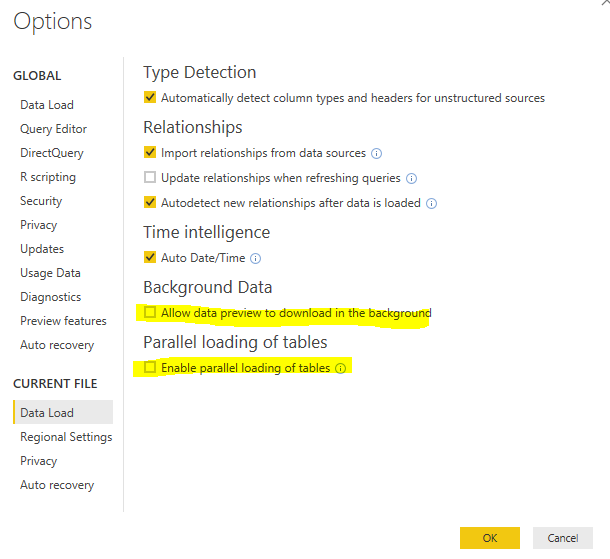
Could you please try unchecking the options highlighted in below screenshot?
By the way, does this issue persist when you refresh dataset in other .pbix files which connect to different data source?
Best regards,
Yuliana Gu
Hi ,
Thanks for your reply @v-yulgu-msft
Yes taking too much time after unchecked above option you suggsted.
The Power BI Data Visualization World Championships is back! It's time to submit your entry.
| User | Count |
|---|---|
| 50 | |
| 43 | |
| 36 | |
| 32 | |
| 29 |
| User | Count |
|---|---|
| 129 | |
| 129 | |
| 59 | |
| 48 | |
| 47 |