cancel
Showing results for 
Search instead for 
Did you mean: 

The Power BI Data Visualization World Championships is back! Get ahead of the game and start preparing now! Learn more

Reply
Makka
New Member

When connecting to SharePoint online list AssignedToID showing List

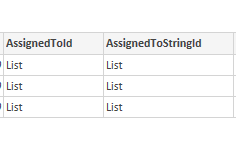
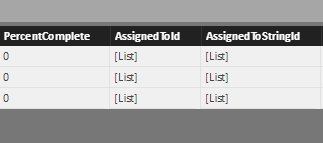
I'm trying to display a sharepoint task list in powerbi, I require showing which user is assigned. In the AssignedToId i was expecting to see the id of the user the tasks are assined to, which I would then match up using "UserInformationList".


Instead all I am getting is "List" as the value in every row (see screanshot)? I'm not sure if i've missed something here.


Thanks for any help in advanceassignedto list.PNGassignedto list2.PNG

1 ACCEPTED SOLUTION
Makka
New Member

I've figured it out 🙂 never realised you could juist "expand" the values. 

View solution in original post

1 REPLY 1
Makka
New Member

I've figured it out 🙂 never realised you could juist "expand" the values. 

Helpful resources

Announcements
Power BI DataViz World Championships

Power BI Dataviz World Championships

The Power BI Data Visualization World Championships is back! Get ahead of the game and start preparing now!

November Power BI Update Carousel

Power BI Monthly Update - November 2025

Check out the November 2025 Power BI update to learn about new features.

FabCon Atlanta 2026 carousel

FabCon Atlanta 2026

Join us at FabCon Atlanta, March 16-20, for the ultimate Fabric, Power BI, AI and SQL community-led event. Save $200 with code FABCOMM.