Don't miss your chance to take the Fabric Data Engineer (DP-700) exam on us!
Learn moreWe've captured the moments from FabCon & SQLCon that everyone is talking about, and we are bringing them to the community, live and on-demand. Starts on April 14th. Register now
Hello!
I have 17 regions in the Region column and I need to create a table with dynamic names. For slicer I have activated "Multiple Choice with CTRL", it means that If nothing is selected, the values will be shown for all regions. Here comes my question: How can I write in DAX, if nothing selected my table name is: Entire country, otherwise region names from the slicer.
so far I tried:
@Anonymous Do you want to Dynamically change the Heading as per the selection from slicer? If Yes,then you can try below dax:_
In my slicer options are selected with CTRL, if there is no selection it shows "ALL". with your dax equation the result empty if i do not select region, but if I select it works. So I want, if slicer shows me "ALL" I want to see "Entire country" name on my table, otherwise selected region names.
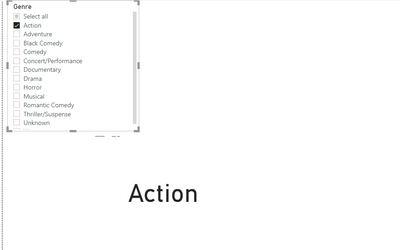
@Anonymous I have implemented same scenario, I have used Genre related dataset.
for me it is working...can you share your .pbix file?
for me is not
Hi @Anonymous ,
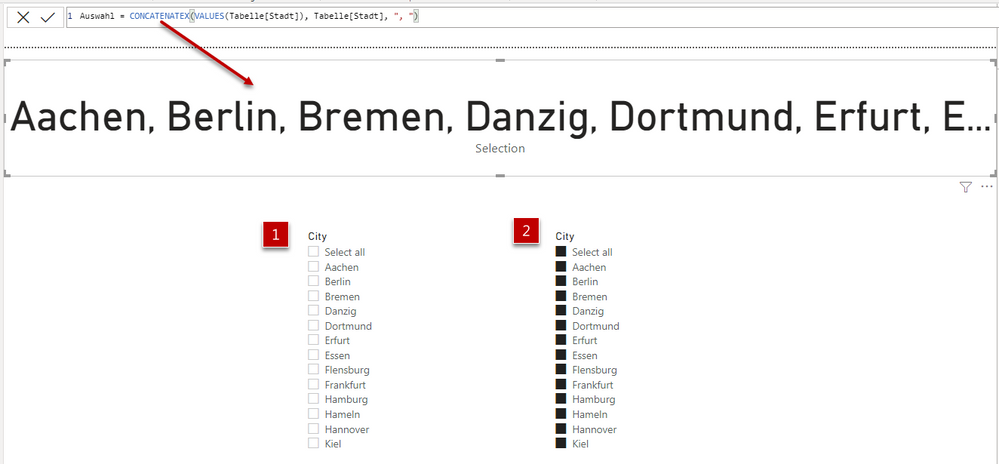
with a slicer, something is always selected! For the selection "Select all" there are two settings in the slicer (see figure). Combinations of the slicer selection can be executed with the CTRL key. If you want to get the selected values use the above measure CONCATENATEX(...).
With kind regards from the town where the legend of the 'Pied Piper of Hamelin' is at home
FrankAT (Proud to be a Datanaut)
Thanks for your reply. I got your idea, but I do not need all these city names, I want to have only one name. For example for your data: Germany.
If you have recently started exploring Fabric, we'd love to hear how it's going. Your feedback can help with product improvements.
A new Power BI DataViz World Championship is coming this June! Don't miss out on submitting your entry.
Share feedback directly with Fabric product managers, participate in targeted research studies and influence the Fabric roadmap.
| User | Count |
|---|---|
| 52 | |
| 38 | |
| 37 | |
| 19 | |
| 17 |
| User | Count |
|---|---|
| 69 | |
| 65 | |
| 39 | |
| 33 | |
| 23 |