cancel
Showing results for 
Search instead for 
Did you mean: 

The Power BI Data Visualization World Championships is back! Get ahead of the game and start preparing now! Learn more

Reply
Anonymous
Not applicable

What if parameter to display min and max

Is there a way to get a parameter control to show the minimum value and the maximum value?  For example, if I have a slicer that shows values from 0-100, I would be able to slide the slicer both ways to show values between 50-60.

1 ACCEPTED SOLUTION
v-frfei-msft
Community Support
Community Support

Hi @Anonymous,


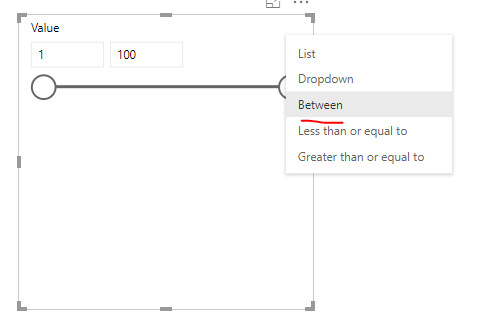
To change the slicer like this. If that doesn't meet your requirement, kindly share your sample data and excepted result to me.


2.PNG


Regards,

Frank

Community Support Team _ Frank
If this post helps, then please consider Accept it as the solution to help the others find it more quickly.

View solution in original post

4 REPLIES 4
v-frfei-msft
Community Support
Community Support

Hi @Anonymous,


To change the slicer like this. If that doesn't meet your requirement, kindly share your sample data and excepted result to me.


2.PNG


Regards,

Frank

Community Support Team _ Frank
If this post helps, then please consider Accept it as the solution to help the others find it more quickly.

Hi @Anonymous,


Does that make sense? If so, kindly mark my answer as a solution to close the case.


Regards,
Frank

Community Support Team _ Frank
If this post helps, then please consider Accept it as the solution to help the others find it more quickly.
Anonymous
Not applicable

@v-frfei-msft

It is not really a solution to my problem, but I marked it correct as it may help someone with a similar problem.  I realized after the fact that I don' t think this will work for what I am trying to do.  In order to create a parameter for an aggregated value, someone else taught me this formula:


# LOADS for DESTINATIONS Above Selected LOADS Parameter = 
VAR LOADParam = [MIN LOAD VALUE]
RETURN
CALCULATE(
    [# LOADS],
    FILTER(
        VALUES(QA[DESTINATION]),
        [# LOADS] >= LOADParam
    )
)

Since this formula is specifically calculating MIN LOAD VALUE, I don't think I can have a max value on my parameter.  I think I would have to create a separate formula for MAX LOAD VALUE and then a separate parameter.  

 
CR
Resolver II
Resolver II

Hi @Anonymous


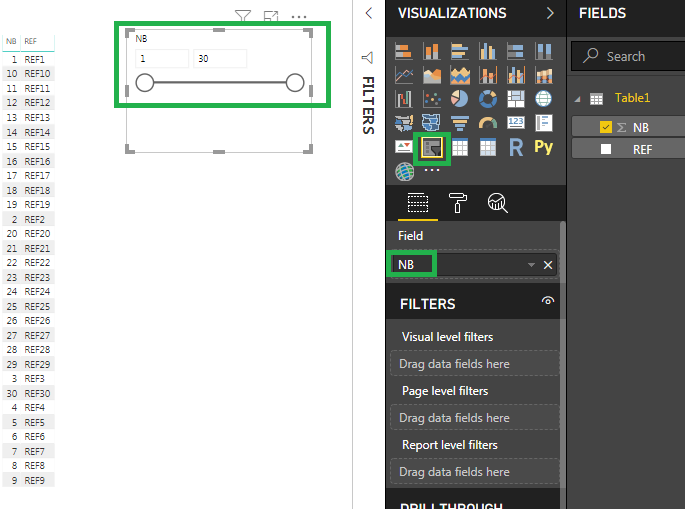
I propose you to add a slicer with the column containing the values 0 to 100 (0to 30 in my sample). Then you will be able to play with the slider to display50-60, etc.


1.png

Is it what you need ?


Regards,

CR


Helpful resources

Announcements
November Power BI Update Carousel

Power BI Monthly Update - November 2025

Check out the November 2025 Power BI update to learn about new features.

Fabric Data Days Carousel

Fabric Data Days

Advance your Data & AI career with 50 days of live learning, contests, hands-on challenges, study groups & certifications and more!

FabCon Atlanta 2026 carousel

FabCon Atlanta 2026

Join us at FabCon Atlanta, March 16-20, for the ultimate Fabric, Power BI, AI and SQL community-led event. Save $200 with code FABCOMM.

Top Solution Authors
Top Kudoed Authors