Don't miss your chance to take the Fabric Data Engineer (DP-600) exam for FREE! Find out how by watching the DP-600 session on-demand now through April 28th.
Learn moreJoin the FabCon + SQLCon recap series. Up next: Power BI, Real-Time Intelligence, IQ and AI, and Data Factory take center stage. All sessions are available on-demand after the live show. Register now
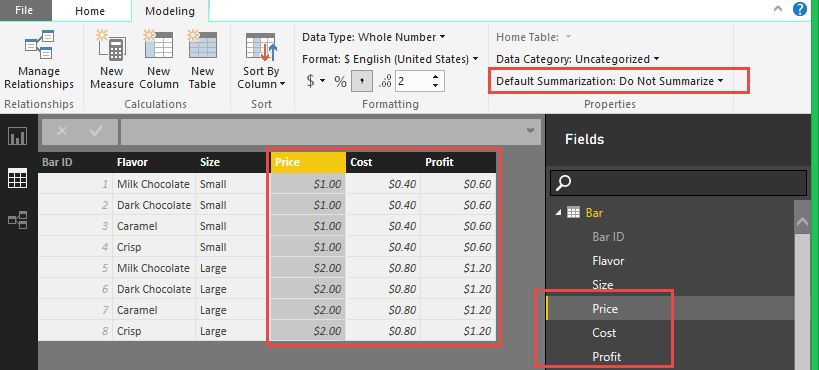
I have a table with three numeric fields. They are Price, Cost, and Profit in the figure below.
All three defaulted to Do Not Summarize in the Data view. Thus, they do not appear as an Aggregate field in Report View. What causes Desktop to make this determination? Since this is essentially a Dimension table for this model, I am pretty happy abou this decision. I just want to understand what drove Desktop to make this choice.
Solved! Go to Solution.
Interesting. Just to keep the conversation alive, I observe the following.
Load the text file - I see that price and cost default to "Sum"
Add another (fact) table and a relationship is automatically determined between the 2 tables (BarID)
The aggregates of Price and Cost automatically changed to "Do Not Summarize"
So, based on my testing I would say that initial loads of all data default to an aggregate, unless a relationship is detected/applied that will drive a 1 to many relationship, and thus change the default behavoir based on a fact/dimension relationship...
It would be good to hear an official answer, but that is what I'm seeing.
I'd be interested in what you pulled the data in from. I just tested all the ways I can think of from excel and it imported the whole number and currency formatted values in and automatically set them to default them to "Sum". My initial guess is that there is some formatting that is being done in your source that Power BI recognizes/doesn't recognize...
The sources is a simple text file.
"BarID","Flavor","Size","Price","Cost"
1,"Milk Chocolate","Small","1","0.4"
2,"Dark Chocolate","Small","1","0.4"
3,"Caramel","Small","1","0.4"
4,"Crisp","Small","1","0.4"
5,"Milk Chocolate","Large","2","0.8"
6,"Dark Chocolate","Large","2","0.8"
7,"Caramel","Large","2","0.8"
8,"Crisp","Large","2","0.8"
Interesting. Just to keep the conversation alive, I observe the following.
Load the text file - I see that price and cost default to "Sum"
Add another (fact) table and a relationship is automatically determined between the 2 tables (BarID)
The aggregates of Price and Cost automatically changed to "Do Not Summarize"
So, based on my testing I would say that initial loads of all data default to an aggregate, unless a relationship is detected/applied that will drive a 1 to many relationship, and thus change the default behavoir based on a fact/dimension relationship...
It would be good to hear an official answer, but that is what I'm seeing.
Seem like a decent theory. Here is my query for my Bar table, in case you want to play.
let
Source = Csv.Document(File.Contents("C:\Users\Mark\OneDrive\Presentations\ClickClickWOW\Chocolate Sales\Bar.txt"),[Delimiter=",",Encoding=1252]),
#"Promoted Headers" = Table.PromoteHeaders(Source),
#"Changed Type" = Table.TransformColumnTypes(#"Promoted Headers",{{"BarID", Int64.Type}, {"Flavor", type text}, {"Size", type text}, {"Price", Int64.Type}, {"Cost", type number}}),
#"Renamed Columns" = Table.RenameColumns(#"Changed Type",{{"BarID", "Bar ID"}}),
#"Added Custom" = Table.AddColumn(#"Renamed Columns", "Profit", each [Price]-[Cost]),
#"Changed Type1" = Table.TransformColumnTypes(#"Added Custom",{{"Profit", type number}})
in
#"Changed Type1"
Check out the April 2026 Power BI update to learn about new features.
If you have recently started exploring Fabric, we'd love to hear how it's going. Your feedback can help with product improvements.
A new Power BI DataViz World Championship is coming this June! Don't miss out on submitting your entry.
| User | Count |
|---|---|
| 43 | |
| 35 | |
| 35 | |
| 21 | |
| 15 |
| User | Count |
|---|---|
| 65 | |
| 58 | |
| 28 | |
| 27 | |
| 25 |