Join us at FabCon Atlanta from March 16 - 20, 2026, for the ultimate Fabric, Power BI, AI and SQL community-led event. Save $200 with code FABCOMM.
Register now!The Power BI Data Visualization World Championships is back! Get ahead of the game and start preparing now! Learn more
Hi,
i created a what-if-parameter as per the below formula:
Param 2013 = GENERATESERIES(0, 500, 0.01)i need to be able to enter any value between 0 and 500 with 2 decimals.
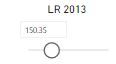
however when i enter any value in the slicer it is automatically changed to another value.
for example i enter 150.23 the value is changed to 150.35.
I did some research many said that it is due to the large number of records but no one mentioned any solution for it.
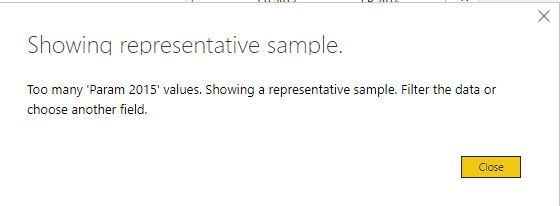
also i notice that there is in information icon on the slicer when i click it i get the below notification:
Appreciate your urgent assistance.
Best regards,
Georges Sabbagh
Hi @gorgo
You could check the Issues forum here:
https://community.powerbi.com/t5/Issues/idb-p/Issues
And if it is not there, then you could post it.
If you have Pro account you could try to open a support ticket. If you have a Pro account it is free. Go to https://support.powerbi.com . Scroll down and click "CREATE SUPPORT TICKET".
@gorgo there is also issue on this on issues forum please vote it so that it gets
I would ❤ Kudos if my solution helped. 👉 If you can spend time posting the question, you can also make efforts to give Kudos whoever helped to solve your problem. It is a token of appreciation!
⚡Visit us at https://perytus.com, your one-stop shop for Power BI related projects/training/consultancy.⚡
fixed.
Subscribe to the @PowerBIHowTo YT channel for an upcoming video on List and Record functions in Power Query!!
Learn Power BI and Fabric - subscribe to our YT channel - Click here: @PowerBIHowTo
If my solution proved useful, I'd be delighted to receive Kudos. When you put effort into asking a question, it's equally thoughtful to acknowledge and give Kudos to the individual who helped you solve the problem. It's a small gesture that shows appreciation and encouragement! ❤
Did I answer your question? Mark my post as a solution. Proud to be a Super User! Appreciate your Kudos 🙂
Feel free to email me with any of your BI needs.
The Power BI Data Visualization World Championships is back! Get ahead of the game and start preparing now!
| User | Count |
|---|---|
| 41 | |
| 39 | |
| 37 | |
| 29 | |
| 24 |
| User | Count |
|---|---|
| 119 | |
| 100 | |
| 72 | |
| 69 | |
| 65 |