cancel
Showing results for 
Search instead for 
Did you mean: 

Learn from the best! Meet the four finalists headed to the FINALS of the Power BI Dataviz World Championships! Register now

Reply
cosmicyes
Helper II
Helper II

What-If Parameter: show different names for parameters to users?

If this is a stupid question just tell me 😉


I want to implement a What-if-Parameter with two values: 0 and 1.
If the user sets the slicer to 0 a measure is multiplied by 0.
If the user sets the sliver to 1 the measure is multiplied by 1 and the complete value is shown.


Now the question:

Is there any possibility to show the user 0 as "No" and 1 as "Yes"?
I want it to be just an optical tweak.

1 ACCEPTED SOLUTION
Idrissshatila
Super User
Super User

Hello,


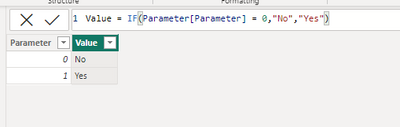
You could add a calculated column in the parameter table and insert this dax :

Value = IF(Parameter[Parameter] = 0,"No","Yes")
 

Idrissshatila_0-1671525200354.png


If I answered your question, please mark my post as solution, Appreciate your Kudos!

 Follow me on Linkedin 


Did I answer your question? Mark my post as a solution! Appreciate your Kudos
Follow me on LinkedIn linkedIn
Vote for my Community Mobile App Idea

Proud to be a Super User!


View solution in original post

2 REPLIES 2
Idrissshatila
Super User
Super User

Hello,


You could add a calculated column in the parameter table and insert this dax :

Value = IF(Parameter[Parameter] = 0,"No","Yes")
 

Idrissshatila_0-1671525200354.png


If I answered your question, please mark my post as solution, Appreciate your Kudos!

 Follow me on Linkedin 


Did I answer your question? Mark my post as a solution! Appreciate your Kudos
Follow me on LinkedIn linkedIn
Vote for my Community Mobile App Idea

Proud to be a Super User!


Thank you @Idrissshatila 
Great Idea!

Helpful resources

Announcements
Join our Fabric User Panel

Join our Fabric User Panel

Share feedback directly with Fabric product managers, participate in targeted research studies and influence the Fabric roadmap.

February Power BI Update Carousel

Power BI Monthly Update - February 2026

Check out the February 2026 Power BI update to learn about new features.