cancel
Showing results for 
Search instead for 
Did you mean: 

Get Fabric Certified for FREE during Fabric Data Days. Don't miss your chance! Request now

Reply
rovercon
New Member

Weighted average comparison

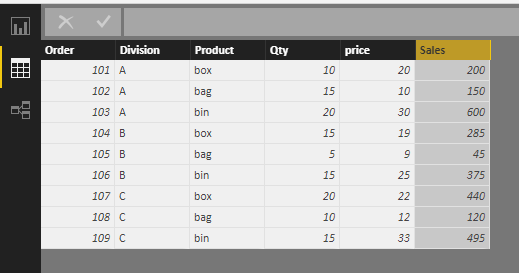
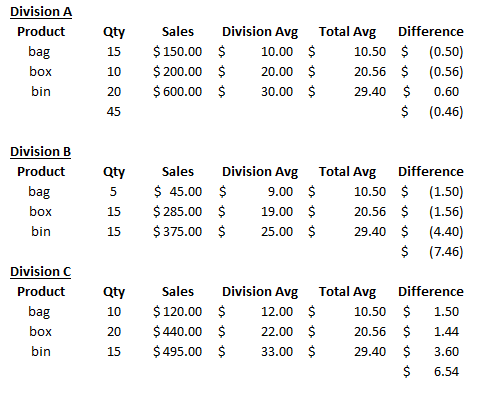
Have a table of item sales by division.    Each division is selling the same items at somewhat different pricing.   Would like to show how much division sales are above/below the Total Avg.    No trouble getting this into Power BI, or getting the Total Avg column.    I can summarize all the data I'm after in visualizations, but am having trouble creating the Division product average that can then be used in further calculations....like the Difference field.    New to Power BI, Many Thanks.


Please see below for what I'm using to the the 'Total Avg' measure.    The table at bottom is an idea of what I'm after.


Total Avg = SUM(Sheet1[Sales]) / SUM(Sheet1[Qty]).    


BI table.PNGBI test.PNG


1 ACCEPTED SOLUTION

Oh so nothing calculated yet, gotcha. You will need a couple of measures:


Total Qty = SUM(Table1[Qty])

Average price = SUMX(Table1,Table1[Qty]*Table1[Price])/[Total Qty]

Average for company = CALCULATE([Average price],ALL(Table1[Division]),VALUES(Table1[Product]))

Difference = IF(HASONEVALUE(Table1[Division]),[Average for company]-[Average price],blank())


the HASONEVALUE bit is not completely necessary but its the bit behind the blanks at the total line on the matrix i have shown.


2018-05-24_11-04-48.png


// if this is a solution please mark as such

// if this is a solution please mark as such. Kudos always appreciated.

View solution in original post

4 REPLIES 4
samdthompson
Memorable Member
Memorable Member

Something along the lines of:


COMPANY AVERAGE = CALCULATE( [DIVISION AVERAGE] , ALL(SHEET1[DIVISION NAME]) , VALUES(SHEET1[PRODUCT]) )


// If this is a solution please mark as such

// if this is a solution please mark as such. Kudos always appreciated.

Thanks!   I'm working with the table at top and trying to replicate something similar to what is at bottom.   I'm working to create the Division Avg field, this isn't currently part of table in BI.    

Oh so nothing calculated yet, gotcha. You will need a couple of measures:


Total Qty = SUM(Table1[Qty])

Average price = SUMX(Table1,Table1[Qty]*Table1[Price])/[Total Qty]

Average for company = CALCULATE([Average price],ALL(Table1[Division]),VALUES(Table1[Product]))

Difference = IF(HASONEVALUE(Table1[Division]),[Average for company]-[Average price],blank())


the HASONEVALUE bit is not completely necessary but its the bit behind the blanks at the total line on the matrix i have shown.


2018-05-24_11-04-48.png


// if this is a solution please mark as such

// if this is a solution please mark as such. Kudos always appreciated.

Thanks!   This is what I'm after.   Your help is much appreciated.   


Regards-  rovercon

Helpful resources

Announcements
November Power BI Update Carousel

Power BI Monthly Update - November 2025

Check out the November 2025 Power BI update to learn about new features.

Fabric Data Days Carousel

Fabric Data Days

Advance your Data & AI career with 50 days of live learning, contests, hands-on challenges, study groups & certifications and more!

FabCon Atlanta 2026 carousel

FabCon Atlanta 2026

Join us at FabCon Atlanta, March 16-20, for the ultimate Fabric, Power BI, AI and SQL community-led event. Save $200 with code FABCOMM.

Top Solution Authors
Top Kudoed Authors