Learn from the best! Meet the four finalists headed to the FINALS of the Power BI Dataviz World Championships! Register now
Dear Community,
I want to calculate a simple weighted value.
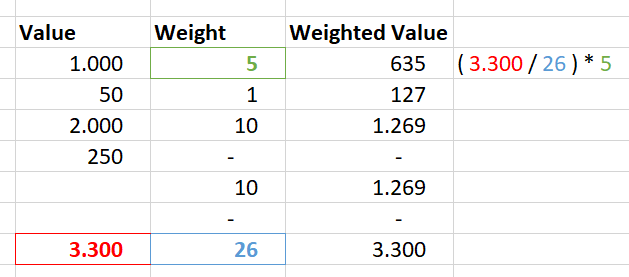
The total and filter resistant sum a value should be divided by the total and filter resistant sum of weight. Next this number should be multiplied with the target variable by row.
See the Image:
Solved! Go to Solution.
Hi @raymond
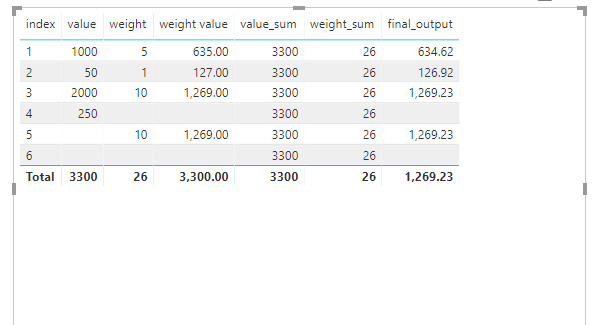
Create a measure
final_output =
DIVIDE (
CALCULATE ( SUM ( Sheet2[value] ), ALL ( Sheet2 ) ),
CALCULATE ( SUM ( Sheet2[weight] ), ALL ( Sheet2 ) )
)
* MAX ( [weight] )
Best Regards
Maggie
Hi @raymond
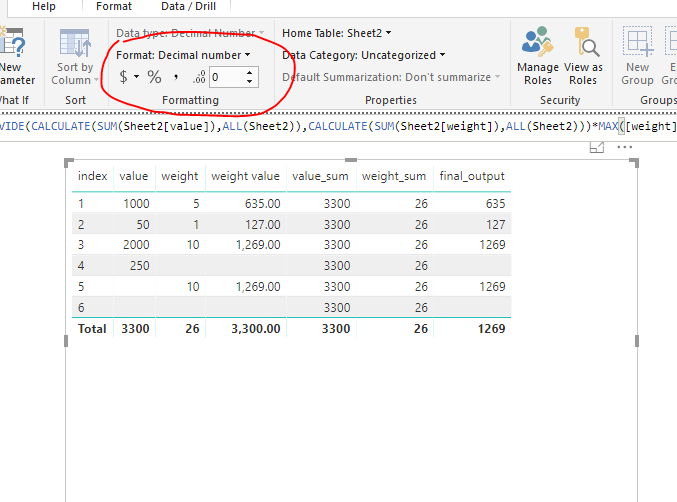
I didn't realize the column "weight value" is what you want until now.
to get the same value as "weight value" , you could set the date format of "final_output" as below.
Best Regards
Maggie
Hi @raymond
Create a measure
final_output =
DIVIDE (
CALCULATE ( SUM ( Sheet2[value] ), ALL ( Sheet2 ) ),
CALCULATE ( SUM ( Sheet2[weight] ), ALL ( Sheet2 ) )
)
* MAX ( [weight] )
Best Regards
Maggie
@v-juanli-msft Thanks for getting back to me.
One question. What is the difference between the column "weight value" and "final_output"? If there is a calculation for the first, could you share that as well?
Hi @raymond
I didn't realize the column "weight value" is what you want until now.
to get the same value as "weight value" , you could set the date format of "final_output" as below.
Best Regards
Maggie
| User | Count |
|---|---|
| 54 | |
| 37 | |
| 26 | |
| 16 | |
| 16 |
| User | Count |
|---|---|
| 69 | |
| 57 | |
| 38 | |
| 21 | |
| 21 |