Don't miss your chance to take the Fabric Data Engineer (DP-700) exam on us!
Learn moreNext up in the FabCon + SQLCon recap series: The roadmap for Microsoft SQL and Maximizing Developer experiences in Fabric. All sessions are available on-demand after the live show. Register now
Dear all,
I need help.
I have a simple data model and have to calculate weighted distribution for products in stores per category.
WSD Calculation is very simple – I should sum StoreShare values only for stores Product has been sold at least ones.
Measure formulas I am using:
SV = CALCULATE(SUM(Sales[SalesVolume])+0) TotalStore = CALCULATE(SUM(Sales[SalesVolume]); ALLEXCEPT(Sales; Sales[Store])) TotalCategory = CALCULATE(SUM(Sales[SalesVolume]); ALLEXCEPT(Sales;Sales[Product]); ALL(Sales)) StoreShare = DIVIDE([TotalStore];[TotalCategory]) WSD = IF(ISBLANK([SV]); 0; [StoreShare])
All calculations goes well exept the most important one.
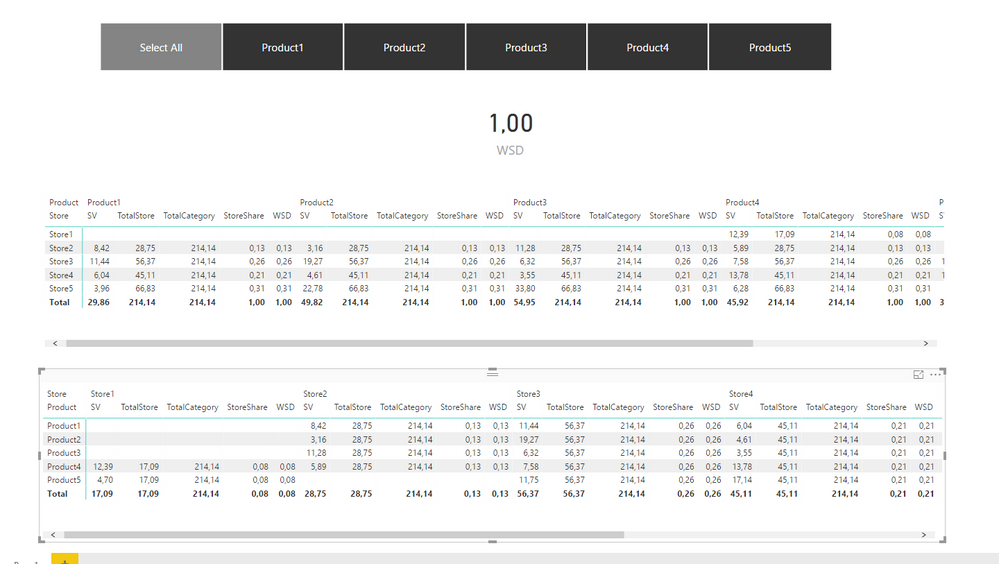
On my dashboard you can see what only Product4 should have 100% distribution, but I got 100% for every item.
Could you please help?
Thank you very much in advance
Solved! Go to Solution.
Hi @iRuso
Try this MEASURE for the CARD VISUAL
WSD =
CALCULATE (
[Store Share],
SUMMARIZE ( Sheet2, Sheet2[Store], "Share", [Store Share] )
)
Hi,
Your question is not clear. Share a dataset, explain the business question and show the expected result.
Hello,
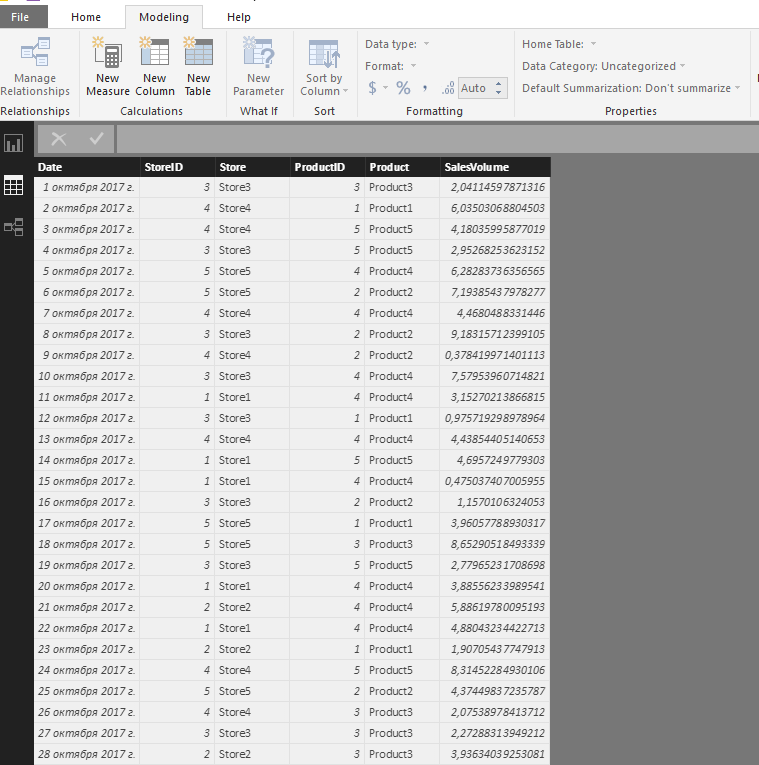
This is link to my dataset and template
https://drive.google.com/file/d/1uy1fpaoC3eJkCeeGZSWT2QXeZmCzEpql/view?usp=sharing
Bussines case:
Weighted distribution for Retail.
We have 5 different products on sales in Retail Chain.
Total category sales calculation is very simple - CALCULATE(SUM([SalesVolume]); ALL())
Total Sales per Store also is easy - CALCULATE(SUM([SalesVolume]); ALLEXECPT(Table;Table[Store]))
The percent share of each store is calculated as Total Store Sales / Total Category Sales.
Now then one product is selected Weighted Distribution is Sum of Store Share only for stores where selected Product has been sold.
In my example only Product4 should have 100% Weighted distribution, but I got 100% for all items.
Could you please help me with correct formula?
Hi,
I still do nto understand your question. Please show me what exact % are you expecting in the card visual when each store is selected.
Hello,
For Product2 as showed above - Card Value should be 92.02.
This Sum of store share values.
Thank you in advance.
Hi @iRuso
Try this MEASURE for the CARD VISUAL
WSD =
CALCULATE (
[Store Share],
SUMMARIZE ( Sheet2, Sheet2[Store], "Share", [Store Share] )
)
Great !
It was easy. Thank you a lot!
If you have recently started exploring Fabric, we'd love to hear how it's going. Your feedback can help with product improvements.
A new Power BI DataViz World Championship is coming this June! Don't miss out on submitting your entry.
Share feedback directly with Fabric product managers, participate in targeted research studies and influence the Fabric roadmap.
| User | Count |
|---|---|
| 53 | |
| 45 | |
| 44 | |
| 20 | |
| 19 |
| User | Count |
|---|---|
| 73 | |
| 71 | |
| 34 | |
| 33 | |
| 31 |