cancel
Showing results for 
Search instead for 
Did you mean: 

Try your skills in the Power BI Dataviz World Championship! Round one ends June 26. Join now

Reply
StephenF
Responsive Resident
Responsive Resident

Weekofyear doesnt work

Its telling me 1st of jan 2023 is week 1, its not, its week 53.


I'm in Europe.


Whats a fix I can use as a custom column in the query editor?


1 ACCEPTED SOLUTION
v-zhangti
Community Support
Community Support

Hi, @StephenF 


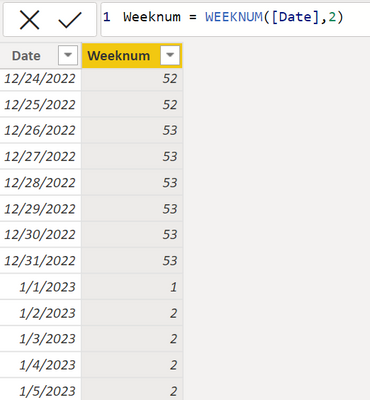
This is the default result in DAX functions.

vzhangti_0-1671603661330.png

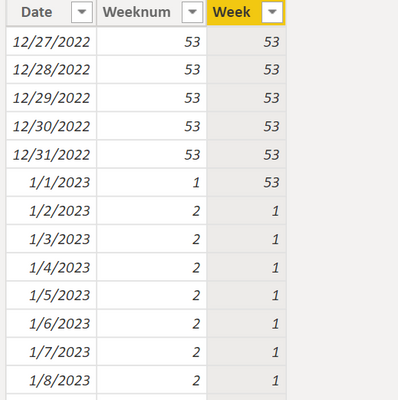
If you want January 1, 2023 to be week 53, you can try this method.

Week = 
IF (
    [Date] = DATE ( 2023, 1, 1 ),
    WEEKNUM ( [Date] - 1, 2 ),
    IF ( [Date] > DATE ( 2023, 1, 1 ), WEEKNUM ( [Date], 2 ) - 1, [Weeknum] )
)

vzhangti_1-1671604077371.png

Hope that can help you.


Best Regards,

Community Support Team _Charlotte

If this post helps, then please consider Accept it as the solution to help the other members find it more quickly.

View solution in original post

2 REPLIES 2
AilleryO
Memorable Member
Memorable Member

Hi,


If you want to create a column with ISO week number in your date table here is a step by step formula to calculate week num according to ISO (DateRef is the column with the date in date table) :

//Calculate week num ISO (Europe) in 4 steps
//1. Calculate Thursday of week
InsertCurrThursday = Table.AddColumn(InsertMonthEnding, "CurrThursday", each Date.AddDays([DateRef], -Date.DayOfWeek([DateRef],1) + 3), type date),
//2. Calculate 1st january of the year (cf step 1)
InsertFirstJan = Table.AddColumn(InsertCurrThursday, "FirstJan", each#date(Date.Year([CurrThursday]),1,1),type date),
//3. Calculate number of days betweeen thursday and 1st january
// (cf step 1 and 2)
InsertDuration= Table.AddColumn(InsertFirstJan, "Duration", each Duration.Days(Duration.From([CurrThursday] - [FirstJan])), type number),
//4. Divide the number of days from step 3 by 7
//round down and add 1
InsertISOWeekNum = Table.AddColumn(InsertDuration, "NumSemISO", each Number.RoundDown([Duration]/7)+1),
ChangeType5=Table.TransformColumnTypes(InsertISOWeekNum,{{"NumSemISO", Int64.Type}}),
Format2Chiffres=Table.AddColumn(ChangeType5, "SemaineISO", each Number.ToText([NumSemISO],"D2"), type text),// D2 means format with 2 Digits
//Delete unusefull columns
RemovedColumns = Table.RemoveColumns(Format2Chiffres, {"CurrThursday","FirstJan","Duration", "NumSemISO"})


Hope it helps

v-zhangti
Community Support
Community Support

Hi, @StephenF 


This is the default result in DAX functions.

vzhangti_0-1671603661330.png

If you want January 1, 2023 to be week 53, you can try this method.

Week = 
IF (
    [Date] = DATE ( 2023, 1, 1 ),
    WEEKNUM ( [Date] - 1, 2 ),
    IF ( [Date] > DATE ( 2023, 1, 1 ), WEEKNUM ( [Date], 2 ) - 1, [Weeknum] )
)

vzhangti_1-1671604077371.png

Hope that can help you.


Best Regards,

Community Support Team _Charlotte

If this post helps, then please consider Accept it as the solution to help the other members find it more quickly.

Helpful resources

Announcements
Fabric Data Days is here Carousel

Fabric Data Days 2026

Don't miss out on Data Days, June 15 through August 7. Learn Fabric, Power BI, SQL, AI and more.

Power BI DataViz World Championships carousel

Power BI DataViz World Championships - June 2026

A new Power BI DataViz World Championship is coming this June! Don't miss out on submitting your entry.