Don't miss your chance to take the Fabric Data Engineer (DP-700) exam on us!
Learn moreWe've captured the moments from FabCon & SQLCon that everyone is talking about, and we are bringing them to the community, live and on-demand. Starts on April 14th. Register now
Hi all! I need some help here...
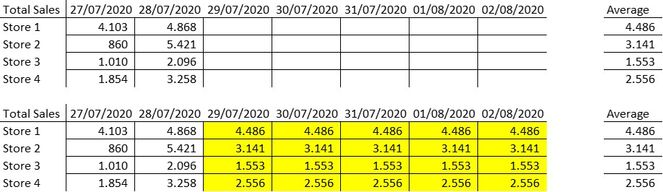
I´m trying to create a table with sales forecast per store, based on last days in this week / month / period of time.
I would like to create a table with stores in the rows, and date in the columns.
For each date (if less than today), I must put the actual sales value. If the date is later, the field must be completed with the average of the last days of the table (yellow marks in the table below). For security reasons, I can not put the true values...
How can I do this?
Best regards,
Lucas
Solved! Go to Solution.
Hi @Anonymous ,
Refer to the sample.
Best Regards,
Liang
If this post helps, then please consider Accept it as the solution to help the other members find it more quickly.
@Anonymous , Try like
new column =
var _olddate = maxx(filter('Table','Table'[store] = earlier( 'Table'[store]) && 'Table'[Date] < earlier( 'Table'[Date])), 'Table'[Date])
return
AvergaeX(filter('Table','Table'[store] = earlier( 'Table'[store]) && 'Table'[Date] =_olddate ),'Table'[sales])
@Anonymous - I would unpivot your week columns and then you can use EARLIER. See my article on Mean Time Between Failure (MTBF) which uses EARLIER: http://community.powerbi.com/t5/Community-Blog/Mean-Time-Between-Failure-MTBF-and-Power-BI/ba-p/339586
If you have recently started exploring Fabric, we'd love to hear how it's going. Your feedback can help with product improvements.
A new Power BI DataViz World Championship is coming this June! Don't miss out on submitting your entry.
Share feedback directly with Fabric product managers, participate in targeted research studies and influence the Fabric roadmap.
| User | Count |
|---|---|
| 52 | |
| 38 | |
| 37 | |
| 19 | |
| 18 |
| User | Count |
|---|---|
| 67 | |
| 67 | |
| 34 | |
| 32 | |
| 29 |