cancel
Showing results for 
Search instead for 
Did you mean: 

Try your skills in the Power BI Dataviz World Championship! Round one ends June 26. Join now

Reply
fabiolamelo
Helper II
Helper II

Week range filter

Hi everyone,


I created a filter with a week number that works fine. "Weekday number", WEEKNUM( [Date] ),

However, I need to inform the range of the week, for example: 


Today is 15/11/2020
I would like to show in the filter 
W46 - 09/11 to 15/11

For the next weeks
W47 - 16/11 to 22/11.
W48 - 23/11 to 29/11


How can I do that? I tried to find something similar like this on the community but I couldn`t.
Can you please help me?
Thanks.

1 ACCEPTED SOLUTION
CNENFRNL
Community Champion
Community Champion

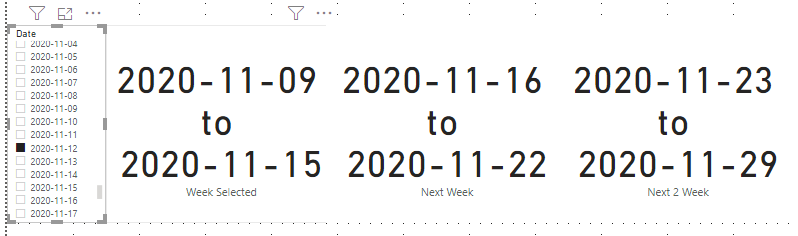
Hi, @fabiolamelo , you might want to try this pattern,


Week Selected = 
VAR __day_selected =
    MAXX ( ALLSELECTED ( 'Calendar'[Date] ), 'Calendar'[Date] )
VAR __start_of_week =
    __day_selected - WEEKDAY ( __day_selected, 2 ) + 1
VAR __week_selected =
    DATESINPERIOD ( 'Calendar'[Date], __start_of_week, 7, DAY )
RETURN
    MINX ( __week_selected, 'Calendar'[Date] ) & " to " & MAXX ( __week_selected, 'Calendar'[Date] )

///////////////////////////
Next Week = CALCULATE( [Week Selected], DATEADD('Calendar'[Date], 7, DAY) )

//////////////////////////
Next 2 Week = CALCULATE( [Week Selected], DATEADD('Calendar'[Date], 14, DAY) )
 

Screenshot 2020-11-15 132643.png


Thanks to the great efforts by MS engineers to simplify syntax of DAX! Most beginners are SUCCESSFULLY MISLED to think that they could easily master DAX; but it turns out that the intricacy of the most frequently used RANKX() is still way beyond their comprehension!

DAX is simple, but NOT EASY!

View solution in original post

2 REPLIES 2
CNENFRNL
Community Champion
Community Champion

Hi, @fabiolamelo , you might want to try this pattern,


Week Selected = 
VAR __day_selected =
    MAXX ( ALLSELECTED ( 'Calendar'[Date] ), 'Calendar'[Date] )
VAR __start_of_week =
    __day_selected - WEEKDAY ( __day_selected, 2 ) + 1
VAR __week_selected =
    DATESINPERIOD ( 'Calendar'[Date], __start_of_week, 7, DAY )
RETURN
    MINX ( __week_selected, 'Calendar'[Date] ) & " to " & MAXX ( __week_selected, 'Calendar'[Date] )

///////////////////////////
Next Week = CALCULATE( [Week Selected], DATEADD('Calendar'[Date], 7, DAY) )

//////////////////////////
Next 2 Week = CALCULATE( [Week Selected], DATEADD('Calendar'[Date], 14, DAY) )


Screenshot 2020-11-15 132643.png


Thanks to the great efforts by MS engineers to simplify syntax of DAX! Most beginners are SUCCESSFULLY MISLED to think that they could easily master DAX; but it turns out that the intricacy of the most frequently used RANKX() is still way beyond their comprehension!

DAX is simple, but NOT EASY!

Thanks, @CNENFRNL  your solution works 🙂

Helpful resources

Announcements
Fabric Data Days is here Carousel

Data Days 2026

Don't miss out on Data Days, June 15 through August 7. Learn Fabric, Power BI, SQL, AI and more.

Power BI DataViz World Championships carousel

Power BI DataViz World Championships - June 2026

A new Power BI DataViz World Championship is coming this June! Don't miss out on submitting your entry.