cancel
Showing results for 
Search instead for 
Did you mean: 

Learn from the best! Meet the four finalists headed to the FINALS of the Power BI Dataviz World Championships! Register now

Reply
electrobrit
Post Patron
Post Patron

Week over Week HELP!

I am doing a report on something I thought would be so simple but it's not working. 
I have to show Cases opened in the week, compared to last week (there are filters they will have by team or indiv or other).
So I need a fairly simple calc. The way I am calculating Total Number of Cases is by a measure:

Total Number of Cases =
CALCULATE(
Count(VW_Cases[CaseCreatedOn])
)

There are quite a few Dax formulas that offer to return previous week I have found that will not let me use that measure in so wondering if it should be a calc column.
(I'm questioning everything)

1. Can anyone provide this simple formula for me and tell me what I am doing wrong? I want a simple line chart showing this week and last week.

2. Also, what is the formula for % week var over last week for a card? like change in how many cases created (%)case created.png

1 ACCEPTED SOLUTION
v-cherch-msft
Microsoft Employee
Microsoft Employee

Hi @electrobrit


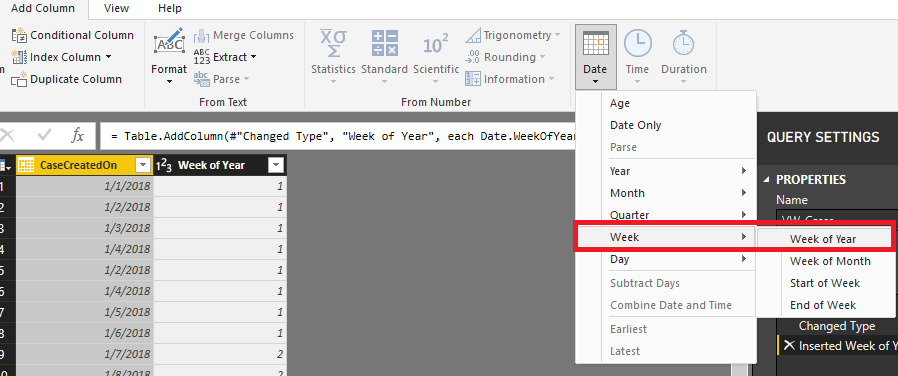
You may add a week of year column first in Query Editor. Then you may refer to below measure to get the table as requested.
1.png

LastWeekTotal =
CALCULATE (
    COUNT ( VW_Cases[CaseCreatedOn] ),
    FILTER (
        ALL ( VW_Cases ),
        VW_Cases[Week of Year]
            = MAX ( VW_Cases[Week of Year] ) - 1
    )
)
WeekOverWeek =
VAR thisweek =
    CALCULATE (
        COUNT ( VW_Cases[CaseCreatedOn] ),
        FILTER (
            ALL ( VW_Cases ),
            VW_Cases[Week of Year] = MAX ( VW_Cases[Week of Year] )
        )
    )
VAR lastweek =
    CALCULATE (
        COUNT ( VW_Cases[CaseCreatedOn] ),
        FILTER (
            ALL ( VW_Cases ),
            VW_Cases[Week of Year]
                = MAX ( VW_Cases[Week of Year] ) - 1
        )
    )
RETURN
    DIVIDE ( thisweek - lastweek, lastweek )

1.png


Regards,

Cherie

Community Support Team _ Cherie Chen
If this post helps, then please consider Accept it as the solution to help the other members find it more quickly.

View solution in original post

2 REPLIES 2
v-cherch-msft
Microsoft Employee
Microsoft Employee

Hi @electrobrit


You may add a week of year column first in Query Editor. Then you may refer to below measure to get the table as requested.

1.png

LastWeekTotal =
CALCULATE (
    COUNT ( VW_Cases[CaseCreatedOn] ),
    FILTER (
        ALL ( VW_Cases ),
        VW_Cases[Week of Year]
            = MAX ( VW_Cases[Week of Year] ) - 1
    )
)
WeekOverWeek =
VAR thisweek =
    CALCULATE (
        COUNT ( VW_Cases[CaseCreatedOn] ),
        FILTER (
            ALL ( VW_Cases ),
            VW_Cases[Week of Year] = MAX ( VW_Cases[Week of Year] )
        )
    )
VAR lastweek =
    CALCULATE (
        COUNT ( VW_Cases[CaseCreatedOn] ),
        FILTER (
            ALL ( VW_Cases ),
            VW_Cases[Week of Year]
                = MAX ( VW_Cases[Week of Year] ) - 1
        )
    )
RETURN
    DIVIDE ( thisweek - lastweek, lastweek )

1.png


Regards,

Cherie

Community Support Team _ Cherie Chen
If this post helps, then please consider Accept it as the solution to help the other members find it more quickly.

i like this for WTD but is there a way to see it by day as well? I would like to do a line chart showing daily this week compared to last week same day

Helpful resources

Announcements
Power BI DataViz World Championships carousel

Power BI DataViz World Championships - June 2026

A new Power BI DataViz World Championship is coming this June! Don't miss out on submitting your entry.

Join our Fabric User Panel

Join our Fabric User Panel

Share feedback directly with Fabric product managers, participate in targeted research studies and influence the Fabric roadmap.

March Power BI Update Carousel

Power BI Community Update - March 2026

Check out the March 2026 Power BI update to learn about new features.