Join us at FabCon Atlanta from March 16 - 20, 2026, for the ultimate Fabric, Power BI, AI and SQL community-led event. Save $200 with code FABCOMM.
Register now!The Power BI Data Visualization World Championships is back! Get ahead of the game and start preparing now! Learn more
Hi,
I created a new table and apply calendar formula to generate date:
CALENDAR(DATE(2017,01,01),DATE(2017,12,31))
Is there any function to show the Week of Month using dax language?
What I mean by Week of Month is for example: 1 Jun 2017 is considered as Week 1 (in month of June)
Regards,
Solved! Go to Solution.
Hi @RMV,
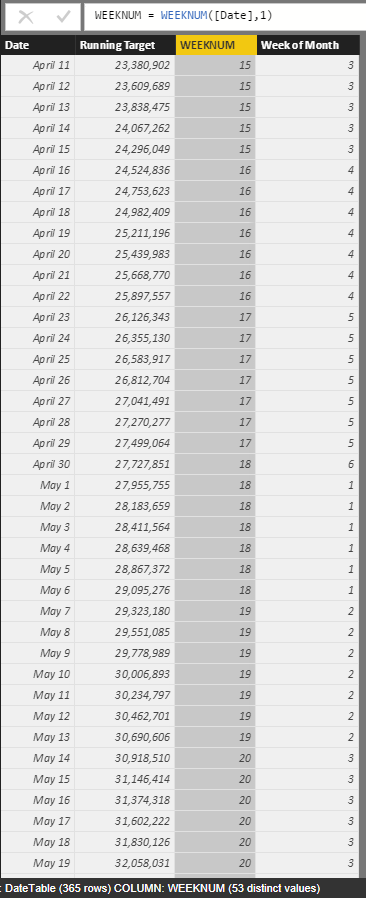
You can simple add a calculated column to calculate the week of month: (use current week number - month start week number)
Week of Month = var currentweek=WEEKNUM([Date],1) var startWeek=WEEKNUM(DATE([Date].[Year],[Date].[MonthNo],1),1) return Currentweek-startWeek+1
Regards,
Xiaoxin Sheng
Hi @RMV,
You can simple add a calculated column to calculate the week of month: (use current week number - month start week number)
Week of Month = var currentweek=WEEKNUM([Date],1) var startWeek=WEEKNUM(DATE([Date].[Year],[Date].[MonthNo],1),1) return Currentweek-startWeek+1
Regards,
Xiaoxin Sheng
It works! Thanks, @Anonymous!
The Power BI Data Visualization World Championships is back! Get ahead of the game and start preparing now!
Check out the November 2025 Power BI update to learn about new features.
| User | Count |
|---|---|
| 59 | |
| 43 | |
| 42 | |
| 23 | |
| 17 |
| User | Count |
|---|---|
| 190 | |
| 122 | |
| 96 | |
| 66 | |
| 47 |