Get certified for free when you join Fabric Data Days 2026 and dive into Fabric, Power BI, SQL, AI, and other essential data skills.
Join nowTry your skills in the Power BI Dataviz World Championship! Round one ends June 26. Join now
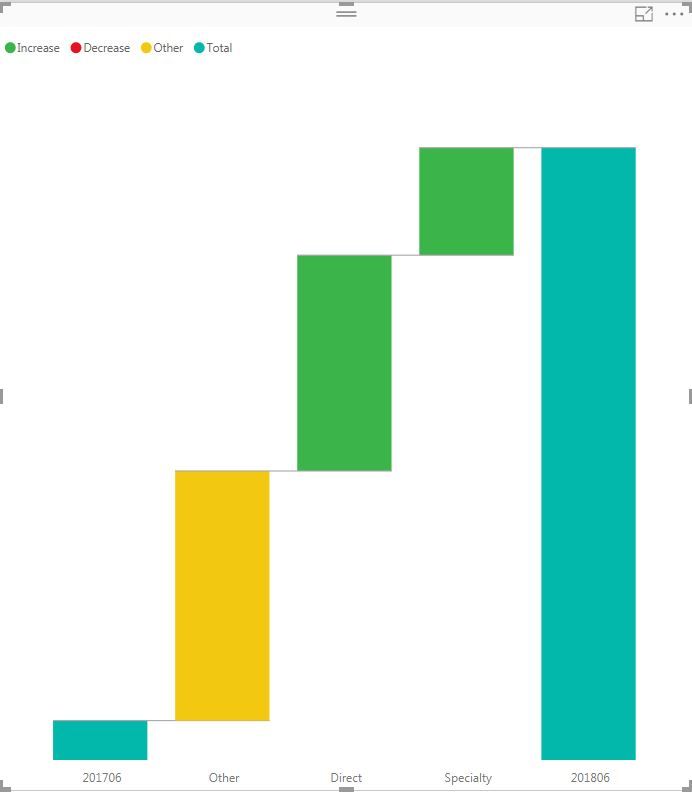
Hello, I am facing an issue of sorting by breakdown name in waterfall. Below is my exaple:
The Power BI will sort waterfall by size of the value but I hope to make "Specialty" always dispaly at first position. I saw some post that if you click the "..." button at the top right and you will see an option of "sort by name" but I didn't see that option on my power bi desktop. Additionaly, I tried "sort by column" and it worked in every visuals except waterfall.
Please let me know if anyone has a solution or faced same issue like me.
Solved! Go to Solution.
Hi @Anonymous,
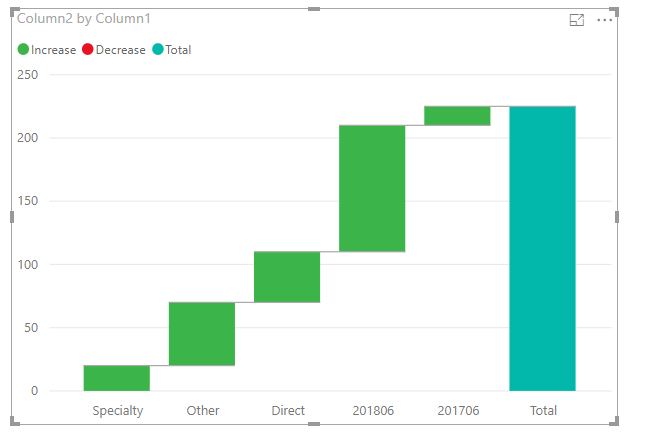
I made a test based on this vison of desktop 2.60.5169.3201 64-bit (July 2018), I cannot reproduce your issue here. Both methods you offered worked well. Could you please have a try to use the latest version? If the issue is still occurred, kindly share your sample data to me.
For more details, please check the pbix as attached.
Regards,
Frank
Hi @Anonymous,
I made a test based on this vison of desktop 2.60.5169.3201 64-bit (July 2018), I cannot reproduce your issue here. Both methods you offered worked well. Could you please have a try to use the latest version? If the issue is still occurred, kindly share your sample data to me.
For more details, please check the pbix as attached.
Regards,
Frank
Thank you so much Frank!
I am using the march 2018 version and believe that will be the problem.
Hi @Anonymous,
Kindly mark my answer as a solurion if you feel that makes sense. Thanks in advance
Regards,
Frank
| User | Count |
|---|---|
| 22 | |
| 22 | |
| 20 | |
| 19 | |
| 11 |
| User | Count |
|---|---|
| 66 | |
| 56 | |
| 45 | |
| 44 | |
| 31 |