cancel
Showing results for 
Search instead for 
Did you mean: 

The Power BI Data Visualization World Championships is back! Get ahead of the game and start preparing now! Learn more

Reply
Anonymous
Not applicable

Waterfall using Multiple Measures not producing anything (source of Measure is included)

HI,


FIRST: I give KUDOS and mark as solved!


I found what looks like a great Waterfall Solution but I can not get it to work. It should work in a simple table with the supporting column PVM_Order[PVM_Waterfall1] (showen in the very bottom snippet).


https://community.powerbi.com/t5/Desktop/Waterfall-chart-with-multiple-measures/m-p/1186499


First, all the measures used in the formula to create a Waterfall work (a snip of a table is below).


Below is my Formula to produce the waterfall.


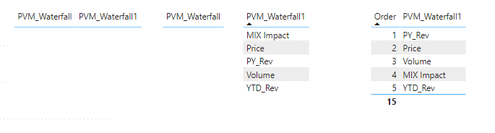
The PVM_Waterfall formula appears to be doing nothing. I show examples at the bottom of four tables in a report with that Measure coming up Blank.


Any ideas? Thank you for reading!


PVM_Waterfall =

SWITCH(

    SELECTEDVALUE( PVM_Order[PVM_Waterfall1] ) , // Table with Values (Name for Column)

    "1", [Sales_USD_PYTD] , // Fact_Sales table

    "2", [PVM_Price_Impact] , //ProductMix_Measures table

    "3",[PVM_Volume_Impact], // ProductMix_Measures table

    "4",[PVM_MIX_Impact] , // ProductMix_Measures table

    "5" , [Sales_USD_YTD],  // Fact_Sales table

    BLANK() )


A table with all the measures: The revenue change produced by the PVM measures matches actual revenue change

PVM_Volume_Impact

PVM_Price_Impact

PVM_Mix_Impact

Revenue_Change_PVM

Sales_USD_YTD_vs_PYTD

                       (282,689)

                   108,707

                  (25,494)

                      (199,475)

              (199,480)


Rounding


A snippet of four tables in a report showing the PVM_Waterfall producing nothing
ScubaBob_0-1607028014939.png


1 ACCEPTED SOLUTION
MattAllington
Community Champion
Community Champion

You need to change your formula to this


SWITCH(

    SELECTEDVALUE( PVM_Order[Order]


* Matt is an 8 times Microsoft MVP (Power BI) and author of the Power BI Book Supercharge Power BI.
I will not give you bad advice, even if you unknowingly ask for it.

View solution in original post

1 REPLY 1
MattAllington
Community Champion
Community Champion

You need to change your formula to this


SWITCH(

    SELECTEDVALUE( PVM_Order[Order]


* Matt is an 8 times Microsoft MVP (Power BI) and author of the Power BI Book Supercharge Power BI.
I will not give you bad advice, even if you unknowingly ask for it.

Helpful resources

Announcements
Power BI DataViz World Championships

Power BI Dataviz World Championships

The Power BI Data Visualization World Championships is back! Get ahead of the game and start preparing now!

December 2025 Power BI Update Carousel

Power BI Monthly Update - December 2025

Check out the December 2025 Power BI Holiday Recap!

FabCon Atlanta 2026 carousel

FabCon Atlanta 2026

Join us at FabCon Atlanta, March 16-20, for the ultimate Fabric, Power BI, AI and SQL community-led event. Save $200 with code FABCOMM.