FabCon is coming to Atlanta
Join us at FabCon Atlanta from March 16 - 20, 2026, for the ultimate Fabric, Power BI, AI and SQL community-led event. Save $200 with code FABCOMM.
Register now!- Power BI forums
- Get Help with Power BI
- Desktop
- Service
- Report Server
- Power Query
- Mobile Apps
- Developer
- DAX Commands and Tips
- Custom Visuals Development Discussion
- Health and Life Sciences
- Power BI Spanish forums
- Translated Spanish Desktop
- Training and Consulting
- Instructor Led Training
- Dashboard in a Day for Women, by Women
- Galleries
- Data Stories Gallery
- Themes Gallery
- Contests Gallery
- QuickViz Gallery
- Quick Measures Gallery
- Visual Calculations Gallery
- Notebook Gallery
- Translytical Task Flow Gallery
- TMDL Gallery
- R Script Showcase
- Webinars and Video Gallery
- Ideas
- Custom Visuals Ideas (read-only)
- Issues
- Issues
- Events
- Upcoming Events
The Power BI Data Visualization World Championships is back! Get ahead of the game and start preparing now! Learn more
- Power BI forums
- Forums
- Get Help with Power BI
- Desktop
- How to set up weighted average for multiple years
- Subscribe to RSS Feed
- Mark Topic as New
- Mark Topic as Read
- Float this Topic for Current User
- Bookmark
- Subscribe
- Printer Friendly Page

- Mark as New
- Bookmark
- Subscribe
- Mute
- Subscribe to RSS Feed
- Permalink
- Report Inappropriate Content
How to set up weighted average for multiple years
I have set up measures to get the percentage of total foreign sales over total gross income for 2007 - 2013. However, I do not know how to set up the weighted averages. Below are examples of my questions and weighted averages. These weighted averages need to be in the same dashboard. Thank you for your help.
2007 86%
2008 87%
2009 89%
2010 90%
2011 91%
2012 92%
2013 88%
Weighted average 1 = (2007+2008+2009)/(2007+2008+2009)
Weighted average 2 = (2008+2009+2010)/(2008+2009+2010)
Weighted average 3 = [(2009+2010)/(2009+2010)]*2/3 + [2011/2011]*1/3
Weighted average 4 = [2011/2011]*1/3 + [(2012+2013)/(2012+2013)]*2/3
Solved! Go to Solution.


- Mark as New
- Bookmark
- Subscribe
- Mute
- Subscribe to RSS Feed
- Permalink
- Report Inappropriate Content
Hi, @minhquankhong
It’s my pleasure to answer for you.
According to your description,I think you can create four measures to calculate the desired result.
Like this:
weighted average4 = var a=CALCULATE('Measures 1'[% of AFBI/Total Income],'PL_Domestic Entitiies'[Year]="2011")
var aa=CALCULATE('Measures 1'[Total AFBI],'PL_Domestic Entitiies'[Year]="2011")
var b=CALCULATE('Measures 1'[% of AFBI/Total Income],'PL_Domestic Entitiies'[Year]="2012")
var bb=CALCULATE('Measures 1'[Total AFBI],'PL_Domestic Entitiies'[Year]="2012")
var c=CALCULATE('Measures 1'[% of AFBI/Total Income],'PL_Domestic Entitiies'[Year]="2013")
var cc=CALCULATE('Measures 1'[Total AFBI],'PL_Domestic Entitiies'[Year]="2013")
return DIVIDE(c*cc+b*bb,c+b)*DIVIDE(2,3)+DIVIDE(a*aa,a)*DIVIDE(1,3)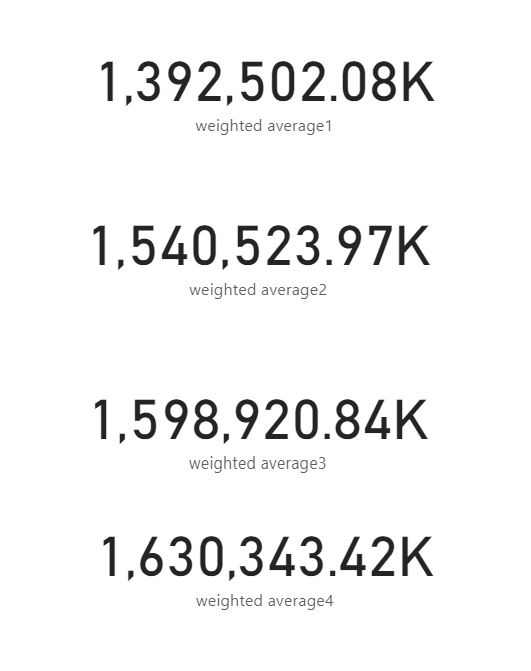
Here is my sample .pbix file.Hope it helps.
If it doesn’t solve your problem, please feel free to ask me.
Best Regards
Janey Guo
If this post helps, then please consider Accept it as the solution to help the other members find it more quickly.
- Mark as New
- Bookmark
- Subscribe
- Mute
- Subscribe to RSS Feed
- Permalink
- Report Inappropriate Content
Hi, @minhquankhong
It’s my pleasure to answer for you.
According to your description,I think you can create four measures to calculate the desired result.
Like this:
weighted average4 = var a=CALCULATE('Measures 1'[% of AFBI/Total Income],'PL_Domestic Entitiies'[Year]="2011")
var aa=CALCULATE('Measures 1'[Total AFBI],'PL_Domestic Entitiies'[Year]="2011")
var b=CALCULATE('Measures 1'[% of AFBI/Total Income],'PL_Domestic Entitiies'[Year]="2012")
var bb=CALCULATE('Measures 1'[Total AFBI],'PL_Domestic Entitiies'[Year]="2012")
var c=CALCULATE('Measures 1'[% of AFBI/Total Income],'PL_Domestic Entitiies'[Year]="2013")
var cc=CALCULATE('Measures 1'[Total AFBI],'PL_Domestic Entitiies'[Year]="2013")
return DIVIDE(c*cc+b*bb,c+b)*DIVIDE(2,3)+DIVIDE(a*aa,a)*DIVIDE(1,3)
Here is my sample .pbix file.Hope it helps.
If it doesn’t solve your problem, please feel free to ask me.
Best Regards
Janey Guo
If this post helps, then please consider Accept it as the solution to help the other members find it more quickly.
- Mark as New
- Bookmark
- Subscribe
- Mute
- Subscribe to RSS Feed
- Permalink
- Report Inappropriate Content
Hi Janey,
Sorry for the late reply. I was out of the office last week and in training the whole time this week. I tested your solution. It worked. Thank you so much for your help.
- Mark as New
- Bookmark
- Subscribe
- Mute
- Subscribe to RSS Feed
- Permalink
- Report Inappropriate Content


- Mark as New
- Bookmark
- Subscribe
- Mute
- Subscribe to RSS Feed
- Permalink
- Report Inappropriate Content
@minhquankhong , the same data does seem to be inline with what you are asking
Can you share sample data and sample output in table format? Or a sample pbix after removing sensitive data.

Helpful resources

Power BI Dataviz World Championships
The Power BI Data Visualization World Championships is back! Get ahead of the game and start preparing now!

Power BI Monthly Update - December 2025
Check out the December 2025 Power BI Holiday Recap!

FabCon Atlanta 2026
Join us at FabCon Atlanta, March 16-20, for the ultimate Fabric, Power BI, AI and SQL community-led event. Save $200 with code FABCOMM.

| User | Count |
|---|---|
| 41 | |
| 38 | |
| 36 | |
| 30 | |
| 28 |


| User | Count |
|---|---|
| 128 | |
| 88 | |
| 79 | |
| 67 | |
| 62 |


