cancel
Showing results for 
Search instead for 
Did you mean: 

The Power BI Data Visualization World Championships is back! It's time to submit your entry. Live now!

Reply
kjani
Helper I
Helper I

Waterfall chart help

Here is my dataset. I want to have walk-forward that takes from Gross Revenue to Net Revenue to Gross Profit. I am also sharing sketch of proposed waterfall. Can you help?

Data Table:

CustomerLine itemAmount
Customer AGross Revenue $    10.00
Customer ADiscounts $     (2.00)
Customer ANet Revenue $      8.00
Customer ACost of Goods $     (3.00)
Customer AFreight $     (1.00)
Customer AGross Profit $      4.00
   
Customer BGross Revenue $    12.00
Customer BDiscounts $     (2.00)
Customer BNet Revenue $    10.00
Customer BCost of Goods $     (2.00)
Customer BFreight $     (1.00)
Customer BGross Profit $      7.00


Output:

Waterfall pic.jpg

1 ACCEPTED SOLUTION
sanimesa
Post Prodigy
Post Prodigy

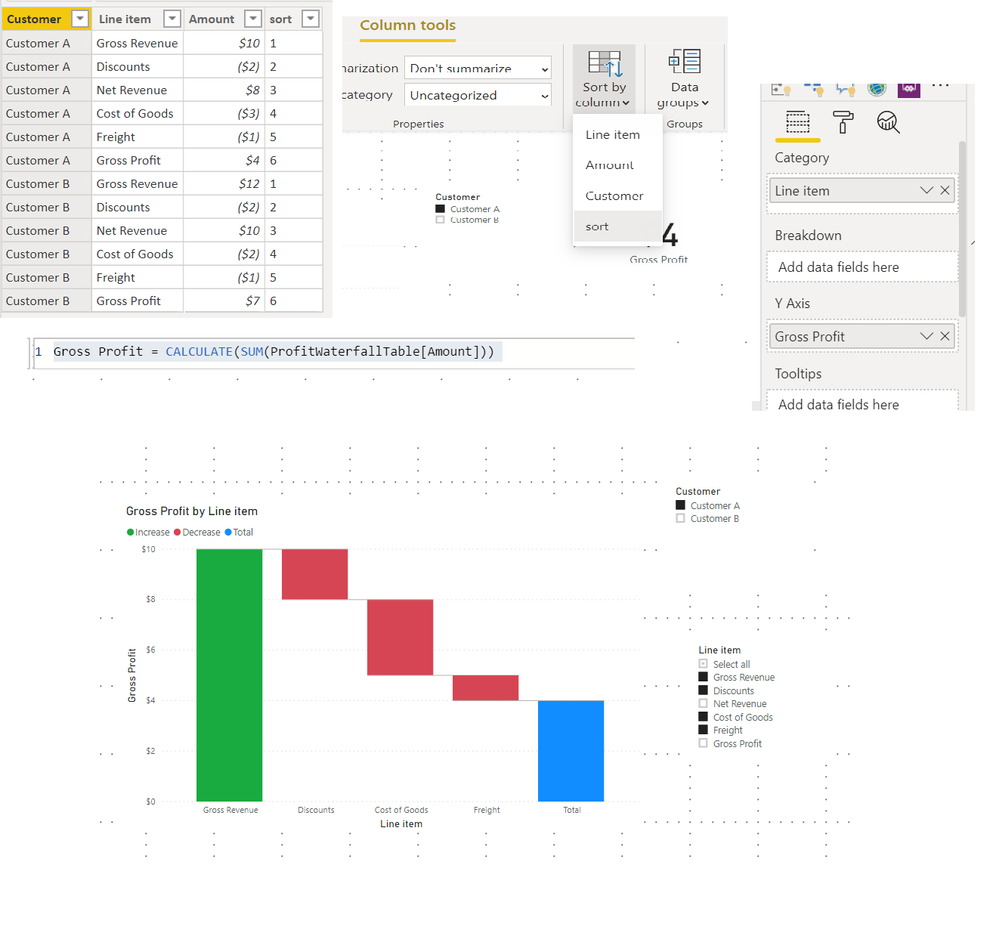
@kjani  It can be done with a few adjustments to you table.


1. Add a sort column to your table - this is to make sure the line items appear in the right order.

2. Create a simple measure:

Gross Profit = CALCULATE(SUM(ProfitWaterfallTable[Amount]))

3. Add the Waterfall chart as shown in example. 

4. You can only add one customer at a time and exclude the Gross Revenue and Net Revenue using slicers - else it will not work. PBI help waterfall.png
View solution in original post

1 REPLY 1
sanimesa
Post Prodigy
Post Prodigy

@kjani  It can be done with a few adjustments to you table.


1. Add a sort column to your table - this is to make sure the line items appear in the right order.

2. Create a simple measure:

Gross Profit = CALCULATE(SUM(ProfitWaterfallTable[Amount]))

3. Add the Waterfall chart as shown in example. 

4. You can only add one customer at a time and exclude the Gross Revenue and Net Revenue using slicers - else it will not work. PBI help waterfall.png

Helpful resources

Announcements
FabCon Atlanta 2026 carousel

FabCon Atlanta 2026

Join us at FabCon Atlanta, March 16-20, for the ultimate Fabric, Power BI, AI and SQL community-led event. Save $200 with code FABCOMM.