Join us at FabCon Atlanta from March 16 - 20, 2026, for the ultimate Fabric, Power BI, AI and SQL community-led event. Save $200 with code FABCOMM.
Register now!The Power BI Data Visualization World Championships is back! Get ahead of the game and start preparing now! Learn more
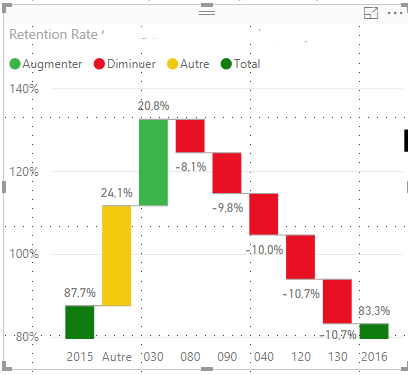
I'm trying to show why a retention figure dropped from 87.7% in 2015 to 83.3% in 2016. The waterfall chart below shows a breakdown of retention rate change by center (130, 120, 040, etc). The problem with this chart is that each center is given equal weight, when in reality, some centers have more students than others. For example, both 130 and 120 dropped 10.7%, but 120 has twice the number of students as 130, so 120 is a larger contributor to the overall drop. How can I account for the population size of each center? This may be more of a statistics question than a visualization one.
Hi @michaelccdf
“The problem with this chart is that each center is given equal weight, when in reality, some centers have more students than others.”
“How can I account for the population size of each center? “
I am confused by these sentence above, and not sure which column you add to the Y Axis field in waterfall visual and how you calculate this column.
Could you show me some example data or a screenshot?
Best Regards
Maggie
The Power BI Data Visualization World Championships is back! Get ahead of the game and start preparing now!
| User | Count |
|---|---|
| 40 | |
| 36 | |
| 34 | |
| 31 | |
| 27 |
| User | Count |
|---|---|
| 136 | |
| 103 | |
| 67 | |
| 65 | |
| 56 |