This is best Fabric, Power BI, SQL and AI community event. How do we know? The last event sold out! Save €200 with code FABCMTY200.
Register nowA new Data Days event is coming soon! This time we’re going bigger than ever. Fabric, Power BI, SQL, AI and more. Don't miss out.
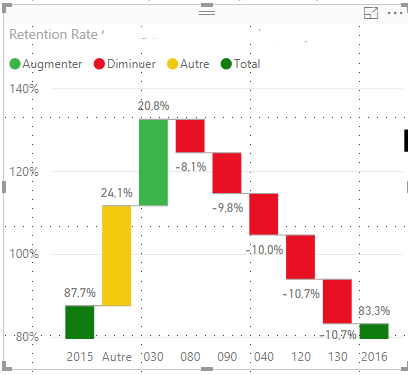
I'm trying to show why a retention figure dropped from 87.7% in 2015 to 83.3% in 2016. The waterfall chart below shows a breakdown of retention rate change by center (130, 120, 040, etc). The problem with this chart is that each center is given equal weight, when in reality, some centers have more students than others. For example, both 130 and 120 dropped 10.7%, but 120 has twice the number of students as 130, so 120 is a larger contributor to the overall drop. How can I account for the population size of each center? This may be more of a statistics question than a visualization one.
Hi @michaelccdf
“The problem with this chart is that each center is given equal weight, when in reality, some centers have more students than others.”
“How can I account for the population size of each center? “
I am confused by these sentence above, and not sure which column you add to the Y Axis field in waterfall visual and how you calculate this column.
Could you show me some example data or a screenshot?
Best Regards
Maggie
Check out the May 2026 Power BI update to learn about new features.
Sign up to receive a private message when registration opens and key events begin.
If you have recently started exploring Fabric, we'd love to hear how it's going. Your feedback can help with product improvements.
| User | Count |
|---|---|
| 32 | |
| 26 | |
| 23 | |
| 22 | |
| 15 |
| User | Count |
|---|---|
| 63 | |
| 45 | |
| 28 | |
| 24 | |
| 22 |