
This is best Fabric, Power BI, SQL and AI community event. How do we know? The last event sold out! Save €200 with code FABCMTY200.
Register nowA new Data Days event is coming soon! This time we’re going bigger than ever. Fabric, Power BI, SQL, AI and more. Don't miss out.
Hi all,
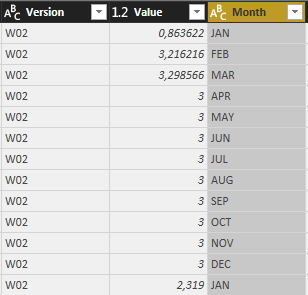
I have some data, this is a part of it:
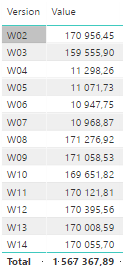
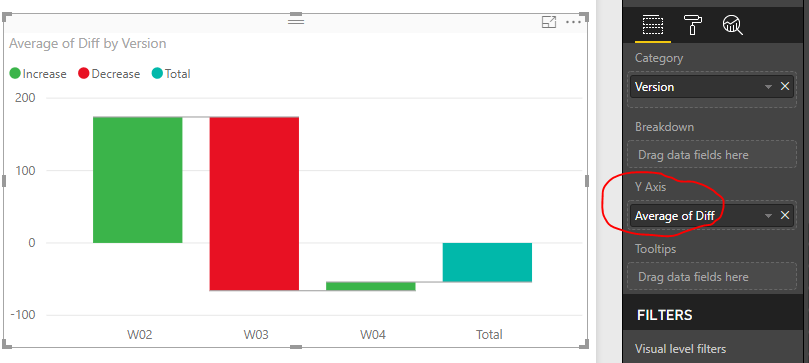
I want to do the Waterfall Chart which shows me difference between sums along every version, the table of version/value looks like this:
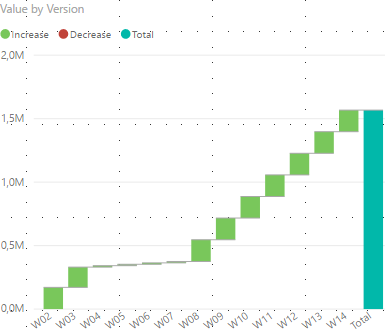
but when I try to do the version/value waterfall chart it adds up to total 1 567 367,89 and I want it to show me changes between f.e. W13 and W14 is +47,11 not +170 055,70.
How do I do that? Should I do some measures? I want it to be responsive to other filters also so I cant do new table with flat values.
Thanks in advance
Hi Everyone,
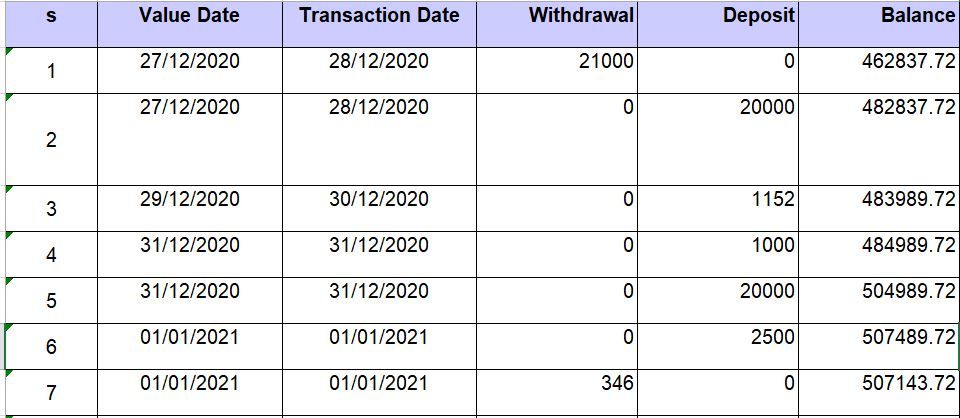
I am trying to develop a Waterfall chart on the data attached. But unable to get correct balance amount . Can anyone help me how to declare start value and get correct balance in waterfall chart.
Hi @Anonymous,
Please add below calculated columns in original table.
Sum per version =
CALCULATE (
SUM ( Version_Value[Value] ),
ALLEXCEPT ( Version_Value, Version_Value[Version] )
)
Sum next version =
CALCULATE (
SUM ( Version_Value[Value] ),
FILTER (
Version_Value,
Version_Value[Index]
= EARLIER ( Version_Value[Index] ) + 1
)
)
Diff =
IF (
Version_Value[Sum next version] = BLANK (),
Version_Value[Sum per version],
Version_Value[Sum next version] - Version_Value[Sum per version]
)
Best regards,
Yuliana Gu
I did what you told and it looks good, but I can't filter the data now, f.e. i want to show only for January, but it still sums all the cells.
Is there a way to enable this kind of filters?
Radkos
These columns are very important to filter, do I put something into existing measure or should I write new one?
Thank again for all help.
Radkos
Check out the May 2026 Power BI update to learn about new features.
Sign up to receive a private message when registration opens and key events begin.
If you have recently started exploring Fabric, we'd love to hear how it's going. Your feedback can help with product improvements.
| User | Count |
|---|---|
| 27 | |
| 25 | |
| 23 | |
| 19 | |
| 14 |
| User | Count |
|---|---|
| 50 | |
| 46 | |
| 19 | |
| 18 | |
| 18 |