Get certified for free when you join Fabric Data Days 2026 and dive into Fabric, Power BI, SQL, AI, and other essential data skills.
Join nowJuly 7 - July 17 | Round 2 of the Power BI Dataviz World Championships. Don't miss your chance! Learn more
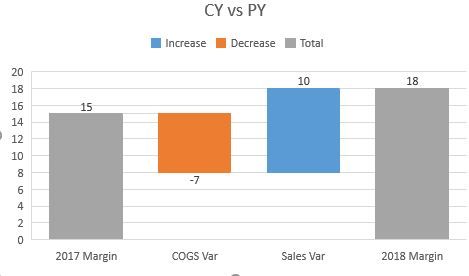
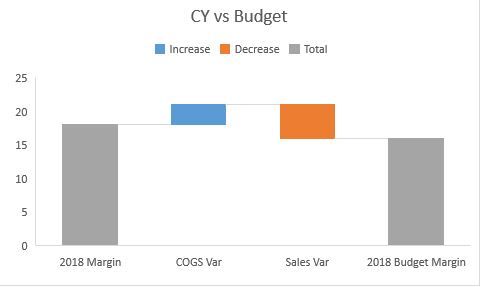
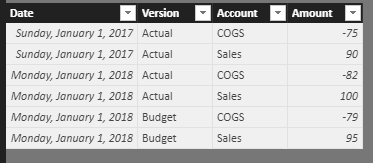
I am new to this visual and am having issues getting it to show anything that I want besides a CY to PY bridge. I have attached a sample of what my data looks like and a couple examples of what waterfalls I would need.
Any help with the basics is welcome. I specifically cannot seem to get to the CY vs Budget view attached.
| Date | Version | Account | Amount |
| 1/1/2017 | Actual | COGS | -75 |
| 1/1/2017 | Actual | Sales | 90 |
| 1/1/2018 | Actual | COGS | -82 |
| 1/1/2018 | Actual | Sales | 100 |
| 1/1/2018 | Budget | COGS | -79 |
| 1/1/2018 | Budget | Sales | 95 |
| 1/1/2018 | Forecast | COGS | -80 |
| 1/1/2018 | Forecast | Sales | 97 |
Solved! Go to Solution.
Hi @ggipson,
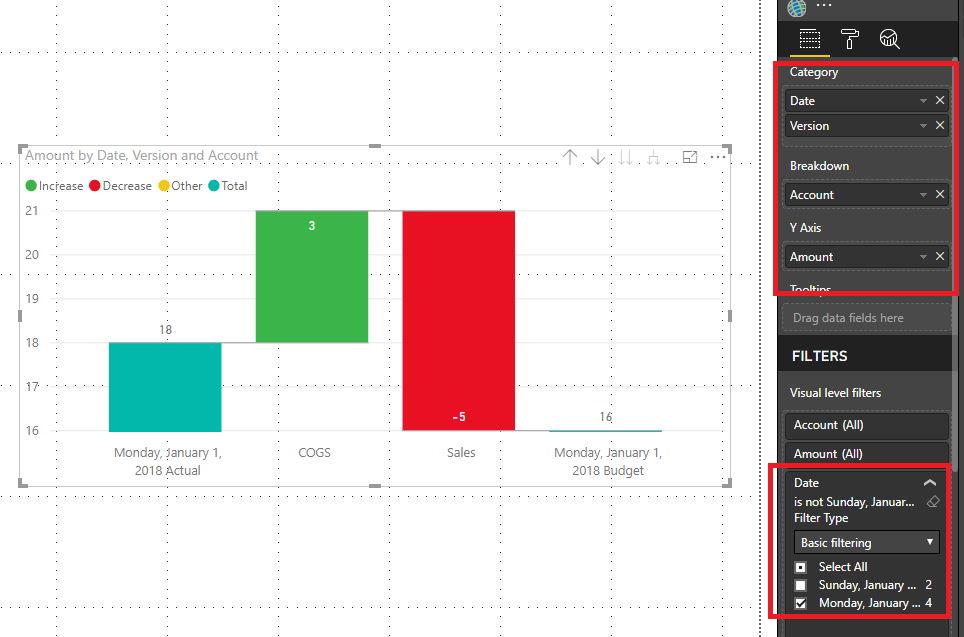
Based on my test, you could refer to below steps:
Sample data:
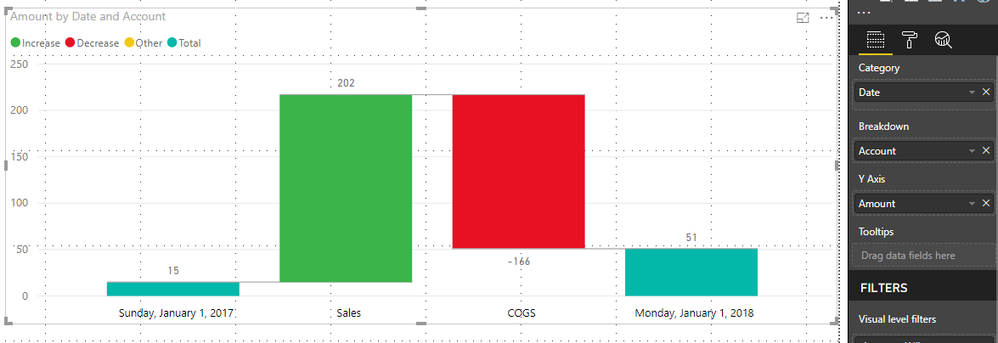
Create a Waterfall Chart and filter out the data in 2017. Now you could see the result.
You can also download the PBIX file to have a view.
https://www.dropbox.com/s/0y6j47zh0c5gcll/Waterfall%20Chart%20Help.pbix?dl=0
Regards,
Daniel He
Hi @ggipson,
Could you please offer me the information about [COGS var] and the [Sales Var] and I also want to know the total should be 51 and you data showed as 18, how could you calculate it? Here is my result.
Regards,
Daniel He
Thank you for your response!
The margin (total) for the actual version for 2018 is 100 - 82 = 18
The margin (total) for the budget version for 2018 is 95 - 79 = 16
The sales and COGS variances would just be the sales and cogs for the ending given scenario and date less the sales and cogs of the starting given scenario.
It looks like you added up all of the 2018 data and compared it to all of the 2017 data. I am asking how I can compare 2018 Actual Version to the 2018 Budget Version.
Hi @ggipson,
Based on my test, you could refer to below steps:
Sample data:
Create a Waterfall Chart and filter out the data in 2017. Now you could see the result.
You can also download the PBIX file to have a view.
https://www.dropbox.com/s/0y6j47zh0c5gcll/Waterfall%20Chart%20Help.pbix?dl=0
Regards,
Daniel He
Join us in Barcelona for FabCon and SQLCon, the Fabric, Power BI, SQL, and AI community event. Save €200 with code FABCMTY200.
Join Fabric Data Days 2026: 60 days of free live/on-demand sessions, challenges, study groups, and certification opportunities.
| User | Count |
|---|---|
| 22 | |
| 22 | |
| 18 | |
| 16 | |
| 13 |
| User | Count |
|---|---|
| 63 | |
| 42 | |
| 40 | |
| 40 | |
| 38 |