cancel
Showing results for 
Search instead for 
Did you mean: 

We've captured the moments from FabCon & SQLCon that everyone is talking about, and we are bringing them to the community, live and on-demand. Starts on April 14th. Register now

Reply
Juampi
Regular Visitor

Water fall chart visualization help

Hello everyone!


I am having some trouble with the waterfall chart and i would really appreciate your help 🙂


My data set consist on forecast data for 2021 in different quarters. I take a snapshot every month (extraction date) to the forecast to analyse fluctuation (202010 is the forecast snapshot of October 2020 , 202011 is November, and so on).


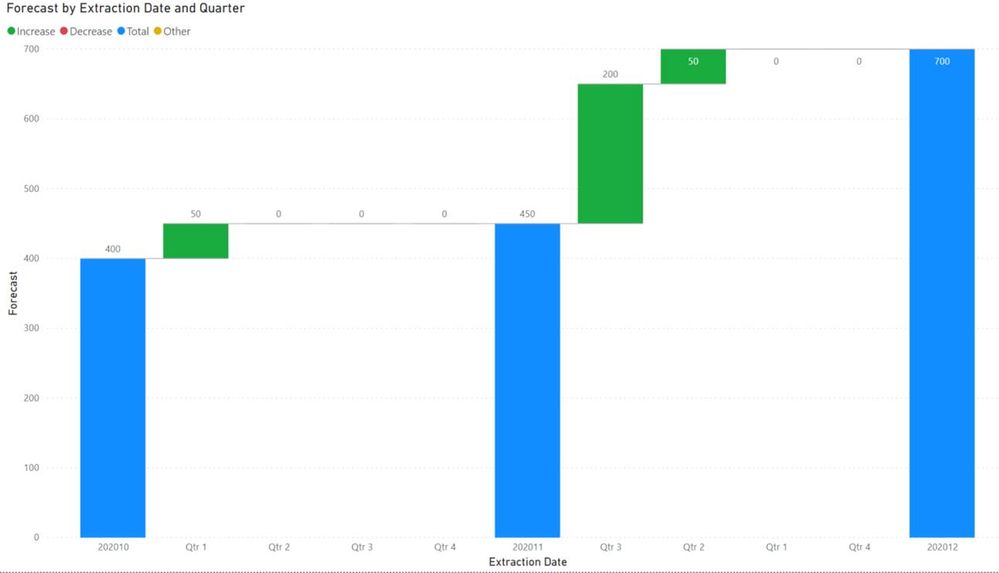
As a result, i can create a waterfall chart and see the increases in the total forecast, but i cannot arrange the quarters properly. See picture below, from 202011 to 202012 extraction dates, it shows the following order: qtr3 , qtr2 , qtr1 , qtr4. When i want to see the proper order: qtr1 , qtr 2, qtr 3, qtr4, independently of the variances volumes.


Table 1. dataset

Extraction Date

Forecast

Year

Quarter

202010

100

2021

Qtr 1

202010

100

2021

Qtr 2

202010

100

2021

Qtr 3

202010

100

2021

Qtr 4

202011

150

2021

Qtr 1

202011

100

2021

Qtr 2

202011

100

2021

Qtr 3

202011

100

2021

Qtr 4

202012

150

2021

Qtr 1

202012

150

2021

Qtr 2

202012

300

2021

Qtr 3

202012

100

2021

Qtr 4


Waterfall result: Arrange by extraction date but cant arrange quarters...

image001.jpg


Thanks! 🙂

Juampi

1 ACCEPTED SOLUTION
v-henryk-mstf
Community Support
Community Support


Hi @Juampi ,


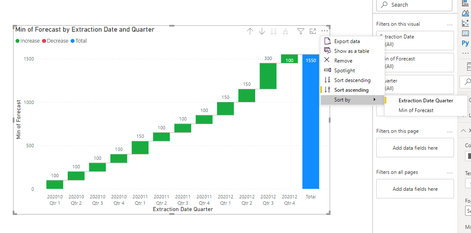
Put the field in the right position, and then sort by Extraction Date can get the desired sort result:


v-henryk-mstf_0-1612774993215.png

If you don’t understand this, there are official documents here for reference:

Sort by column in Power BI Desktop - Power BI | Microsoft Docs


If the problem is still not resolved, please provide detailed error information. Let me know immediately, looking forward to your reply.


Best Regards,
Henry


If this post helps, then please consider Accept it as the solution to help the other members find it more quickly.


View solution in original post

3 REPLIES 3
JessSvetlik
Frequent Visitor

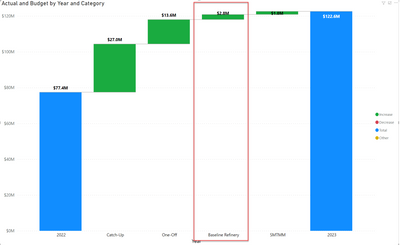
Hi!  I am looking to build a waterfall chart to have a starting point of 2022, adding in a category breakdown of "Baseline Refinery", having a new total bar, then having the supplimental step changes to get to 2023. Please help! 


2022    77,400,000Budget
2023    27,000,000Catch-up
2023    13,600,000One-Off
2023      2,800,000Baseline Refinery
2023      1,800,000SMTMM
2023  122,600,000Budget


JessSvetlik_0-1665607038640.png


v-henryk-mstf
Community Support
Community Support


Hi @Juampi ,


Put the field in the right position, and then sort by Extraction Date can get the desired sort result:


v-henryk-mstf_0-1612774993215.png

If you don’t understand this, there are official documents here for reference:

Sort by column in Power BI Desktop - Power BI | Microsoft Docs


If the problem is still not resolved, please provide detailed error information. Let me know immediately, looking forward to your reply.


Best Regards,
Henry


If this post helps, then please consider Accept it as the solution to help the other members find it more quickly.


timg
Solution Sage
Solution Sage

Hi Juampi,

This topic covers a similar question: https://community.powerbi.com/t5/Desktop/Waterfall-chart-to-show-product-availability/m-p/1642428#M6...

I think editing the sort by option should work in your case as well. 

Hope it helps! 


Regards,

Tim


Did I answer your question? Mark my post as a solution!

Proud to be a Super User!


Helpful resources

Announcements
New to Fabric survey Carousel

New to Fabric Survey

If you have recently started exploring Fabric, we'd love to hear how it's going. Your feedback can help with product improvements.

Power BI DataViz World Championships carousel

Power BI DataViz World Championships - June 2026

A new Power BI DataViz World Championship is coming this June! Don't miss out on submitting your entry.

Join our Fabric User Panel

Join our Fabric User Panel

Share feedback directly with Fabric product managers, participate in targeted research studies and influence the Fabric roadmap.

March Power BI Update Carousel

Power BI Community Update - March 2026

Check out the March 2026 Power BI update to learn about new features.