cancel
Showing results for 
Search instead for 
Did you mean: 

Vote for your favorite vizzies from the Power BI Dataviz World Championship submissions. Vote now!

Reply
Anonymous
Not applicable

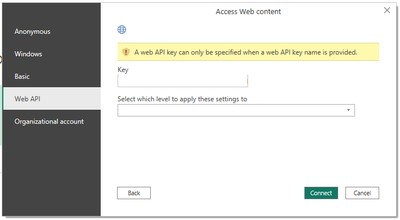
WEB API Error - API Key Name is provided.

Im going to begin with I have no Idea how API works but I thought this would be fairly straight forward.


I have a URL and a Key but when I Neter it on the Get Data on Power Bi Desktop I get this Error.


jamescosten_0-1700568633946.png

Now the URL and Key works as I can view it on Swagger, but cannot for the life of me find a solution on Google, not sure if thats a limitation of my searching ro that Google is filled with utter rubbish.

1 ACCEPTED SOLUTION
Anonymous
Not applicable

Hi @Anonymous ,

Please review the content in the following links, hope they can help you resolve the problem.

Get data from web error: A web API key can only be specified when a web API key name is provided

Suggestions :

  1. Open the Desktop , and on the "home" tab , select get data and choose Web 
  2. Paste your metric query's URL into the Power BI dialog asking for the Web page URL.
  3. In the Access web content dialog, select Basic, enter your app'sAPI keyas the Username, and pressConnect

Best Regards,
Xianda Tang

If this post helps, then please consider Accept it as the solution to help the other members find it more quickly.

View solution in original post

2 REPLIES 2
mariamdembele
New Member

Bonjour à tous, comment creer un API pour integer power bi à son sever?? 

Merci de me repondre , c'est tres urgent.

Anonymous
Not applicable

Hi @Anonymous ,

Please review the content in the following links, hope they can help you resolve the problem.

Get data from web error: A web API key can only be specified when a web API key name is provided

Suggestions :

  1. Open the Desktop , and on the "home" tab , select get data and choose Web 
  2. Paste your metric query's URL into the Power BI dialog asking for the Web page URL.
  3. In the Access web content dialog, select Basic, enter your app'sAPI keyas the Username, and pressConnect

Best Regards,
Xianda Tang

If this post helps, then please consider Accept it as the solution to help the other members find it more quickly.

Helpful resources

Announcements
Power BI DataViz World Championships

Power BI Dataviz World Championships

Vote for your favorite vizzies from the Power BI World Championship submissions!

Sticker Challenge 2026 Carousel

Join our Community Sticker Challenge 2026

If you love stickers, then you will definitely want to check out our Community Sticker Challenge!

January Power BI Update Carousel

Power BI Monthly Update - January 2026

Check out the January 2026 Power BI update to learn about new features.

FabCon Atlanta 2026 carousel

FabCon Atlanta 2026

Join us at FabCon Atlanta, March 16-20, for the ultimate Fabric, Power BI, AI and SQL community-led event. Save $200 with code FABCOMM.