Don't miss your chance to take the Fabric Data Engineer (DP-700) exam on us!
Learn moreNext up in the FabCon + SQLCon recap series: The roadmap for Microsoft SQL and Maximizing Developer experiences in Fabric. All sessions are available on-demand after the live show. Register now
I'm new to Power BI, so this is probably a really dopey question-
I'm trying to create a report to show how my website traffic is performing. I have created a date table, using time data taken from GA, and a table for traffic, which includes a date column and session column, both taken from GA.
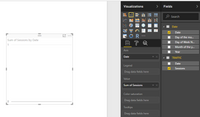
When I try and create a visual using 'Date'[Date] and 'Traffic'[Sessions], it will not display, but if I select the session and date columns both from the 'Traffic' table, it works.
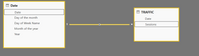
Is this likely to be a relationship issue between the Date and Traffic tables? The cardinality is many to 1 from Dates to Traffic, in a single direction. I tried changing this to 1 to many, but it says this isn't valid cardinality for this relationship.
Thanks
Solved! Go to Solution.
It appears that you are connecting date to sessions instead of date. Try moving your relationship to date on both tables.
Proud to be a Super User!
Woohoo!
Thank you so much. I knew it would be something really simple. ![]()
I have a lot to learn.
Make sure you are populating the rows / axis from your date/calendar table and not from your fact tables. Also make sure all dates are included in the date table and that none are skipped.
If those two things do not help, share a snip of your model and/or a sample of your data and we can help more.
Proud to be a Super User!
Thank you for the reply.
I am trying to populate the axis from the date calendar, but it won't display- this is my problem. It will display if I use the date that is in the fact table.
All dates are included and both the date columns came from the same source, so should be identical, so I assume that if one is working it can't be an issue with skipped dates.
Not sure that these snips will help much....
Thanks!
It appears that you are connecting date to sessions instead of date. Try moving your relationship to date on both tables.
Proud to be a Super User!
Woohoo!
Thank you so much. I knew it would be something really simple. ![]()
I have a lot to learn.
Proud to be a Super User!
If you have recently started exploring Fabric, we'd love to hear how it's going. Your feedback can help with product improvements.
A new Power BI DataViz World Championship is coming this June! Don't miss out on submitting your entry.
Share feedback directly with Fabric product managers, participate in targeted research studies and influence the Fabric roadmap.
| User | Count |
|---|---|
| 53 | |
| 45 | |
| 44 | |
| 20 | |
| 19 |
| User | Count |
|---|---|
| 73 | |
| 71 | |
| 34 | |
| 33 | |
| 31 |