Don't miss your chance to take the Fabric Data Engineer (DP-600) exam for FREE! Find out how by attending the DP-600 session on April 23rd (pacific time), live or on-demand.
Learn moreNext up in the FabCon + SQLCon recap series: The roadmap for Microsoft SQL and Maximizing Developer experiences in Fabric. All sessions are available on-demand after the live show. Register now
Hello Guys,
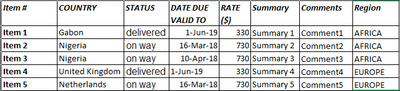
I need a urgent help to represent data. I have data table with below sample data.
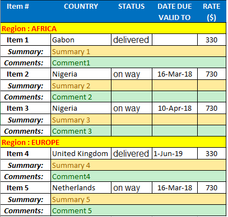
Now I want to represent above data in below visual in power bi. I have tried it with "DataText Box" custom visual and it is pretty close to my requirement. The only limititation with this visual to display only one row at a time which vanish the requirement.
Please suggest and help to to disply data in below format.
Thanks & Regards,
Ram
Hi @Ram007
I can't find "DataText Box" custom visual, could you give me a link of this visual?
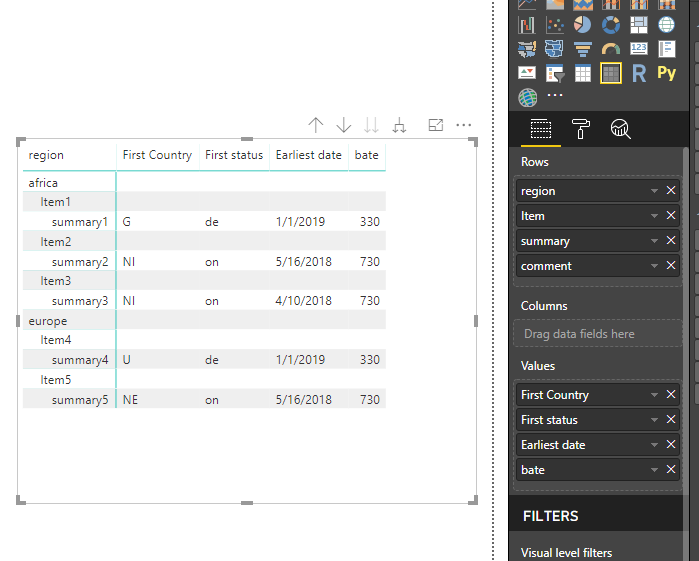
I use Matrix viusal and finally get a visual similar to your expected one.
add columns to the Rows, Values as above, then expend all down one level in hierarchy.
Best Regards
maggie
Thanks maggie,
Your feedback is very commendable. You can find the "Data Text Box" custom visual on the link below.
https://appsource.microsoft.com/en-us/product/power-bi-visuals/WA104381655?tab=Overview
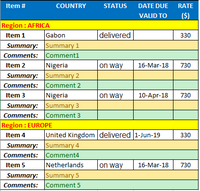
But my requirement is very much stick with the formated (screenshot below)
The Region row may be removed but other rows and column cann't be change. If you suggest around that will really very helpful.
Thanks & Regards,
Ram
If you have recently started exploring Fabric, we'd love to hear how it's going. Your feedback can help with product improvements.
A new Power BI DataViz World Championship is coming this June! Don't miss out on submitting your entry.
Experience the highlights from FabCon & SQLCon, available live and on-demand starting April 14th.
| User | Count |
|---|---|
| 48 | |
| 40 | |
| 37 | |
| 20 | |
| 16 |
| User | Count |
|---|---|
| 70 | |
| 67 | |
| 32 | |
| 27 | |
| 25 |