This is best Fabric, Power BI, SQL and AI community event. How do we know? The last event sold out! Save €200 with code FABCMTY200.
Register nowA new Data Days event is coming soon! This time we’re going bigger than ever. Fabric, Power BI, SQL, AI and more. Don't miss out.
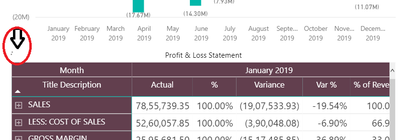
The following data refresh indicator (red circle) will be invisible while using a title color for the visual. Is there any solution?
Solved! Go to Solution.
@hari127
You cannot modify the loading indicator, I can slightly see it with colored title background. You might just want to change the tiltle color to something contrary to the indicator color (grey) to make it stand out.
Paul Zheng _ Community Support Team
If this post helps, please Accept it as the solution to help the other members find it more quickly.
This needs to be a change - we have hundreds of users contacting us as done know the pages graph is still loading.. changing the Graph title bar is not a solution as impedes awesome graphs... web developers figured this out a long time ago hence seeing the load "icon" in the middle of a page - not somewhere it cant be noticed...
@hari127
You cannot modify the loading indicator, I can slightly see it with colored title background. You might just want to change the tiltle color to something contrary to the indicator color (grey) to make it stand out.
Paul Zheng _ Community Support Team
If this post helps, please Accept it as the solution to help the other members find it more quickly.
@hari127
Not sure if your question is about hiding the data loading indicator or applying color to it. However, it cannot be modified.
⭕ Subscribe and learn Power BI from these videos
⚪ Website ⚪ LinkedIn ⚪ PBI User Group
Plesse see the Title of the visual (Profit & Loss Statement). I can't see the data refresh indicator If i give black/dark color as back ground color to this title(Matrix\Title\Back Color). Hope my question is clear.
Check out the May 2026 Power BI update to learn about new features.
Sign up to receive a private message when registration opens and key events begin.
If you have recently started exploring Fabric, we'd love to hear how it's going. Your feedback can help with product improvements.
| User | Count |
|---|---|
| 30 | |
| 28 | |
| 23 | |
| 19 | |
| 17 |
| User | Count |
|---|---|
| 49 | |
| 47 | |
| 40 | |
| 21 | |
| 18 |