
cancel
Showing results for 
Search instead for 
Did you mean: 

The Power BI Data Visualization World Championships is back! Get ahead of the game and start preparing now! Learn more

Reply
Kerma
Frequent Visitor

Visualizing workshifts starting and ending on different day in day-hour table

Hello!


I'm interested in showing in a table visualization the amount of workers working each hour of the day. I succesfully managed to map the shifts that happen within the same day with hours as rows and days as columns. I ran into into problems when trying to show shifts that spread over two or more days. 


The way I'm visualizing is as follows


 MondayTuesdayWednesday
06-07 2 
07-08131
08-092  
09-1011 


and the sample data whch I haven't managed to visualized could be as follows


StartdateStarttimeEnddateEndtime
3.7.201722:006.7.20176:00
30.6.20178:0030.6.201714:00
30.6.201718:002.7.20172:00
29.6.201710:0030.6.201712:00
29.6.201720:003.7.201715:00


Any help would be greatly appreciated.

1 ACCEPTED SOLUTION
Anonymous
Not applicable

Hi @Kerma,


You can refer to below sample to get hour - weekday analysis visual:


Sample:

1. Add custom columns to convert columns to datetime.

4.PNG


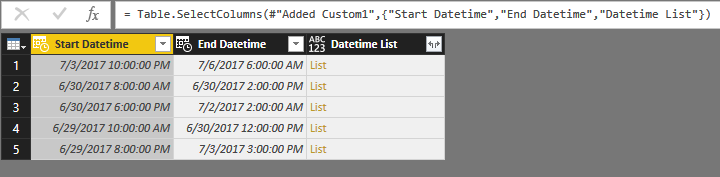
2. Add custom column to get datetime records between 'start datetime' and 'end datetime'.

#"Added Custom1"= Table.AddColumn(#"Changed Type1", "Datetime List", each List.DateTimes([Start Datetime],Duration.TotalHours(Duration.From([End Datetime]-[Start Datetime])), #duration(0, 1, 0, 0)))

5.PNG


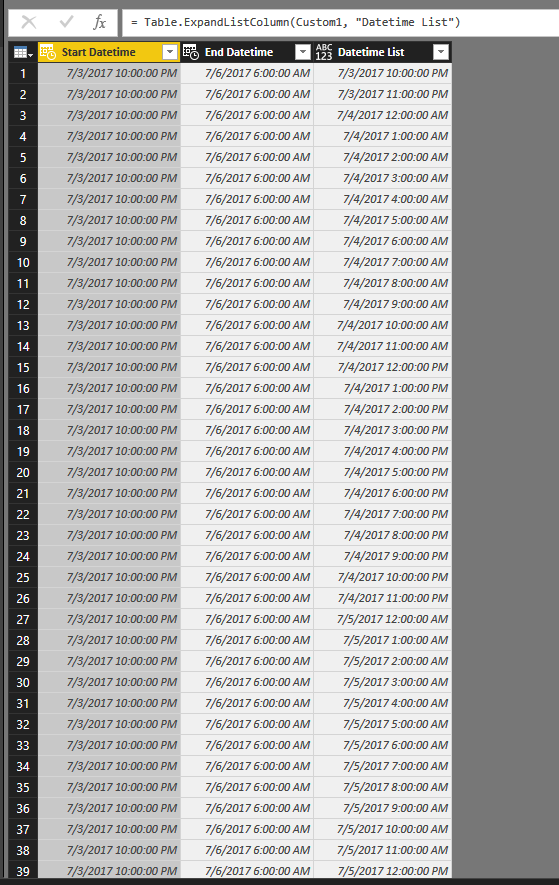
3. Keep related columns and expand these records.

6.PNG7.PNG


4. Save and return to report view.

5. Add calculated columns to show weekday and hour.

HOUR = HOUR([Datetime List])

WeekDay = FORMAT([Datetime List],"dddd") 


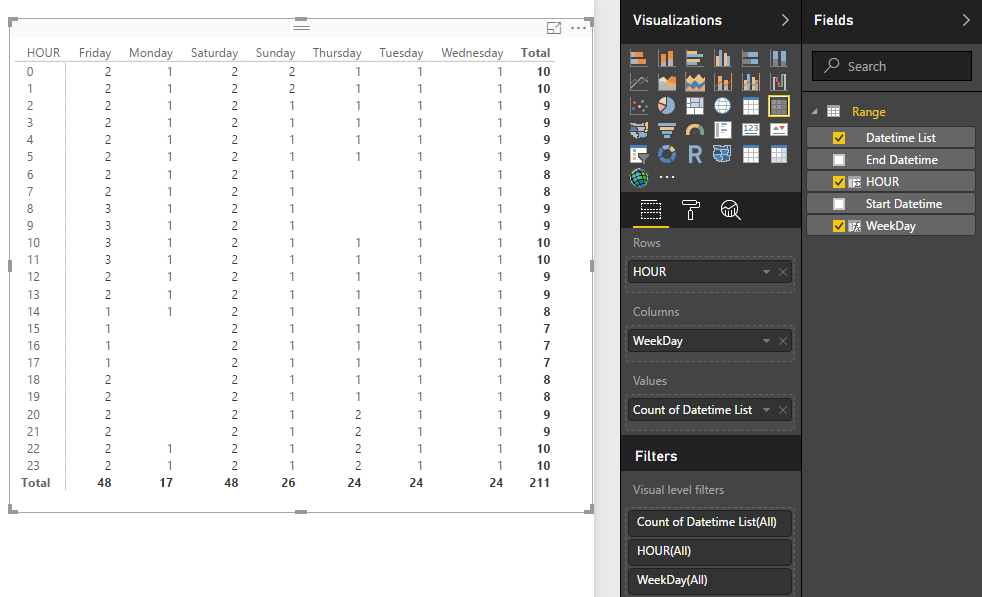
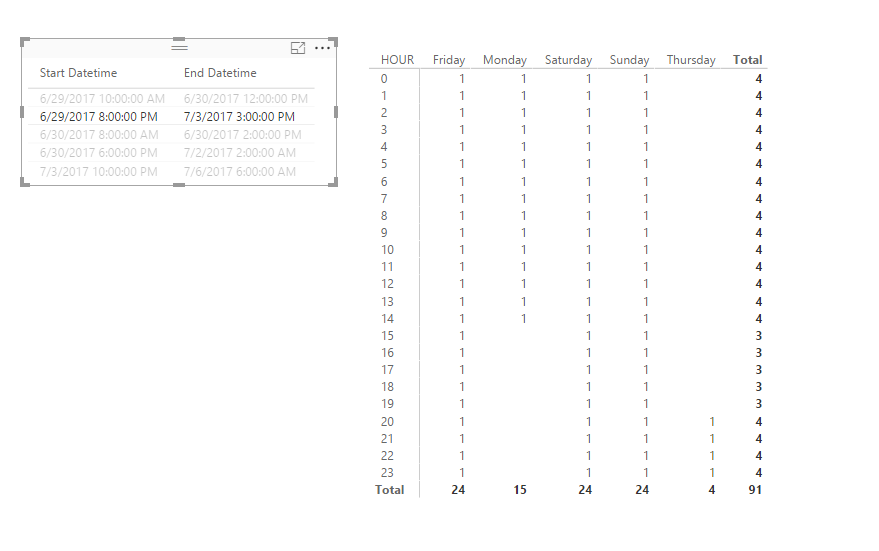
5. Create matrix visual with above calculate columns.

8.PNG

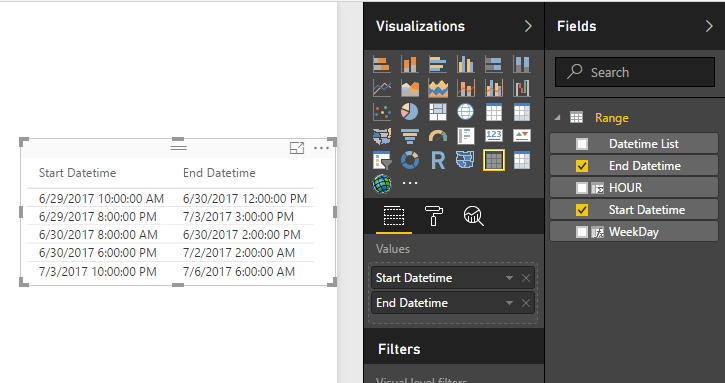
6. Add a table preview visual as the slicer.

9.PNG


After above steps, you can use table preview visual to choose the analysed records.

10.PNG


Notice: I also upload this sample file as the attachments.


Regards,

XXiaoxinSheng

View solution in original post

4 REPLIES 4
KarineLago
Advocate I
Advocate I

@Kermayou could merge the date and hour column to obtain one type of start date and end date. After that, you can use:


DATEDIFF(<start_date>, <end_date>, <interval>)


Imagem 4 2017-07-03 09h06min.png

From Brazil? Go to IntelExcel YT channel https://www.youtube.com/user/Intelxcel to learn Power BI.

I need to map the results in a day-hour visualization shown above. For example a shift from 3.7.2017 20:00 to 5.7.2017 08:00 would show 1 for each hour on 3.7.2017 after 20:00, 1 for each hour of 4.7.2017 and 1 for hours 00-08 on 5.7.2017.

Anonymous
Not applicable

Hi @Kerma,


You can refer to below sample to get hour - weekday analysis visual:


Sample:

1. Add custom columns to convert columns to datetime.

4.PNG


2. Add custom column to get datetime records between 'start datetime' and 'end datetime'.

#"Added Custom1"= Table.AddColumn(#"Changed Type1", "Datetime List", each List.DateTimes([Start Datetime],Duration.TotalHours(Duration.From([End Datetime]-[Start Datetime])), #duration(0, 1, 0, 0)))

5.PNG


3. Keep related columns and expand these records.

6.PNG7.PNG


4. Save and return to report view.

5. Add calculated columns to show weekday and hour.

HOUR = HOUR([Datetime List])

WeekDay = FORMAT([Datetime List],"dddd") 


5. Create matrix visual with above calculate columns.

8.PNG

6. Add a table preview visual as the slicer.

9.PNG


After above steps, you can use table preview visual to choose the analysed records.

10.PNG


Notice: I also upload this sample file as the attachments.


Regards,

XXiaoxinSheng

This looks very good, I will try this out! Thanks a lot 🙂

Helpful resources

Announcements
Power BI DataViz World Championships

Power BI Dataviz World Championships

The Power BI Data Visualization World Championships is back! Get ahead of the game and start preparing now!

November Power BI Update Carousel

Power BI Monthly Update - November 2025

Check out the November 2025 Power BI update to learn about new features.

FabCon Atlanta 2026 carousel

FabCon Atlanta 2026

Join us at FabCon Atlanta, March 16-20, for the ultimate Fabric, Power BI, AI and SQL community-led event. Save $200 with code FABCOMM.